


Support our independent tech coverage. Chrome Unboxed is written by real people, for real people—not search algorithms. Join Chrome Unboxed Plus for just $2 a month to get an ad-free experience, access to our private Discord, and more. Learn more about membership here.
START FREE TRIAL (MONTHLY)START FREE TRIAL (ANNUAL)
If you’ve been following our coverage of the upcoming ‘Sapphire’ Chromebook tablet, you know we are incredibly excited about it and think you should be too. For years, we’ve been waiting for a true, no-compromises flagship ChromeOS tablet that can go toe-to-toe with something like the iPad Pro. Based on everything we’ve uncovered so far, ‘Sapphire’ is shaping up to be exactly that device.
Pairing this hardware with the upcoming move to Google’s ‘Aluminium OS’ project, we could have a device I’ve been dreaming of since I began my Chromebook journey well over a decade ago.
Multiple hints at a high pixel density
Whenever a new ChromeOS device is in development, developers have to configure things like boot screens and low-battery icons to look right on the specific hardware. Two recently merged commits – one to update the low battery indicator to 300% scale and another to make use of a 3x resolution logo bitmap – give us a clearer picture of what to expect from the display on ‘Sapphire’.
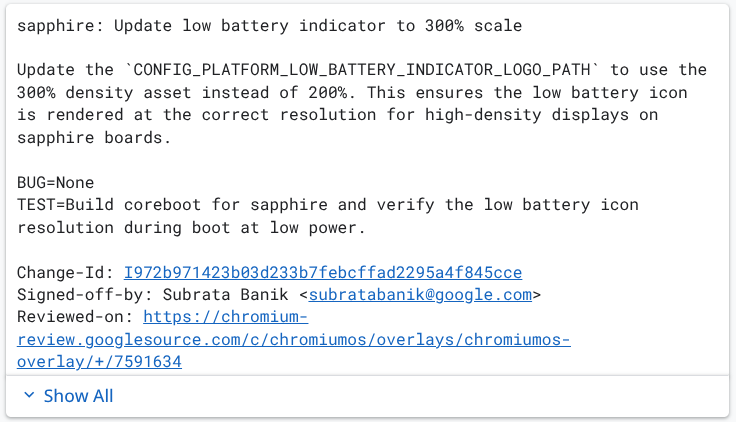
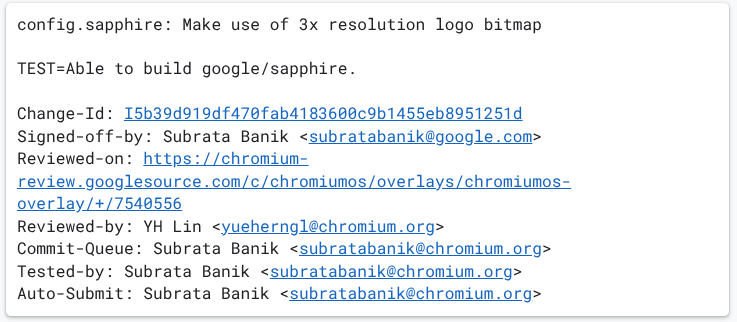
One commit explicitly states that this 300% density asset is needed to ensure the icon is “rendered at the correct resolution for high-density displays on sapphire boards.” In terms of laptop/tablet displays, a 3x (or 300%) scale factor is reserved for incredibly pixel-dense screens.
Given that we already know ‘Sapphire’ features a 13-inch display, needing a 300% asset strongly implies we are looking at a QHD+ or even a 4K resolution panel. This screen is going to be incredibly sharp.
‘Sapphire’ recap
If you haven’t been keeping up with the steady drip of ‘Sapphire’ news over the past few months, here is a quick catch-up on why this device is such a big deal. ‘Sapphire’ isn’t just another Chromebook tablet; it is a flagship part of the new ‘Aluminium’ OS project. Here is what we know Lenovo is packing into this device so far:
- The first Chromebook Plus tablet: ‘Sapphire’ is officially the very first tablet to meet the strict hardware requirements of the Chromebook Plus moniker.
- A 13-inch canvas: It steps up from the traditional 11-inch size to a much more productive 13-inch footprint.
- iPad Pro-level audio: It will feature an impressive quad-speaker setup for what we hope will be full, elite-level sound.
- A powered detachable keyboard: The keyboard base actually houses its own secondary battery, making it unique and likely a bit more flexible with different detached use cases.
- A magnetic charging stylus: Borrowing a decidedly premium feature, it will support a magnetic, wirelessly charging pen that attaches directly to the chassis.
The ultimate ChromeOS tablet?
When you put it all together – a high-resolution 13-inch screen, quad speakers, an extended-battery keyboard, and top-tier Chromebook Plus internals – ‘Sapphire’ looks like the absolute pinnacle of ChromeOS hardware. Lenovo is clearly pulling out all the stops for this one, and we can’t wait to see it officially unveiled.
SUBSCRIBE TO UPSTREAM
Get Chrome Unboxed delivered straight to your inbox
Upstream is our flagship, curated newsletter with the top stories, most click-worthy deals, giveaways, and trending articles from Chrome Unboxed sent directly to your inbox a few times a week. Join 31,000+ subscribers.

