

Support our independent tech coverage. Chrome Unboxed is written by real people, for real people—not search algorithms. Join Chrome Unboxed Plus for just $2 a month to get an ad-free experience, access to our private Discord, and more. Learn more about membership here.
START FREE TRIAL (MONTHLY)START FREE TRIAL (ANNUAL)
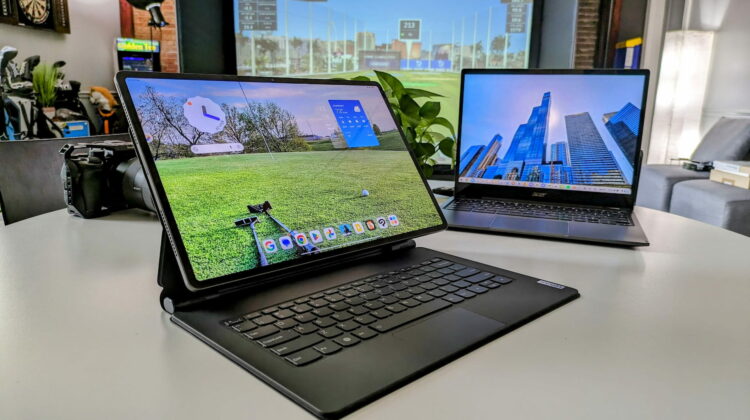
Lenovo was kind enough to send over their new, bombastic Tab Extreme that we were lucky enough to handle back at CES 2023, and I’ll be honest: I was really, really excited to try out Android as a pseudo-desktop replacement for light workflows. In only a few days, I’ve realized just how far Android still has to go from a big-screen, productivity standpoint; and by only day two, I was already reaching for my trusty Acer Chromebook Spin 513 to finish up what little work I needed to complete. It wasn’t a good look for Android tablets.
To be fair, I’ve not attempted this with any other big Android tablets so far. Samsung has their own desktop take on Android with DeX and I’m unsure what trying this experiment out with something like the new OnePlus Pad would be like; I just know this big, beautiful Lenovo Tab Extreme failed me in too many ways to ignore when a perfectly solid Chromebook is within arm’s reach.
Eye-popping, gorgeous hardware
Let me first say that I wanted this little experiment to work based solely on the fact that the Lenovo Tab Extreme is so pretty. From the 14.5-inch OLED 3K screen to the ultra-slim build and impressive speakers, this tablet is impressive to look at. Whether in your hand or on a desk, the Tab Extreme makes you want to hold it, use it, and find reasons to make it the right device for any task.
I played some games on it, watched both YouTube and YouTube TV, and browsed the web on this monstrous screen that absolutely begs to be utilized at every turn. While I still am not quite sure what to do with a tablet of this size full-time if I can’t slap on the keyboard and get truly productive (more on that in a second), there’s something very compelling about a device with a display this large that is so easy to hold in a single hand. It feels a bit like the future.
Desktop drawbacks
And the keyboard case Lenovo built for this tablet is seriously impressive. The keyboard deck is firm, the hinge mechanism steals well from Apple’s newer iPad keyboard accessory, and the whole setup – once again – absolutely looks the part. Well, that’s until you start to actually start working on it.
It is precisely at this point where Android starts to show its desktop weaknesses. With a device like the Tab Extreme, you want to get productive. While the trackpad is tiny, it is nice to use and the backlit keys on this keyboard case are absolutely fantastic. As a unit, this tablet with the docked keyboard begs to be used for email, content creation, and anything else I’d do on my Chromebook.
But then Android gets right in the way. First off, the mouse pointer is strange. The movement feels imprecise and while it doesn’t lag, it is almost as if the mouse acceleration is off somehow. It’s like the mouse cursor feels as if it is being drug through water – if that makes sense. It moves when you do, but somehow gets to the end point a bit behind your gestures. It’s odd and tough to maneuver, and it immediately made using this for desktop work very strange.
I also had issues clicking into smaller links here and there on the web. I was writing an article for our other site (Proof Golf if you’re into that sort of thing) and clicking smaller links in the backend of Wordpress simply wouldn’t pick up sometimes. I ended up reaching up and touching the links on the screen, but it feels very odd that the mouse pointer is the less precise option many times on this tablet.
But perhaps the most-annoying part of the experience was trying to navigate the general UI with a trackpad. The gestures don’t make a ton of sense, and simple things like dismissing any one of your open apps is unintuitive and strange. The whole experience feels like you’re trying to learn how to manipulate the trackpad to behave like a touchscreen instead of the OS simply changing a bit when the mouse and keyboard are plugged in.
The strangest inclusion in my mind is the left/right trackpad buttons. In a world where we’ve largely moved to a 2-finger click for a right click action, I can’t understand why this device’s trackpad has a separate sensor for right-click actions. Android isn’t even very consistent with a right-click behavior, so it was a constant pain to figure out why my clicks were missing on this very small trackpad, only to find it was an accidental right-click half of the time.
ChromeOS is by far the better desktop OS
And after about an hour of fiddling with all of this, I shut the tablet, grabbed my Acer Chromebook Spin 513, and knocked out the rest of the job. And coming from a non-intuitive experience back to ChromeOS, I was truly overwhelmed with how good it felt to be able to navigate multiple, open windows, virtual desks, and quick/nimble web apps.
The mouse precision felt like a breath of fresh air and the overall snappiness of the UI immediately made me jot a note to myself to share my thoughts on all of this first thing on Monday. While I’m not here to say that ChromeOS is better than Android at all things – that clearly isn’t true – there’s absolutely no doubt left in my brain that ChromeOS is the superior desktop OS made by Google.

And that matters if you are looking at devices like the Lenovo Tab Extreme. That thing is pricey, coming in at just under $1000 without the keyboard, and that means it should be absolutely capable of handling not just your consumption time, but your work time, too. And as much as I love this hardware and think that Lenovo built something beautiful and stunning with this tablet, there’s no way I can tell you that it would be a better purchase than their more-humble IdeaPad Chromebook Flex 3i we just reviewed.
Sure, the Tab Extreme is a more-beautiful piece of hardware that is sure to turn more heads, but if you are buying a device to actually do some work on, there’s no comparison between the two. And for a device that costs 1/3 of what the Tab Extreme does, that’s saying something quite lovely. ChromeOS may not always be the best for content consumption (it is getting better), but when it comes down to actually getting productive, Android has a long, long way to go to even begin to compete with what you get on a Chromebook.
SUBSCRIBE TO UPSTREAM
Get Chrome Unboxed delivered straight to your inbox
Upstream is our flagship, curated newsletter with the top stories, most click-worthy deals, giveaways, and trending articles from Chrome Unboxed sent directly to your inbox a few times a week. Join 31,000+ subscribers.

