


Support our independent tech coverage. Chrome Unboxed is written by real people, for real people—not search algorithms. Join Chrome Unboxed Plus for just $2 a month to get an ad-free experience, access to our private Discord, and more. Learn more about membership here.
START FREE TRIAL (MONTHLY)START FREE TRIAL (ANNUAL)
Today is the day that Google has scheduled the next milestone release of the Chrome browser for desktop. While we haven’t seen Chrome 92 on our non-Chromebook devices as of yet, I suspect that the update will begin rolling out to users as the day progresses. With this update, Google is bringing more user-friendly tools to the browser that will help keep users safe and secure while surfing the web. From The Keyword:
For most people, internet browsers like Chrome act as a window to the web, where you can read the latest news, find the perfect gift or finally cross that task off your to-do list. And when you browse the web from A to Z, you definitely want an experience that offers peace of mind. That’s why today, we’re making a number of privacy features more accessible, useful, and powerful in Chrome — helping you make informed decisions faster, and saving you some battery, too.
The Keyword
Chrome Actions
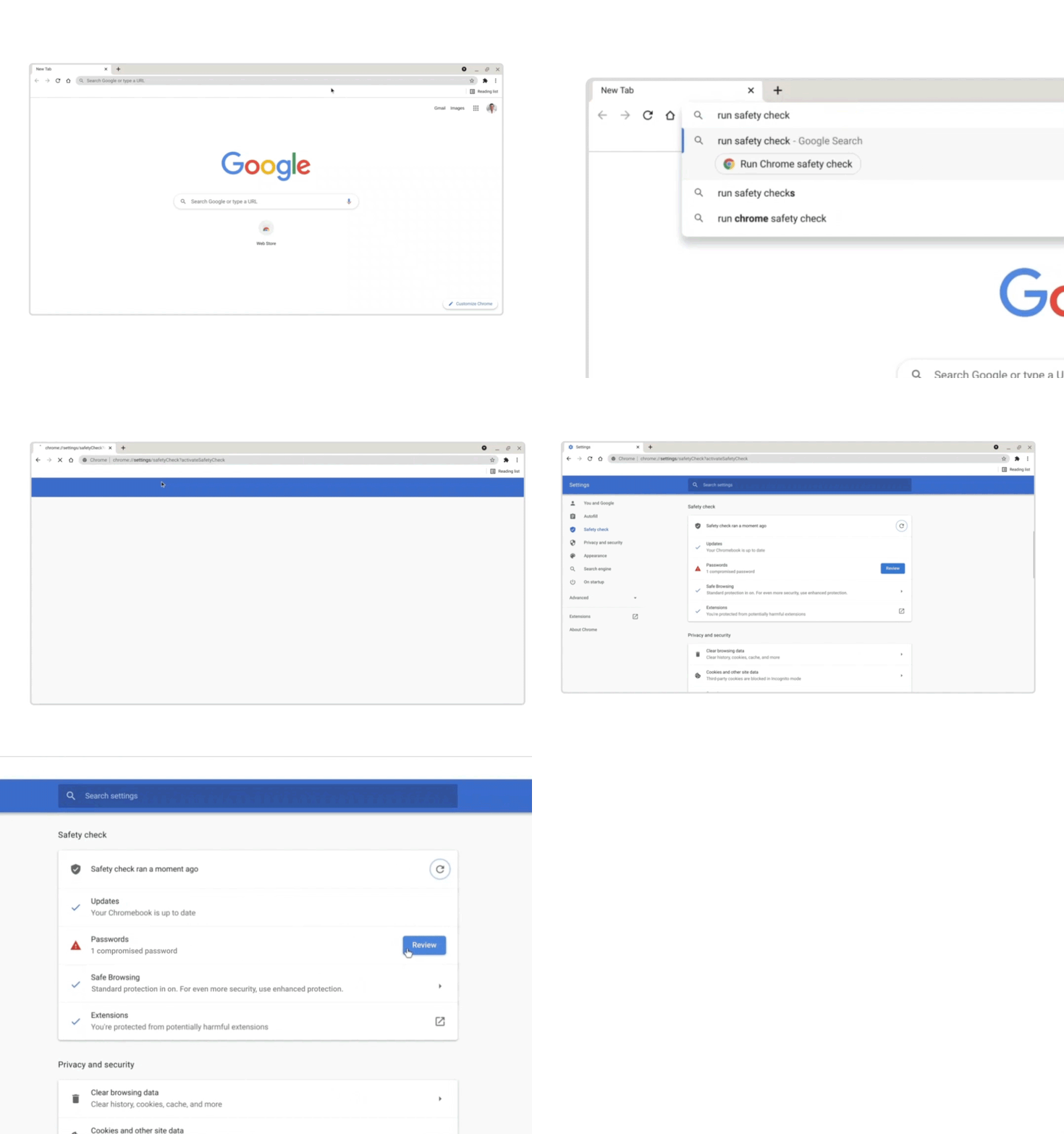
The most front-facing update in this Chrome update comes in the form of new Chrome Actions that are aimed squarely at keeping your personal identity and accounts safe when using the browser. Chrome Actions are essentially quick shortcuts that can be accessed directly from the URL bar without having to navigate to a given setting or menu item. Actions were launched in November of last year and with options like typing “update Chrome” or “manage passwords” in the URL bar (Omnibox) to trigger the corresponding feature.
Google is adding new Actions that allow you to run automated safety checks, manage sync options and security settings with quick shortcuts in the Omnibox. Typing “safety check” and clicking the suggested popup will automatically trigger Chrome to check the security of your passwords, extensions, updates, and more.
One-tap site permissions
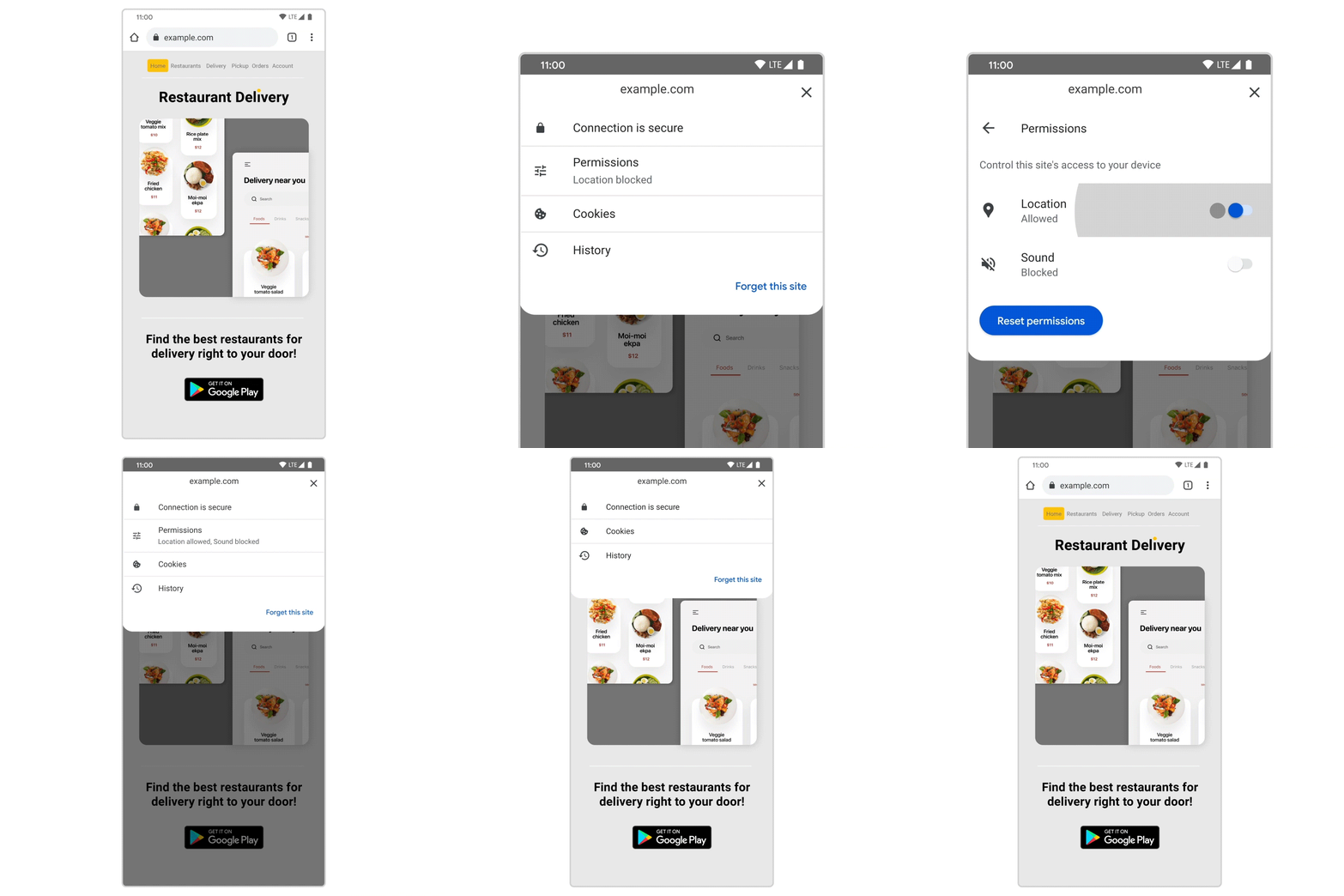
The first time you give a website access to your mic, camera, location, or other permissions, Chrome saves these preferences so you can edit or delete them from the Chrome settings page. In the latest update, you can simply click the lock icon to the right of the web site’s URL and toggle permissions on a per-site basis without having to leave the page. In my opinion, this is a great update that will make website permissions more visible and give users a better feeling of security when browsing the web.
Enhanced site isolation
Chrome has been using site isolation for some time now. The premise behind the feature is to keep websites separate in order to prevent malicious attacks from breaking out of their respective sandboxes, a.k.a. Chrome tab. In Chrome 92, site isolation will extend even further by preventing Chrome extensions from sharing processes which will strengthen online protection should malicious code find its way into the Chrome Web Store.
For Chrome on Android, site isolation will beef up security with two enhancements in which site Isolation will apply to sites where users log in via third-party providers, as well as sites that carry Cross-Origin-Opener-Policy headers. Google is rolling out these features to harden the security of Chrome on Android while working to keep overhead low. This effort is to accommodate lower-powered devices that may suffer poor user experience under stress from the Chrome browser. You can learn more about the new site isolation process on the Google Security Blog. To learn more about the latest version of Chrome desktop, head on over to The Keyword. I suspect some of these features will begin rolling out with the update to Chrome 92 which should happen over the next few days.
SUBSCRIBE TO UPSTREAM
Get Chrome Unboxed delivered straight to your inbox
Upstream is our flagship, curated newsletter with the top stories, most click-worthy deals, giveaways, and trending articles from Chrome Unboxed sent directly to your inbox a few times a week. Join 31,000+ subscribers.

