

Support our independent tech coverage. Chrome Unboxed is written by real people, for real people—not search algorithms. Join Chrome Unboxed Plus for just $2 a month to get an ad-free experience, access to our private Discord, and more. Learn more about membership here.
START FREE TRIAL (MONTHLY)START FREE TRIAL (ANNUAL)
We all take tons of videos, but most of them just sit in our cloud storage, unseen and unedited. Why? Because editing video on a phone is generally a tedious, clunky experience.
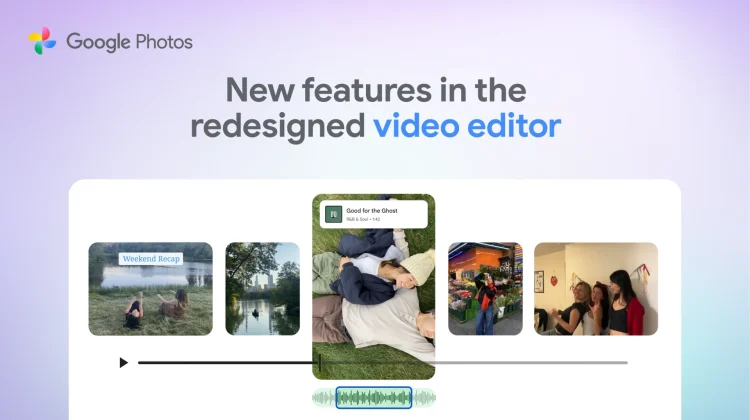
Google Photos is looking to change that with a major update that introduces 5 new video editing tools: templates, a redesigned editor, new soundtracks, custom text overlays, and individual clip editing. All of these features are designed to make creating highlight reels not just easier, but actually fun and a baked-in part of the Android experience.
And with an impending trip to TPC Sawgrass to play on one of the most legendary golf courses in the world (the story of how I’m getting this opportunity is wild, but for another day), I’m going to have a massive amount of footage to try all of this out with. Between the deep history of this golf course and the iconic 17th island green, there will be no shortage of fodder for some Google Photos magic in the video editing department. So, let’s look at those new tools, shall we?
Instant creativity with Templates
If you don’t want to do the heavy lifting, Google is rolling out Templates on Android. These act like the “magic” features we’ve seen in other apps—you pick a style, select your clips, and Google Photos automatically cuts them to the beat of a built-in soundtrack, complete with text and effects.
A “Pro-style” Universal Timeline
For those who want more control, the manual editing experience has been completely overhauled on both Android and iOS. The new editor features a universal timeline that supports multi-clip editing and a new “adaptive canvas”. This brings the interface much closer to a desktop editor like CapCut or Premiere Rush, putting all your clips, audio, and effects in one easy-to-manage view.
Custom Text and Audio
Finally, you can add context to your clips. The update allows you to add custom text overlays with different fonts, colors, and backgrounds (currently rolling out on Android). You can also browse the Google Photos music library to find the perfect soundtrack to match the vibe of your video.
It works for single clips, too
This isn’t just for highlight reels. The redesigned editor is now the default experience for editing individual video clips on Android. That means even if you just want to trim a single video of your dog, you get access to all these new tools, including the ability to add music and text to that single file.
These updates are rolling out now, so head to the “Create” tab in Google Photos to start turning those buried video clips into something worth sharing. And I’ll be sure to share some of my creations from my trip soon!
SUBSCRIBE TO UPSTREAM
Get Chrome Unboxed delivered straight to your inbox
Upstream is our flagship, curated newsletter with the top stories, most click-worthy deals, giveaways, and trending articles from Chrome Unboxed sent directly to your inbox a few times a week. Join 31,000+ subscribers.

