

• Skip to main content
  • Skip to primary sidebar
  • Deals
  • Features
  • Guides
  • Chromebooks
  • Videos
  • Podcast
  • More +
    • Reviews
    • Unboxing
    • Upcoming Devices
    • Chromebook Plus
    • Chrome
    • ChromeOS
    • Chrome OS Flex
  • Search
  • Sign Up
  • Log In
Chrome Unboxed – The Latest Chrome OS News

Chrome Unboxed - The Latest Chrome OS News

A Space for All Things Chrome, Google, and More!

  • Deals
  • Features
  • Guides
  • Chromebooks
  • Videos
  • Podcast
  • More +
    • Reviews
    • Unboxing
    • Upcoming Devices
    • Chromebook Plus
    • Chrome
    • ChromeOS
    • Chrome OS Flex
  • Search
  • Sign Up
  • Log In

How to force your Chromebook into the tablet mode UI

December 29, 2023 By Robby Payne View Comments

Support our independent tech coverage. Chrome Unboxed is written by real people, for real people—not search algorithms. Join Chrome Unboxed Plus for just $2 a month to get an ad-free experience, access to our private Discord, and more. Learn more about membership here.
START FREE TRIAL (MONTHLY)START FREE TRIAL (ANNUAL)

In preparation for a post I’m working on, I really needed a device that meets a few, specific parameters. First, I needed it to at least be a convertible, and second, I needed it to have the new 12th-gen Intel Core i3-N305. Unfortunately, I don’t think that Chromebook exists just yet, and even if it does, I don’t have one around.

What I do have is an Intel Core i3-N305-powered clamshell Chromebook Plus with a touch screen, and that gets me close. You’ll see the post later (it’s about testing an experience of a Chromebook Plus tablet we may one day have), but I figured there was probably a way to force even clamshell-only devices into tablet mode with a little trickery. And there absolutely is.

Xremove ads

Forcing tablet mode on a clamshell Chromebook

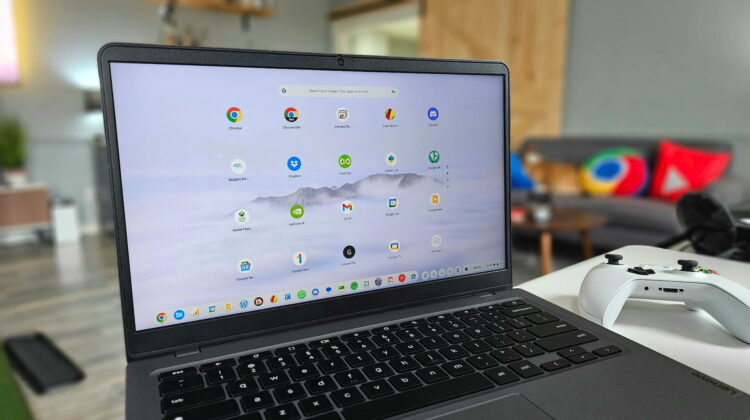
It only takes a few steps (I found them over on Reddit) and you can easily force your clamshell device into tablet mode with just a quick keyboard shortcut. This requires the enabling of one experimental flag, found here: chrome://flags/#ash-debug-shortcuts. After enabling it and performing the restart by pushing the big blue button at the bottom of the screen, you can simply press CTRL-ALT-SHIFT-T and just like that, you’ll be in tablet mode.

Once you’ve forced tablet mode, the UI will still accept keyboard and mouse input even though that’s not how it works on a convertible or tablet. On those devices, the minute a keyboard or mouse is detected, the UI switches back to the desktop layout. When you are finished with whatever you are testing, the CTRL-ALT-SHIFT-T shortcut will get back to the desktop UI.

Featured Videos

Xremove ads
Check out Today’s Best Chomebook Deals

This trick allows users to test things in tablet mode on their devices without needing to buy a separate Chromebook for it. Want to know how a particular Android game runs on a Chromebook tablet or convertible? Try it out first! And, more importantly for my uses, this gave me the ability to really test out the tablet UI on a Chromebook that meets the bare minimum spec requirement for Chromebook Plus to see what it will be like when/if we finally get Chromebook tablets that get included in the Chromebook Plus family.

Hopefully this little trick comes in handy for you at some point in your Chromebook journey. While it isn’t exactly something I’m going to use on a daily basis, it’s a nice trick to have in the back pocket for a rainy day when it is needed.

SUBSCRIBE TO UPSTREAM

Get Chrome Unboxed delivered straight to your inbox

Upstream is our flagship, curated newsletter with the top stories, most click-worthy deals, giveaways, and trending articles from Chrome Unboxed sent directly to your inbox a few times a week. Join 31,000+ subscribers.

Xremove ads
SUBSCRIBE HERE!

Filed Under: Chrome OS Tablet, Chromebook Plus, Chromebooks

About Robby Payne

As the founder of Chrome Unboxed, Robby has been reviewing Chromebooks for over a decade. His passion for ChromeOS and the devices it runs on drives his relentless pursuit to find the best Chromebooks, best services, and best tips for those looking to adopt ChromeOS and those who've already made the switch.

Primary Sidebar

Googlebook

How many years of updates Googlebook gets could make or break it on Day One

By Robby Payne
September 8, 2026

Your Android phone might soon double as a wireless mouse for Googlebook

By Robby Payne
September 5, 2026

Google’s John Solomon explains why Googlebook is Google’s next Chromebook moment

By Robby Payne
September 4, 2026

Googlebook is designed for AI, but that’s not why I’m excited for it

By Robby Payne
September 3, 2026

Leaked Googlebook ‘Look up’ app appears on the Play Store ahead of launch

By Robby Payne
September 2, 2026

More Googlebook

Xremove ads

Deals

The best Chromebook deals today

By Robby Payne
September 2, 2026

The best Chromebook ever made is $350 off at Best Buy right now

By Robby Payne
August 21, 2026

The excellent, powerful Acer Chromebook Plus Spin 514 is $150 off right now

By Robby Payne
August 12, 2026

Acer’s new Chromebook 315 is wildly affordable and points to the real future of Chromebooks

By Robby Payne
August 11, 2026

You can score the massively upgraded ASUS CX54 Chromebook Plus for just $599 right now

By Joseph Humphrey
July 28, 2026

More Deals

Xremove ads

Reviews

Acer Chromebook Plus Spin 514 Review: the best convertible you can buy [VIDEO]

By Robby Payne
July 1, 2026

Lenovo Chromebook Plus 2-in-1 Review: pretty great in a vacuum

By Robby Payne
April 23, 2026

My review after 6 weeks with the Lenovo Chromebook Plus 14 [VIDEO]

By Robby Payne
August 11, 2025

One week with the best small Android tablet you can buy, and I’m sold

By Robby Payne
May 9, 2025

Best Chromebooks of 2024 [VIDEO]

By Robby Payne
November 28, 2024

More Reviews

Xremove ads

TWITTER · FACEBOOK · INSTAGRAM · YOUTUBE · EMAIL · ABOUT

Copyright © 2026 · Chrome Unboxed · Chrome is a registered trademark of Google Inc.
We are participants in various affiliate advertising programs designed to provide a means for us to earn fees by linking to affiliated sites.

PRIVACY POLICY