

• Skip to main content
  • Skip to primary sidebar
  • Deals
  • Features
  • Guides
  • Chromebooks
  • Videos
  • Podcast
  • More +
    • Reviews
    • Unboxing
    • Upcoming Devices
    • Chromebook Plus
    • Chrome
    • ChromeOS
    • Chrome OS Flex
  • Search
  • Sign Up
  • Log In
Chrome Unboxed – The Latest Chrome OS News

Chrome Unboxed - The Latest Chrome OS News

A Space for All Things Chrome, Google, and More!

  • Deals
  • Features
  • Guides
  • Chromebooks
  • Videos
  • Podcast
  • More +
    • Reviews
    • Unboxing
    • Upcoming Devices
    • Chromebook Plus
    • Chrome
    • ChromeOS
    • Chrome OS Flex
  • Search
  • Sign Up
  • Log In

How to create web app shortcuts on ChromeOS for sites that don’t have a PWA

July 10, 2022 By Johanna Romero View Comments

Support our independent tech coverage. Chrome Unboxed is written by real people, for real people—not search algorithms. Join Chrome Unboxed Plus for just $2 a month to get an ad-free experience, access to our private Discord, and more. Learn more about membership here.
START FREE TRIAL (MONTHLY)START FREE TRIAL (ANNUAL)

We never get tired of singing a well-made PWA its praises as it once again proves that Progressive Web Apps are the future of the open web. Unfortunately, however, not every single website you use has a PWA available as a one-click install or is even listed on the Play Store to easily add it to your Chromebook. So what can you do when this happens? Well, you can make your own web app shortcut. It won’t be a proper PWA in that it won’t include all the native app-like features that PWAs are known to provide, but it will tide you over when you just want a quick way to access said app and not have to fumble around in your bookmarks.

Creating the application shortcut

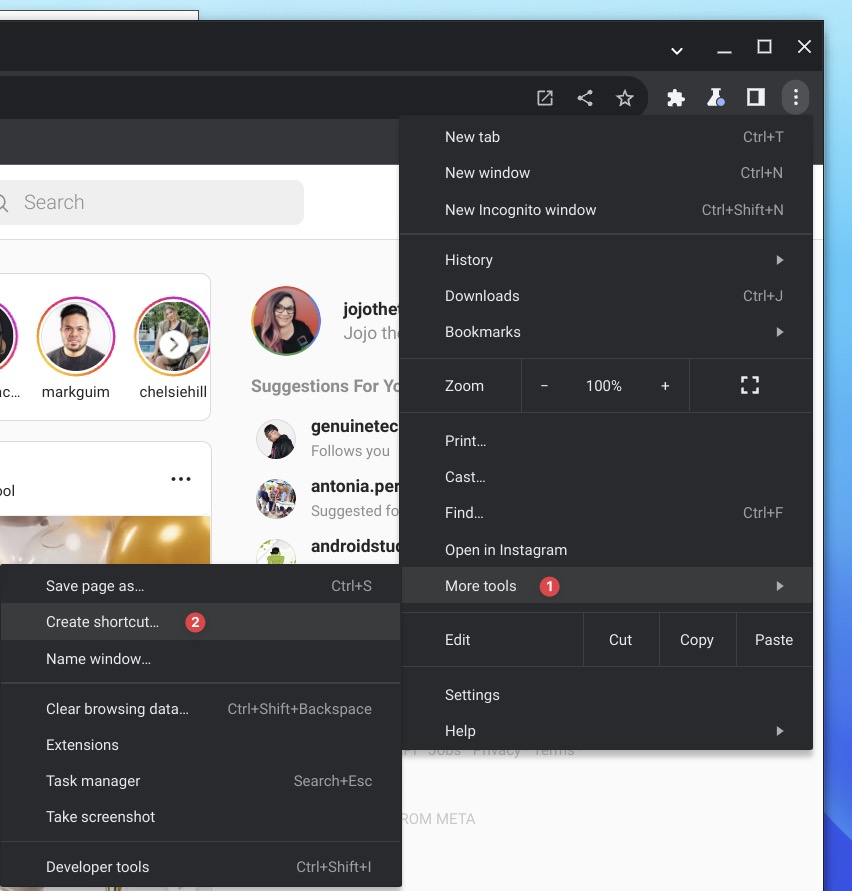
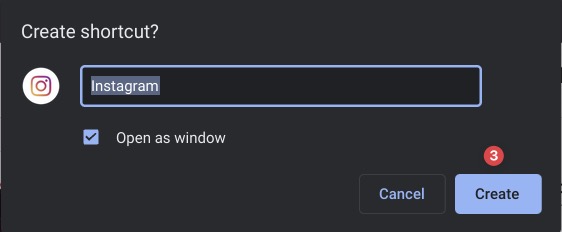
Pull up the website you want to create a shortcut for, then click on the three-dot menu on the top right of the browser window. From there, select “More tools,” then “Create shortcut.” You should then see a popup window asking you to confirm that you want to proceed with creating this shortcut. This is your opportunity to rename the app and select if you want it to open in its own standalone window, otherwise, the app will open in a browser tab.
Xremove ads
I just want the steps!
    ​
  1. Open the site you want to create a shortcut for on your browser
  2. Click on the browser three-dot menu
  3. Select More tools > Create shortcut
  4. Rename your app and click on “Open as window”

Finding your newly created shortcut
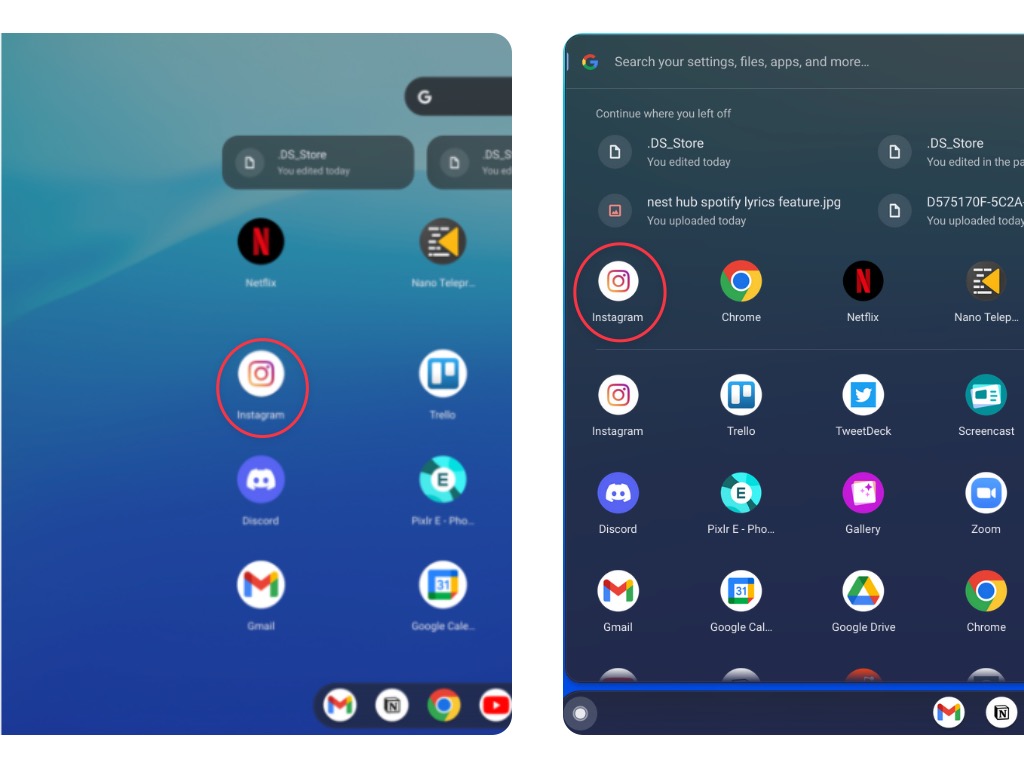
Application list in tablet and clamshell mode

Once your shortcut has been created, you will be able to find it in your list of applications, both in tablet and clamshell mode. It is usually placed at the top-most spot or alphabetically if you’ve already applied a sorting order. Once you open the app, you’ll notice that it opens in its own window, just like a regular web app, and you will be able to resize and reposition the window as you choose.

SUBSCRIBE TO UPSTREAM

Get Chrome Unboxed delivered straight to your inbox

Upstream is our flagship, curated newsletter with the top stories, most click-worthy deals, giveaways, and trending articles from Chrome Unboxed sent directly to your inbox a few times a week. Join 31,000+ subscribers.

Featured Videos

Xremove ads
SUBSCRIBE HERE!

Filed Under: ChromeOS, Guides and How-To's Tagged With: app icon, app shortcuts, chromeos, pwa, web apps

Primary Sidebar

Googlebook

Google’s classic ‘Text’ app is now an Android app for Googlebook on the Play Store

By Robby Payne
September 24, 2026

Why we can now rule out hardware or software bugs for the missing Lenovo Duet m

By Robby Payne
September 24, 2026

Best Buy is giving away free Pixel Buds 2a with any Googlebook pre-order

By Robby Payne
September 23, 2026

Every new Googlebook includes nearly $600 in free software perks

By Robby Payne
September 23, 2026

Our first real look at Googlebook OS in the wild features CapCut, Figma, offline downloads, and games

By Robby Payne
September 23, 2026

More Googlebook

Xremove ads

Deals

The best Chromebook deals today

By Robby Payne
September 2, 2026

The best Chromebook ever made is $350 off at Best Buy right now

By Robby Payne
August 21, 2026

The excellent, powerful Acer Chromebook Plus Spin 514 is $150 off right now

By Robby Payne
August 12, 2026

Acer’s new Chromebook 315 is wildly affordable and points to the real future of Chromebooks

By Robby Payne
August 11, 2026

You can score the massively upgraded ASUS CX54 Chromebook Plus for just $599 right now

By Joseph Humphrey
July 28, 2026

More Deals

Xremove ads

Reviews

Acer Chromebook Plus Spin 514 Review: the best convertible you can buy [VIDEO]

By Robby Payne
July 1, 2026

Lenovo Chromebook Plus 2-in-1 Review: pretty great in a vacuum

By Robby Payne
April 23, 2026

My review after 6 weeks with the Lenovo Chromebook Plus 14 [VIDEO]

By Robby Payne
August 11, 2025

One week with the best small Android tablet you can buy, and I’m sold

By Robby Payne
May 9, 2025

Best Chromebooks of 2024 [VIDEO]

By Robby Payne
November 28, 2024

More Reviews

Xremove ads

TWITTER · FACEBOOK · INSTAGRAM · YOUTUBE · EMAIL · ABOUT

Copyright © 2026 · Chrome Unboxed · Chrome is a registered trademark of Google Inc.
We are participants in various affiliate advertising programs designed to provide a means for us to earn fees by linking to affiliated sites.

PRIVACY POLICY