

• Skip to main content
  • Skip to primary sidebar
  • Deals
  • Features
  • Guides
  • Chromebooks
  • Videos
  • Podcast
  • More +
    • Reviews
    • Unboxing
    • Upcoming Devices
    • Chromebook Plus
    • Chrome
    • ChromeOS
    • Chrome OS Flex
  • Search
  • Sign Up
  • Log In
Chrome Unboxed – The Latest Chrome OS News

Chrome Unboxed - The Latest Chrome OS News

A Space for All Things Chrome, Google, and More!

  • Deals
  • Features
  • Guides
  • Chromebooks
  • Videos
  • Podcast
  • More +
    • Reviews
    • Unboxing
    • Upcoming Devices
    • Chromebook Plus
    • Chrome
    • ChromeOS
    • Chrome OS Flex
  • Search
  • Sign Up
  • Log In

Google wants Chrome to become your preferred password manager

February 22, 2022 By Johanna Romero View Comments

Support our independent tech coverage. Chrome Unboxed is written by real people, for real people—not search algorithms. Join Chrome Unboxed Plus for just $2 a month to get an ad-free experience, access to our private Discord, and more. Learn more about membership here.
START FREE TRIAL (MONTHLY)START FREE TRIAL (ANNUAL)

As a heavy Chrome user, the password manager that is built into the Chrome browser – which can be easily accessed by navigating to passwords.google.com – has always been my preference when it comes to saving a website’s login info. Originally, all I could expect the Chrome Password Manager to do was prompt me to save a password for a new site I was visiting or auto-complete a previously-saved password for a site I was returning to.

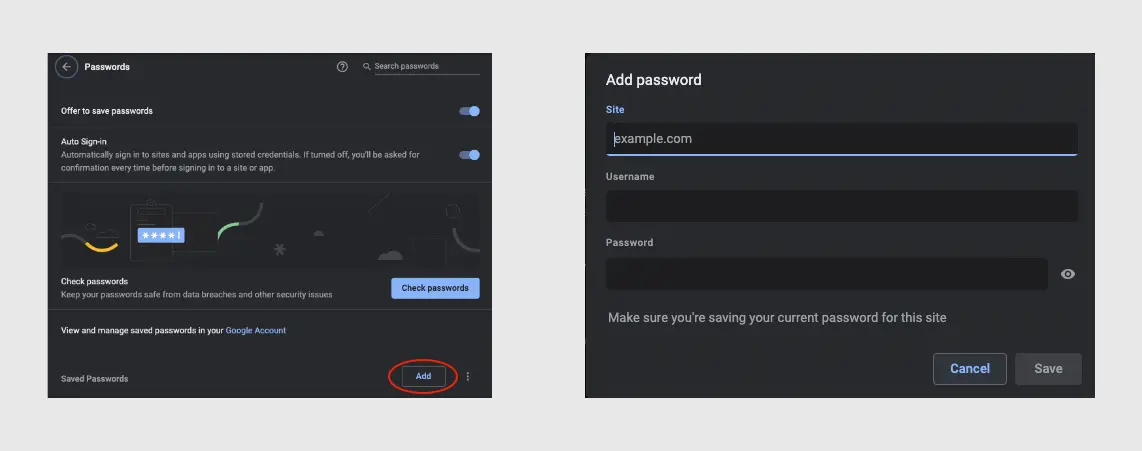
That changed a few months ago when an experimental flag became available that allowed users to manually save a password to Chrome without having to visit that site in the first place. This discovery was made by Redditor u/Leopeva64-2 who found this to be working in Chrome Canary. Since then, that feature has become available in the stable version of Chrome, but it is still behind a flag that you have to manually turn on via chrome://flags/#add-passwords-in-settings to give it a try.
Xremove ads
Manual “Add” password button in Chrome settings after chrome://flags/#add-passwords-in-settings is enabled

Well, it looks like more development is being done to that feature, as the same Redditor now points out that in Chrome Canary version 101 there is a new field where you can add a note while saving a password. This can be very helpful if you wanted to have additional information available such as the security questions and answers you used for that site, or even a third login field like a reference number that Chrome wouldn’t normally be able to capture. This same field will also be available on passwords you have already saved.
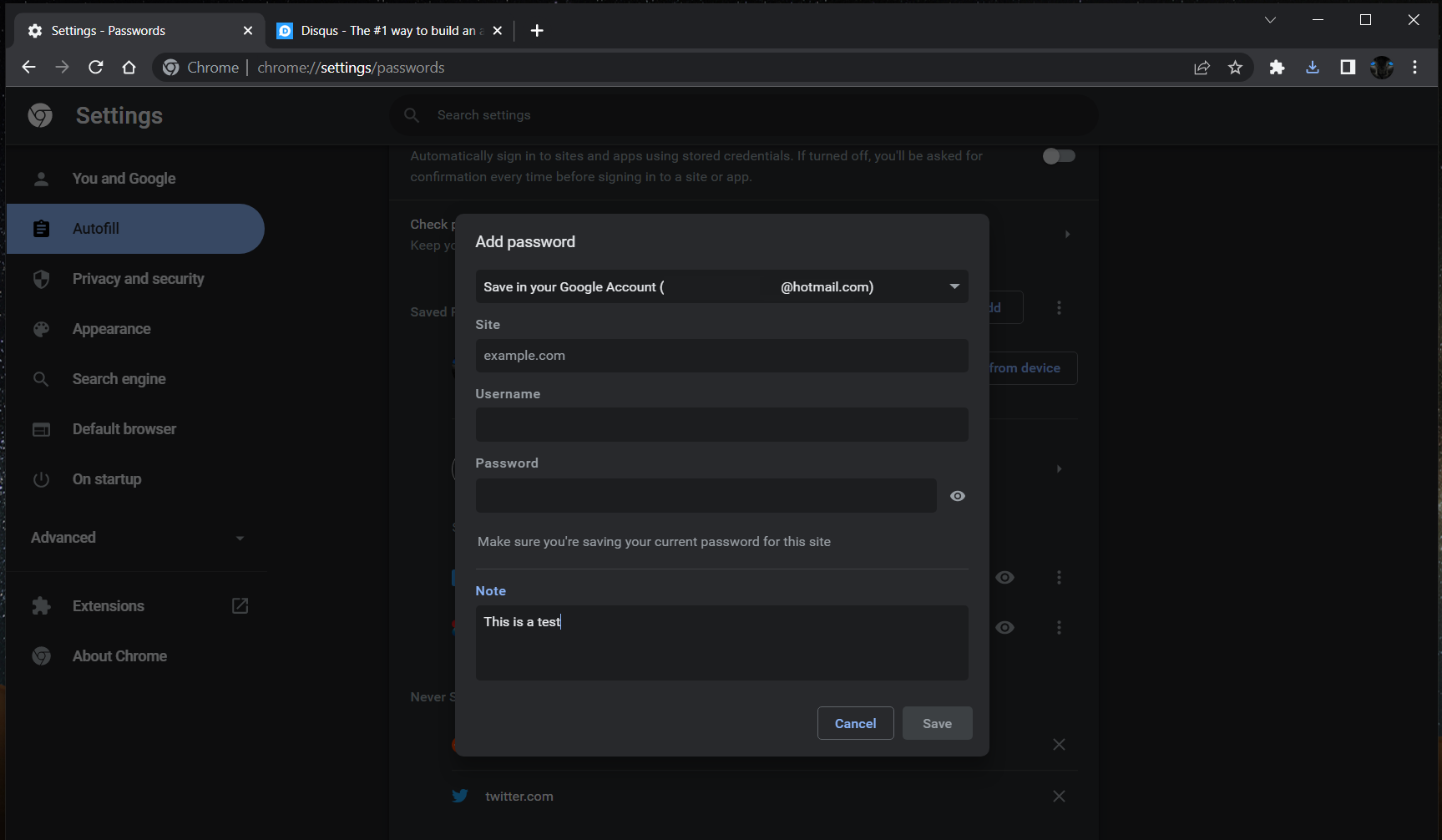
The additional “notes” field that will be available while saving or editing a password.
Source: u/Leopeva64-2 on Reddit

It is unclear if this notes field will be encrypted the same way as your username and password currently are. As this is an experimental feature, there is currently no help documentation on it, but I would expect this to be cleared up by the time this is released to the public. We will be watching this feature as it moves from Canary to Stable and will report back once it becomes widely available.

Featured Videos

Xremove ads

SUBSCRIBE TO UPSTREAM

Get Chrome Unboxed delivered straight to your inbox

Upstream is our flagship, curated newsletter with the top stories, most click-worthy deals, giveaways, and trending articles from Chrome Unboxed sent directly to your inbox a few times a week. Join 31,000+ subscribers.

SUBSCRIBE HERE!

Filed Under: Chrome, ChromeOS, New & Upcoming Features, News Tagged With: chrome, password manager

Primary Sidebar

Googlebook

Best Buy is giving away free Pixel Buds 2a with any Googlebook pre-order

By Robby Payne
September 23, 2026

Every new Googlebook includes nearly $600 in free software perks

By Robby Payne
September 23, 2026

Our first real look at Googlebook OS in the wild features CapCut, Figma, offline downloads, and games

By Robby Payne
September 23, 2026

Googlebook perk officially confirms Adobe Premiere is on the way

By Joseph Humphrey
September 22, 2026

I’m confused why the Lenovo Googlebook Duet m wasn’t at Google’s big launch event

By Robby Payne
September 22, 2026

More Googlebook

Xremove ads

Deals

The best Chromebook deals today

By Robby Payne
September 2, 2026

The best Chromebook ever made is $350 off at Best Buy right now

By Robby Payne
August 21, 2026

The excellent, powerful Acer Chromebook Plus Spin 514 is $150 off right now

By Robby Payne
August 12, 2026

Acer’s new Chromebook 315 is wildly affordable and points to the real future of Chromebooks

By Robby Payne
August 11, 2026

You can score the massively upgraded ASUS CX54 Chromebook Plus for just $599 right now

By Joseph Humphrey
July 28, 2026

More Deals

Xremove ads

Reviews

Acer Chromebook Plus Spin 514 Review: the best convertible you can buy [VIDEO]

By Robby Payne
July 1, 2026

Lenovo Chromebook Plus 2-in-1 Review: pretty great in a vacuum

By Robby Payne
April 23, 2026

My review after 6 weeks with the Lenovo Chromebook Plus 14 [VIDEO]

By Robby Payne
August 11, 2025

One week with the best small Android tablet you can buy, and I’m sold

By Robby Payne
May 9, 2025

Best Chromebooks of 2024 [VIDEO]

By Robby Payne
November 28, 2024

More Reviews

Xremove ads

TWITTER · FACEBOOK · INSTAGRAM · YOUTUBE · EMAIL · ABOUT

Copyright © 2026 · Chrome Unboxed · Chrome is a registered trademark of Google Inc.
We are participants in various affiliate advertising programs designed to provide a means for us to earn fees by linking to affiliated sites.

PRIVACY POLICY