

Support our independent tech coverage. Chrome Unboxed is written by real people, for real people—not search algorithms. Join Chrome Unboxed Plus for just $2 a month to get an ad-free experience, access to our private Discord, and more. Learn more about membership here.
START FREE TRIAL (MONTHLY)START FREE TRIAL (ANNUAL)
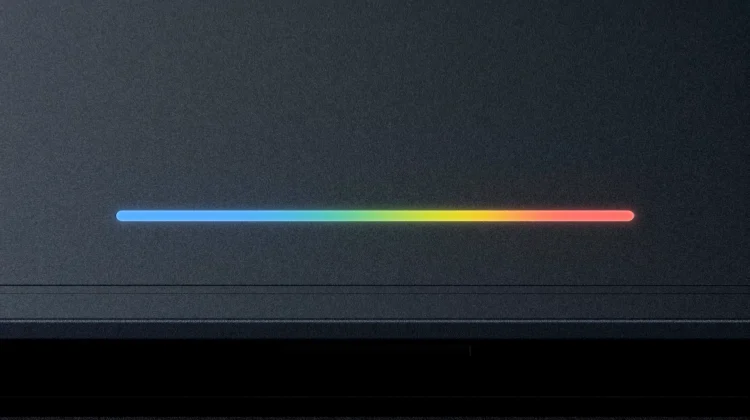
If you are a long-time follower of the Chromebook ecosystem, it’s very likely that you hold a special place in your heart for the original Chromebook Pixel. Back in 2013 and 2015, Google did something completely unexpected by launching its own flagship hardware. While those laptops were packed with incredible screens and top-tier materials, the real visual highlight of the design was a simple, iconic strip of colored lights on the lid: the Pixel light bar.
Google used the two Chromebook Pixels to do what they tend to do with their own hardware in this space – light the way for OEMs – and when they accomplished that task, we didn’t see another Google-made Chromebook until the 2017 Pixelbook. Unfortunately, the light bar didn’t resurface at that point, and this iconic band of light only showed up in bits and pieces via software inclusions around the Google Assistant in Android after those original Chromebook Pixel devices.
But as we prepare for the massive arrival of Googlebook devices this fall, we’ve known for quite some time that this 4-light LED fixture would be returning; and it has been made very clear by Google’s marketing materials thus far that the Pixel Light Bar will return on all Googlebooks, only under a new name: Glow Bar.
A hardware feature the team refused to let go
Bringing a legacy design feature back into production after a multi-year hiatus isn’t something that happens by accident in a huge organization like Google. According to John Maletis (at the 11:40 mark in the video), the return of the Glow Bar is the result of years of persistent internal campaigning by Google’s own user experience team.
“I don’t have enough fingers and toes to count how many times our UX team has been just like, ‘Hey, we’ve got to get the Glow Bar back,'” Maletis told us during the interview.
While the team had previously considered some concepts and kept the idea in the back pocket of their development playbook, the timing was never quite right. That completely changed when Google committed to establishing the Googlebook as an entirely new, distinct class of laptop. To anchor this premium category of devices, the team decided it was time to bring back the iconic LED bar, and it looks like it will be far more useful than just a showpiece.
More than just an eye-catching trick
Back in the day, the original Pixel light bar was a massive conversation starter. If you tapped the lid while the laptop was closed, it would display your battery status. If you typed in the famous Konami code, the lights would perform a dancing sequence. It was a brilliant piece of branding that immediately made people stop and ask questions when you opened your laptop in a coffee shop.
With the new iteration on upcoming Googlebooks, Google is aiming to keep that distinct, premium visual identity while actively expanding what the hardware can actually do.
“I think it’s going to stand out quite a bit,” Maletis explained. “I have this vision of people working away in a cafe with the Glow Bar, and it’ll have some functionality to it that I think will be really cool, that will kind of be more of a hardware light effect that is mimicking some of the workflows that you’re doing.”
While Maletis kept the exact feature set close to his chest, the implication is incredibly exciting. Instead of just acting as a static branding element, the new Glow Bar is being engineered to tie directly into the operating system’s activity. Whether it is quietly pulsing to indicate a processing background task, signaling an incoming notification, or interacting with the core Gemini system, it sounds like the light bar is evolving into a functional extension of the user interface.
Establishing a premium hardware footprint
Resurrecting the Glow Bar is a clear indicator of exactly how Google is positioning the Googlebook category right out of the gate. This isn’t a tentative, budget-first experiment. Google is setting a very high bar for physical polish, requiring strict hardware guidelines for partner OEMs like Dell, HP, ASUS, Acer, and Lenovo.
By adding a unique, physical element like the Glow Bar across the hardware family, Google is ensuring that these laptops are immediately recognizable the second you walk into a store or spot one out in the wild. It gives the ecosystem a distinct personality that sets it entirely apart from standard Windows laptops or MacBooks.
We are still a few months away from the official launch window later this fall, but knowing that a beloved piece of Google hardware history is making its big return for Googlebook is pretty exciting. I’m sure we’re not alone in our excitement about that launch, and it’ll be here before we know it.
SUBSCRIBE TO UPSTREAM
Get Chrome Unboxed delivered straight to your inbox
Upstream is our flagship, curated newsletter with the top stories, most click-worthy deals, giveaways, and trending articles from Chrome Unboxed sent directly to your inbox a few times a week. Join 31,000+ subscribers.

