

Support our independent tech coverage. Chrome Unboxed is written by real people, for real people—not search algorithms. Join Chrome Unboxed Plus for just $2 a month to get an ad-free experience, access to our private Discord, and more. Learn more about membership here.
START FREE TRIAL (MONTHLY)START FREE TRIAL (ANNUAL)
It’s not like we didn’t already know this was coming, right? We’ve seen every basic detail on both of Google’s new phones for weeks and Google’s brief, tight presentation today didn’t bring a whole lot in the way of surprise. Don’t get me wrong, the event was very considerate of all our time and was produced perfectly: it just didn’t offer up a single thing we didn’t already know from a pure hardware perspective. Software? Well now that is a little bit of a different story.
A quick hardware recap
We’ve already covered these phones like every other tech blog on the internet, so I don’t want to waste your time. There are two new phones – the Pixel 4a 5G and the Pixel 5 – and both come with the Snapdragon 765G and very similar designs. Here’s the spec breakdown provided by Google:

Right now, Google is saying the Pixel 5 will begin shipping out on October 15th 2020 for the US and eight other countries with the Pixel 4a 5G shipping in Japan on October 15th and sometime in November for 8 other countries. Pricing is as expected, $799 for the Pixel 5 and $499 for the Pixel 4a 5G. The 4a 5G will come in Just Black and the Pixel 5 will get Just Black and Sorta Sage. You can pre-order the Pixel 5 now at the Google Store and sign up for a waiting list if you are interseted in the Pixel 4a 5G.
Camera upgrades
The only real surprise came in the form of software upgrades Pixel users will get the opportunity to try out soon. Most of these software additions come with the upgraded dual-camera setup on both new phones and the additions to Google’s already-legendary photo skills look very, very enticing.
- Ultrawide lens for ultra awesome shots: With a new ultrawide lens alongside the standard rear camera, you’ll be able to capture the whole scene. And thanks to Google’s software magic, the latest Pixels still get our Super Res Zoom. So whether you’re zooming in or zooming out, you get sharp details and breathtaking images.
- Better videos with Cinematic Pan: Pixel 4a (5G) and Pixel 5 come with Cinematic Pan, which gives your videos a professional look with ultra-smooth panning that’s inspired by the equipment Hollywood directors use.
- Night Sight in Portrait Mode: Night Sight currently gives you the ability to capture amazing low-light photos—and even the Milky Way with astrophotography. Now, these phones bring the power of Night Sight into Portrait Mode to capture beautifully blurred backgrounds in Portraits even in extremely low light.
- Portrait Light: Portrait Mode on the Pixel 4a (5G) and Pixel 5 lets you capture beautiful portraits that focus on your subject as the background fades into an artful blur. If the lighting isn’t right, your Pixel can drop in extra light to illuminate your subjects.
- New editor in Google Photos: Even after you’ve captured your portrait, Google Photos can help you add studio-quality light to your portraits of people with Portrait Light, in the new, more helpful Google Photos editor.
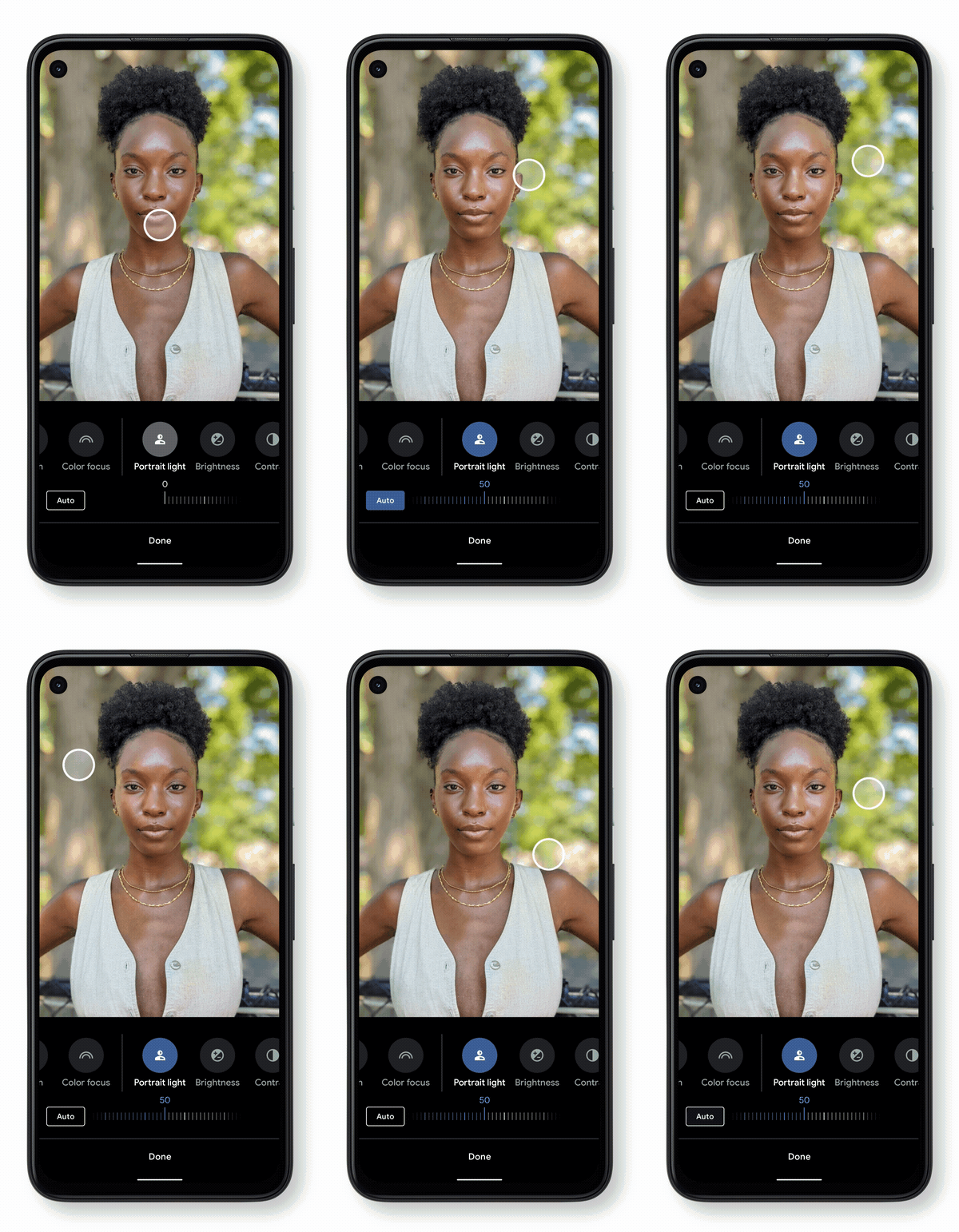
Google breezed through all of this pretty quickly, but the results on screen looked pretty stunning. Obviously, we’ll need to wait until we have a Pixel 5 in-hand to take all of this stuff for a spin, but we’ll be testing the updated photo editor in Google Photos once it rolls out for sure. If there’s one thing Google is great at, it is photography software. These new phones will most definitely be in the running for best smartphone camera again this year.
On hold? Pixel has you covered
Adding to their abilities to help fend off spam calls, Pixel phones will now be able to take on long hold times, too. When placed on hold, the Assistant can listen in on the call and notify you when someone actually comes back on the line. Meanwhile, you can go back to what you were doing instead of wasting time on hold. This honestly looks amazing, but we’ll defer to trying it out for ourselves once this feature launches.
A smarter voice recorder
With Pixel 4, Google introduced a new voice recorder that can quickly transcribe voice to text while also capturing the audio. It’s a handy app that is very useful for grabbing text snippets from lectures or interviews and Google is making it even more amazing with a new feature that allows users to edit their audio by removing the corralating transcribed text. Again, we can’t test this yet, but it looks absolutely amazing in action and all works offline, too.

While I still bristle a bit at the $799 asking price for a phone with a upper-mid-range processor inside, everything else about the Pixel 5 has me pretty excited. As they opted to forego a larger device this year, I think they may have nailed it with the small bezels and 6-inch screen. While this may not be the ideal phone for someone like myself, I can see a ton of people wanting to give the Pixel 5 a try. Hopefully regular sale prices will get it down in the $600 price range with regularity and will propel it to sell well alongside the Pixel 4a and 4a 5G.
SUBSCRIBE TO UPSTREAM
Get Chrome Unboxed delivered straight to your inbox
Upstream is our flagship, curated newsletter with the top stories, most click-worthy deals, giveaways, and trending articles from Chrome Unboxed sent directly to your inbox a few times a week. Join 31,000+ subscribers.

