
• Skip to main content
  • Skip to primary sidebar
  • Deals
  • Features
  • Guides
  • Chromebooks
  • Videos
  • Podcast
  • More +
    • Reviews
    • Unboxing
    • Upcoming Devices
    • Chromebook Plus
    • Chrome
    • ChromeOS
    • Chrome OS Flex
  • Search
  • Sign Up
  • Log In
Chrome Unboxed – The Latest Chrome OS News

Chrome Unboxed - The Latest Chrome OS News

A Space for All Things Chrome, Google, and More!

  • Deals
  • Features
  • Guides
  • Chromebooks
  • Videos
  • Podcast
  • More +
    • Reviews
    • Unboxing
    • Upcoming Devices
    • Chromebook Plus
    • Chrome
    • ChromeOS
    • Chrome OS Flex
  • Search
  • Sign Up
  • Log In

Real Tone filters rolling out in Google Photos

May 25, 2022 By Johanna Romero View Comments

Support our independent tech coverage. Chrome Unboxed is written by real people, for real people—not search algorithms. Join Chrome Unboxed Plus for just $2 a month to get an ad-free experience, access to our private Discord, and more. Learn more about membership here.
START FREE TRIAL (MONTHLY)START FREE TRIAL (ANNUAL)

One of the things Google spoke about the most during the I/O conference this year was how much advancements in A.I. (Artificial Intelligence) played a role in software improvements. The implementation of Real Tone for Pixel with the launch of the Pixel 6 line sought to improve the representation of diverse skin tones across all of Google’s products. To achieve that, Google partnered with Harvard professor and sociologist Dr. Ellis Monk to develop a new skin tone scale called the “Monk Skin Tone Scale.”
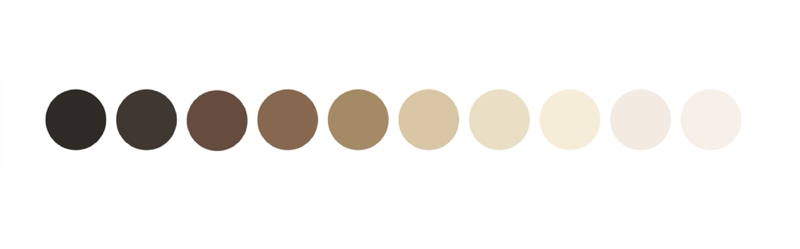
Monk Skin Tone Scale

The MST – or Monk Skin Tone Scale – was designed to be more inclusive of our society’s variety of skin tones. Google announced at I/O that they would be openly releasing it so that anyone could use it for research and product development. Additionally, Google promised that they would start using the MST Scale to improve existing products, such as Google Photos, by launching a new set of Real Tone filters designed to work well with various skin tones.

Xremove ads

Google kept that promise and yesterday announced via Twitter that the Real Tone filters in Google Photos were starting to roll out on Android, iOS, and the web. Once applied, the filter will identify itself as being “Made with Real Tone” with a small popup banner at the bottom of the preview. The new filters are Playa, Honey, Isla, Desert, and Clay.

The new Real Tone filters in Google Photos are starting to roll out today on Android, iOS, and web. These filters were designed by professional image makers to work well across skin tones, so you can choose the filter that reflects your style. pic.twitter.com/UwTS4KIodY

— Google Photos (@googlephotos) May 24, 2022

The implementation in Google Photos is seamless. I was very pleased with the results I saw as I played around with applying the filters on existing photos with family members of different skin tones. The filters look natural and subtle, as if the only change in the environment was the lighting angle. I see myself using these filters quite a bit and am looking forward to Google implementing the MST scale in more products in the future.

Featured Videos

Xremove ads

SUBSCRIBE TO UPSTREAM

Get Chrome Unboxed delivered straight to your inbox

Upstream is our flagship, curated newsletter with the top stories, most click-worthy deals, giveaways, and trending articles from Chrome Unboxed sent directly to your inbox a few times a week. Join 31,000+ subscribers.

SUBSCRIBE HERE!

Filed Under: Apps, New & Upcoming Features Tagged With: google photos, real tone, real tone filters

Primary Sidebar

Xremove ads

Deals

How to get 50% off YouTube Premium for a full year with Google One

By Robby Payne
April 16, 2026

The Pixel 10a just dropped to $449, but here’s why you should buy the Pixel 10 instead

By Joseph Humphrey
April 13, 2026

Save up to $200 on the two best Chromebooks on the market

By Robby Payne
April 13, 2026

The best Chromebook deals today

By Robby Payne
April 13, 2026

You can grab the battery-powered Nest Doorbell for just $129.99 right now

By Joseph Humphrey
April 11, 2026

More Deals

Xremove ads

Reviews

Acer Chromebook Plus Spin 514 Review: Kompanio Ultra power in a convertible

By Robby Payne
December 24, 2025

My review after 6 weeks with the Lenovo Chromebook Plus 14 [VIDEO]

By Robby Payne
August 11, 2025

One week with the best small Android tablet you can buy, and I’m sold

By Robby Payne
May 9, 2025

Best Chromebooks of 2024 [VIDEO]

By Robby Payne
November 28, 2024

Samsung Galaxy Chromebook Plus Review: Samsung is back! [VIDEO]

By Robby Payne
October 28, 2024

More Reviews

Xremove ads

Guides

This Chromebook trackpad shortcut is definitely not new, but is blowing my mind

By Robby Payne
March 11, 2024

How to reduce broadcast delay on YouTube TV to stop live spoilers

By Robby Payne
December 8, 2023

Windows PC keyboard and Chromebook

How to use a Windows keyboard with a Chromebook

By Joseph Humphrey
December 8, 2023

How reset and revert your Chromebook to the previous version of Chrome OS

By Robby Payne
November 29, 2023

My Chromebook Plus features disappeared: here’s how I fixed it

By Robby Payne
November 24, 2023

More Guides

TWITTER · FACEBOOK · INSTAGRAM · YOUTUBE · EMAIL · ABOUT

Copyright © 2026 · Chrome Unboxed · Chrome is a registered trademark of Google Inc.
We are participants in various affiliate advertising programs designed to provide a means for us to earn fees by linking to affiliated sites.

PRIVACY POLICY