


Support our independent tech coverage. Chrome Unboxed is written by real people, for real people—not search algorithms. Join Chrome Unboxed Plus for just $2 a month to get an ad-free experience, access to our private Discord, and more. Learn more about membership here.
START FREE TRIAL (MONTHLY)START FREE TRIAL (ANNUAL)
Google Photos is one of Google’s most popular and beloved apps from Google, and it’s now getting a significant redesign of its main photo viewing experience. In an announcement on its support forums, Google has detailed a new look that aims to be “simpler, more modern, and more intuitive.”
For now, unfortunately, this fresh new UI is rolling out now on the Google Photos iOS app, with Android users having to wait a bit longer. I have to admit that I’ll never understand this; but let’s break down what’s new.
A cleaner, more modern look
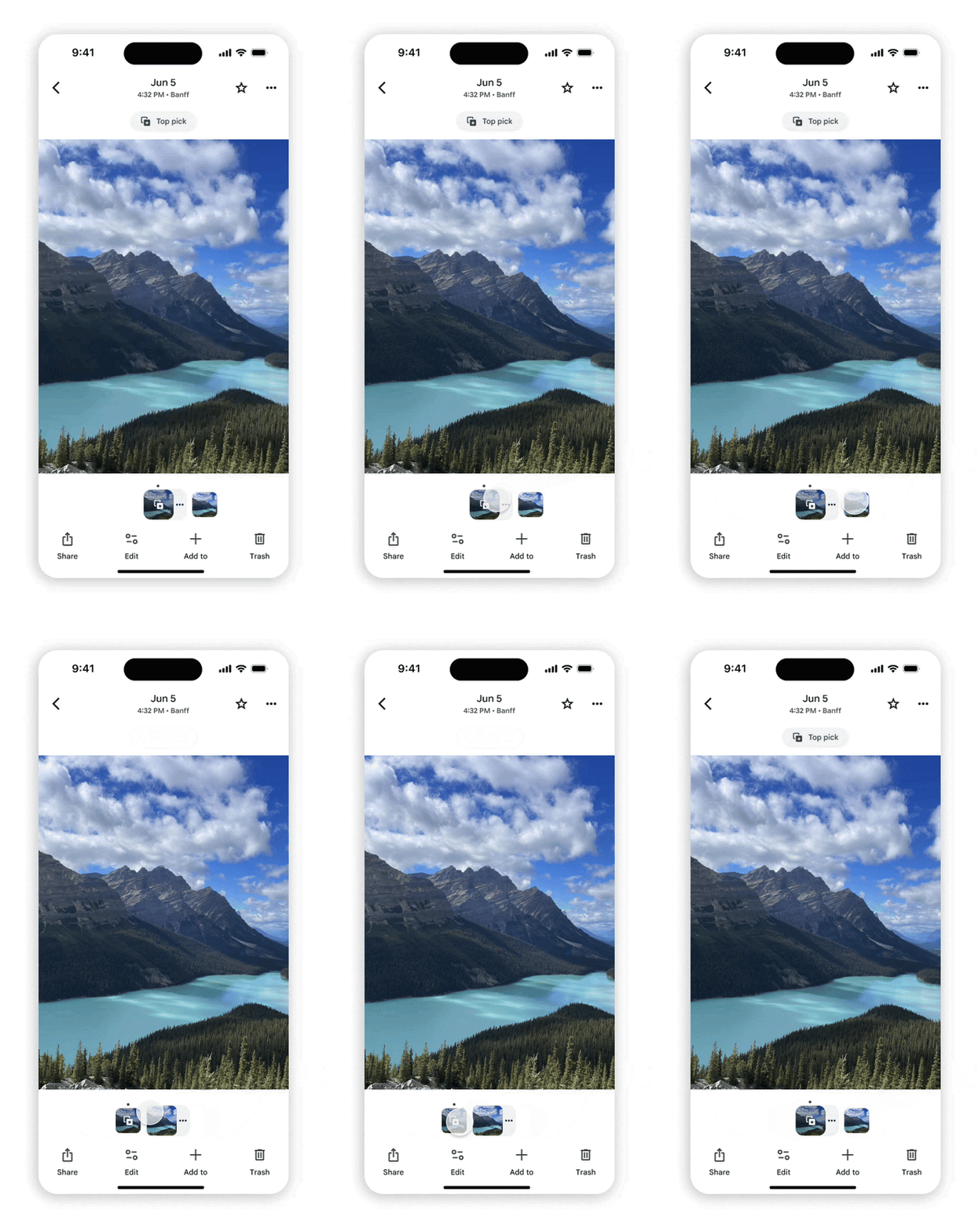
The redesign brings several key visual and usability improvements. First up, for those who aren’t fans of the always-dark background when viewing a photo, there is now a brand-new light mode. The app will automatically match your device’s system-level light or dark mode preference.
You’ll also find that important details are now easier to see at a glance. The date, time, and location information for a photo are now displayed right at the top of the screen, making it simpler to know exactly when and where a memory was captured.
Streamlined menus and actions

Google has also decluttered the interface by consolidating many key actions into a more streamlined menu system. The main functions are now split between a new “Add to (+)” button at the bottom and the familiar three-dot menu at the top. Tapping the “Add to (+)” button lets you quickly:
- Organize photos into albums
- Move photos to your Archive
- Secure photos in your Locked Folder
The three-dot menu now contains a streamlined set of actions, including About, Google Lens, Create, Cast, and Download or Delete from device. Managing your Photo Stacks and bursts is also now handled via a new three-dot icon attached to the photo’s thumbnail in the filmstrip view, too.
New interactive badges
Lastly, Google has added new tappable “badges” that appear on your photos to give you quick access to context-aware actions. You can tap these badges to:
- Change the photo’s category
- Play or pause a Live or Motion photo
- Save a shared photo to your library
- Back up a photo or manage your storage
iPhone first roll-out
As mentioned, in a move that’s as confusing as always for a major Google app redesign, this new photo view is available now on the Google Photos iOS app. Google simply states that it will be “coming soon to Android.” While I’m sure it won’t be a long wait, it’s always disappointing to see the iOS app get first dibs on this one.
Overall, this looks like a great step forward for the Google Photos UI, making it cleaner and more intuitive to use. We’ll be keeping a close eye out for the update to start rolling out on our Android devices.
SUBSCRIBE TO UPSTREAM
Get Chrome Unboxed delivered straight to your inbox
Upstream is our flagship, curated newsletter with the top stories, most click-worthy deals, giveaways, and trending articles from Chrome Unboxed sent directly to your inbox a few times a week. Join 31,000+ subscribers.

