

Support our independent tech coverage. Chrome Unboxed is written by real people, for real people—not search algorithms. Join Chrome Unboxed Plus for just $2 a month to get an ad-free experience, access to our private Discord, and more. Learn more about membership here.
START FREE TRIAL (MONTHLY)START FREE TRIAL (ANNUAL)
Since Ask Photos began rolling out back in 2024, Google has been tweaking the balance between AI-powered intelligence and the “classic” search experience we’ve used for years. While the goal is to make finding memories more natural, Google has heard the feedback: sometimes, users just want to be in the driver’s seat.
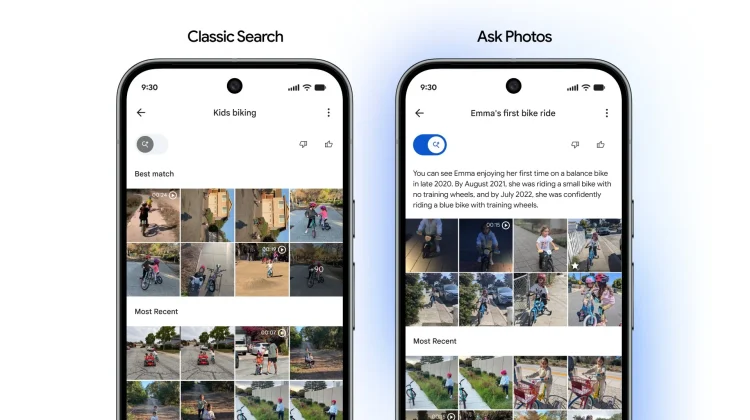
According to a new announcement from Google Photos lead Shimrit Ben-Yair over on X, a new experience is rolling out that adds a dedicated toggle to the search UI. This allows you to quickly swap back and forth between “fast classic search” and “intelligent Ask Photos results” without digging into settings menus.
Putting users in control
The logic behind the toggle is simple: Google will lead with the results it thinks best fit your query, but you now have the manual control to switch views if the AI isn’t hitting the mark. This addresses a common pain point where classic keyword searches occasionally felt broken or slower when forced through the AI model.
Beyond the UI change, the Google Photos team has also been working under the hood to improve search quality for popular terms. Ben-Yair specifically noted that common searches like “turtles,” “purple dress,” and “lipstick” are now more accurate than ever.
The reach of Ask Photos is also growing. It is now live in over 100 countries and is officially beginning its rollout in Europe this week.
A few more “quality of life” tweaks
Hidden in the replies to the announcement, Ben-Yair confirmed another small but highly requested feature currently in the rollout process: “More from this date.” Soon, when you tap on an image after a search, the date at the top of the photo will become a tappable target. Tapping it will instantly take you to the main timeline view for that specific day, making it much easier to see the full context around a specific memory.
How to get it
This is a server-side rollout, so you won’t necessarily need an app update to see the changes. If you don’t see the new toggle or the tappable date targets yet, hang tight; Google is still in the process of pushing these updates to all users.
SUBSCRIBE TO UPSTREAM
Get Chrome Unboxed delivered straight to your inbox
Upstream is our flagship, curated newsletter with the top stories, most click-worthy deals, giveaways, and trending articles from Chrome Unboxed sent directly to your inbox a few times a week. Join 31,000+ subscribers.

