


Support our independent tech coverage. Chrome Unboxed is written by real people, for real people—not search algorithms. Join Chrome Unboxed Plus for just $2 a month to get an ad-free experience, access to our private Discord, and more. Learn more about membership here.
START FREE TRIAL (MONTHLY)START FREE TRIAL (ANNUAL)
If you are an Android user, I’m sure you’ve been there. You have an ongoing message thread (SMS/MMS) with an iPhone user, and littered throughout the conversation are messages that look wildly out of place and only make sense if you know why they are there to begin with. Messages like the one you see below.
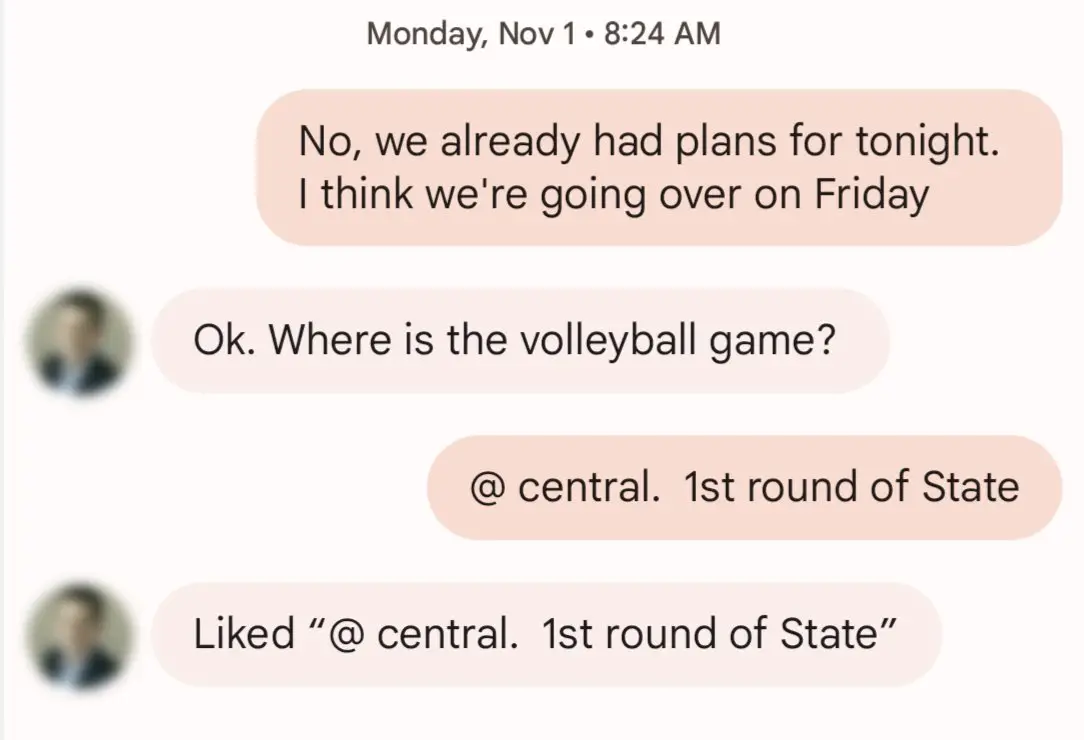
See that one at the bottom, the one that says Liked “@ central. 1st round of State”? If you message someone who is used to only messaging other iPhone users, you’ll see this a lot. It’s just a simple reaction, but it doesn’t work the way it should across operating systems. With most messaging platforms these days, you can simply react to messages without typing things. WhatsApp, Messenger, and Discord all have this feature, so it isn’t strange or odd for someone to reply in this way to a message.
The problem arises from the fact that iMessage is both an SMS/MMS client AND a web-based messaging service all in one. When it’s iPhone-to-iPhone, all the extra fun stuff we use with messaging platforms works. When it is iPhone-to-Android, things fall back to the archaic SMS/MMS standard, and all that functionality goes away, leaving us with ridiculous extra messages in our threads to let you know the other person actually responded. Or, more accurately, reacted.
Now, take this into a group thread and things get really gross. The entire thing becomes littered with actual messages and faux messages that are simply reading reactions aloud to all the Android users in the group. It’s pretty terrible and one of many reasons Apple needs to simply add the RCS standard into iMessage just as it has with SMS/MMS. Since they are obviously too stubborn to do this and it’s Apple we’re talking about, I hold no hope that it will ever actually happen. So, it’s up to Google to try and mend the gap a bit.
Google Messages will now assign emotes to iMessage reactions
While Google can only get so far in fixing things due to the limits of SMS/MMS, there are small fixes they can make to ease some of these tensions, and according to 9to5 Google, one of those issues is getting a bandage. Rolling out slowly at this point, it looks like Google is adding the ability for Messages to intercept incoming message reactions and assign emoji to those replies. They likely won’t match up 100% with the actual emoji reaction that was sent from the iPhone, but it looks like Google is trying to map out those reactions and assign workable RCS emoji as best as they can.

As you can imagine, this will vastly de-clutter message threads between Android and iOS users in a pretty significant way. For individual chats and group chats alike, this small change will make the divide between these two user bases a bit smaller. According to 9to5 Google, this update is rolling out for users that have opted into the Messages Beta program, so we could see a wider rollout in the coming weeks. For now, the next time you see one of those spelled-out reactions on your phone, take a breath, relax, and know that a fix is on the way.
SUBSCRIBE TO UPSTREAM
Get Chrome Unboxed delivered straight to your inbox
Upstream is our flagship, curated newsletter with the top stories, most click-worthy deals, giveaways, and trending articles from Chrome Unboxed sent directly to your inbox a few times a week. Join 31,000+ subscribers.

