Support our independent tech coverage. Chrome Unboxed is written by real people, for real people—not search algorithms. Join Chrome Unboxed Plus for just $2 a month to get an ad-free experience, access to our private Discord, and more. Learn more about membership here. START FREE TRIAL (MONTHLY)START FREE TRIAL (ANNUAL)
Video conferencing has become an everyday event for millions of employees and students alike and for that reason, chat platforms have been forced to evolve to meet the ever-growing need of these users. Blurred backgrounds, noise cancellation, grid view and more have all made appearances on various platforms like Zoom and Google Meet. One particular feature that has remained elusive in Google Meet is the native ability to take attendance or a roll call of a meeting’s participants.
Third-party tools are available and we’ve covered a couple of those here on Chrome Unboxed. Unfortunately, these are developed and managed by kind souls outside of Google’s organization. No matter how well these unofficial extensions work, they could break at any time when Google updates the Meet platform. What’s more, some of these tools have been developed by actual educators. The day may come when these hard-working teachers and administrators no longer have the time to maintain a free, third-party extension.
Google has just announced a new feature that will hopefully alleviate these worries for many institutions. In an announcement on the G Suite Blog, Google Meet will soon automatically log attendance for web and mobile-based meetings that include five to two hundred fifty attendees. This announcement comes a little late for the beginning of the school year but it’s a much-needed addition to the Google Meet platform.
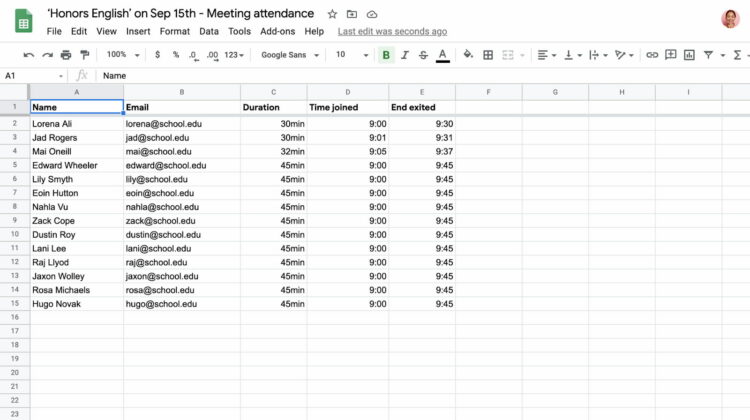
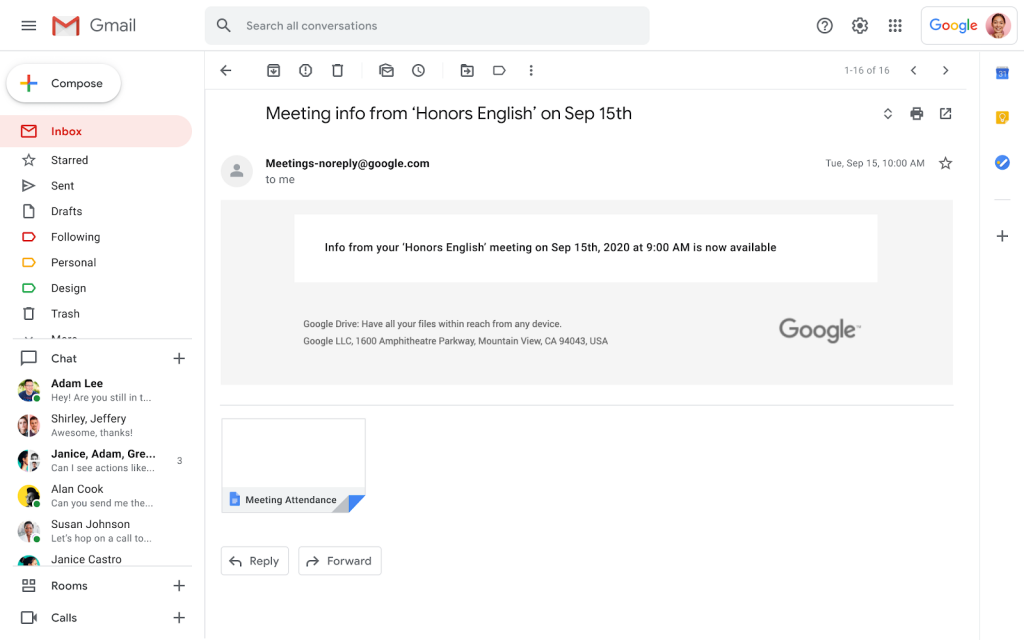
Organizers of G Suite Enterprise for Education meetings will now receive an attendance report via email once the meeting is over. Attendance reports will be generated for web or mobile meetings with at least five (and no more than 250) participants and will contain the following information for each:
Length of time a participant was on the call, including when they joined and exited
Before you fire up that email to your IT Admin, there are a couple of caveats to consider. First, the attendance feature is only available to G Suite Enterprise for Education accounts. This is the premium tier of G Suite for Education, not the free suite that many schools may use. If your institution is paying for the Enterprise Education tier, you will have access to this feature and it will be on by default. Admins will not have the ability to disable the attendance feature at this time.
Second, there has been an update to the announcement stating that the rollout of the attendance feature has been temporarily paused while the “performance is evaluated.” While I’m happy to see this feature become a part of the Google Meet ecosystem, I’m not sure why Google isn’t making it available to the free tier of G Suite for Education. According to the post, that could change in the future.
Not available to G Suite Essentials, G Suite Basic, G Suite Business, G Suite for Education, G Suite Enterprise, and G Suite for Nonprofits customers. Stay tuned to the G Suite Updates blog for information when this launches to additional customers.
Perhaps Google is giving this feature to the premium users and when it is tested and ready, the company will give other G Suite users access. This is definitely a long-asked-for feature and I’m sure that there are plenty of smaller schools that would love to have this ability baked right into Google Meet. You can keep up with the progress of Google Meet attendance on the blog post here.
SUBSCRIBE TO UPSTREAM
Get Chrome Unboxed delivered straight to your inbox
Upstream is our flagship, curated newsletter with the top stories, most click-worthy deals, giveaways, and trending articles from Chrome Unboxed sent directly to your inbox a few times a week. Join 31,000+ subscribers.
Lover of all things coffee. Foodie for life. Passionate drummer, hobby guitar player, Web designer and proud Army Veteran. I have come to drink coffee and tell the world of all things Chrome. "Whatever you do, Carpe the heck out of that Diem" - Roman poet, Horace. Slightly paraphrased.