

Support our independent tech coverage. Chrome Unboxed is written by real people, for real people—not search algorithms. Join Chrome Unboxed Plus for just $2 a month to get an ad-free experience, access to our private Discord, and more. Learn more about membership here.
START FREE TRIAL (MONTHLY)START FREE TRIAL (ANNUAL)
There has been a ton of talk lately about video meeting applications and rightfully so. Millions upon millions of students, employees and just about everyone else has had to make the shift to online chat as a primary source of communication and means to stay connected during this time of telecommuting, homeschooling and simply staying at home. With this explosion of video conferencing, the platforms that we use have seen exponential growth and Google Meet is no exception. According to a blog post from GSuite GM and VP Javier Soltero stated hat Google’s Enterprise/EDU chat platform is seeing a record 2 million new users daily.
Google Meet isn’t for everyone but thankfully, most users have some form of access to it. Perhaps you are a student who is doing non-traditional learning from home at the moment. Maybe you’re an employee who was lucky enough to keep your job and you are working remotely until further notice. So long as your school or your employer has a GSuite account, they can host Google Meet meetings and allow anyone to join even if they don’t have an organizational email address. Now, with the wild growth of tools such as Zoom and House Party, Google appears to be stepping up its video chat game with some much-needed additions to the Meet platform.
According to a report from Reuters, Google will be rolling out some key features to Meet over the next couple of weeks. Javier Soltero told Reuters that Google is adding direct integration into Gmail which ” will allow business and education users on Gmail.com to directly take calls on its video conferencing tool.” It isn’t immediately clear exactly how this feature will work but Reuters stated that it should be available at some point today. (I’ve checked our GSuite account and admin settings but have yet to see the integration. It will likely be a staggered rollout as is with many GSuite updates.)
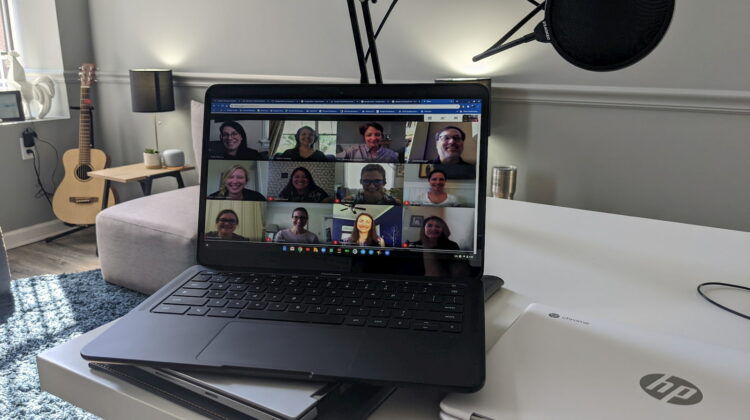
Later this month, Google aims to add a grid-view feature to Meet similar to Zoom. This is good timing on Google’s part as the “Brady Bunch” grid feature on other platforms is not only popular but a must-have for many meeting scenarios. The grid layout will allow for up to 16 users in the gallery view. Honestly, I’m shocked that Google didn’t already have this feature in place. Until it arrives, you can still lean on the third-party grid-view extension that Robby reported on earlier this week.
Last but not least, Meet will soon see enhancements for dimly lit rooms as well as noise filtering to cut down on annoyances such as keyboard clicks and possibly the neighbors yappy dog. Now, all Meet needs are customizable virtual backgrounds and background blur and it will be near perfect. Oh yeah, make a public version that doesn’t require a GSuite account. That’d be great but hey, one thing at a time.
SUBSCRIBE TO UPSTREAM
Get Chrome Unboxed delivered straight to your inbox
Upstream is our flagship, curated newsletter with the top stories, most click-worthy deals, giveaways, and trending articles from Chrome Unboxed sent directly to your inbox a few times a week. Join 31,000+ subscribers.
Source: Reuters

