

• Skip to main content
  • Skip to primary sidebar
  • Deals
  • Features
  • Guides
  • Chromebooks
  • Videos
  • Podcast
  • More +
    • Reviews
    • Unboxing
    • Upcoming Devices
    • Chromebook Plus
    • Chrome
    • ChromeOS
    • Chrome OS Flex
  • Search
  • Sign Up
  • Log In
Chrome Unboxed – The Latest Chrome OS News

Chrome Unboxed - The Latest Chrome OS News

A Space for All Things Chrome, Google, and More!

  • Deals
  • Features
  • Guides
  • Chromebooks
  • Videos
  • Podcast
  • More +
    • Reviews
    • Unboxing
    • Upcoming Devices
    • Chromebook Plus
    • Chrome
    • ChromeOS
    • Chrome OS Flex
  • Search
  • Sign Up
  • Log In

Google Lens upgrades with Screen Search on iOS and AI Overviews

February 19, 2025 By Robby Payne View Comments

Support our independent tech coverage. Chrome Unboxed is written by real people, for real people—not search algorithms. Join Chrome Unboxed Plus for just $2 a month to get an ad-free experience, access to our private Discord, and more. Learn more about membership here.
START FREE TRIAL (MONTHLY)START FREE TRIAL (ANNUAL)

Google Lens has become a pretty incredible tool for searching the world around us, and it only continues to get better and more useful. With over 20 billion visual searches happening every month, Google is rolling out some exciting updates to make Lens even more powerful and versatile. These updates include a new way to search your screen on iOS and enhanced AI capabilities that can provide more detailed information about what you’re looking at.

Search Your Screen on iOS

With this latest update, iPhone users will be able to activate Lens directly within the Chrome browser or the Google app. Imagine reading an article about a historical monument and wanting to learn more. Instead of opening a new tab and conducting a separate search, you can now simply highlight the monument’s name on your screen, trigger Lens, and instantly access a wealth of information without ever leaving the page. This feature has been available on Chrome desktop since last summer, but it is now here for iPhone users, too!

Xremove ads

AI Overviews

With the introduction of AI Overviews, Lens can now provide more detailed and comprehensive information about the objects it identifies. For example, if you take a picture of a car, Lens might not only identify the make and model but also provide insights into its design, history, or even its current market value. This feature is particularly useful for identifying unique or obscure objects that might not be readily recognizable.
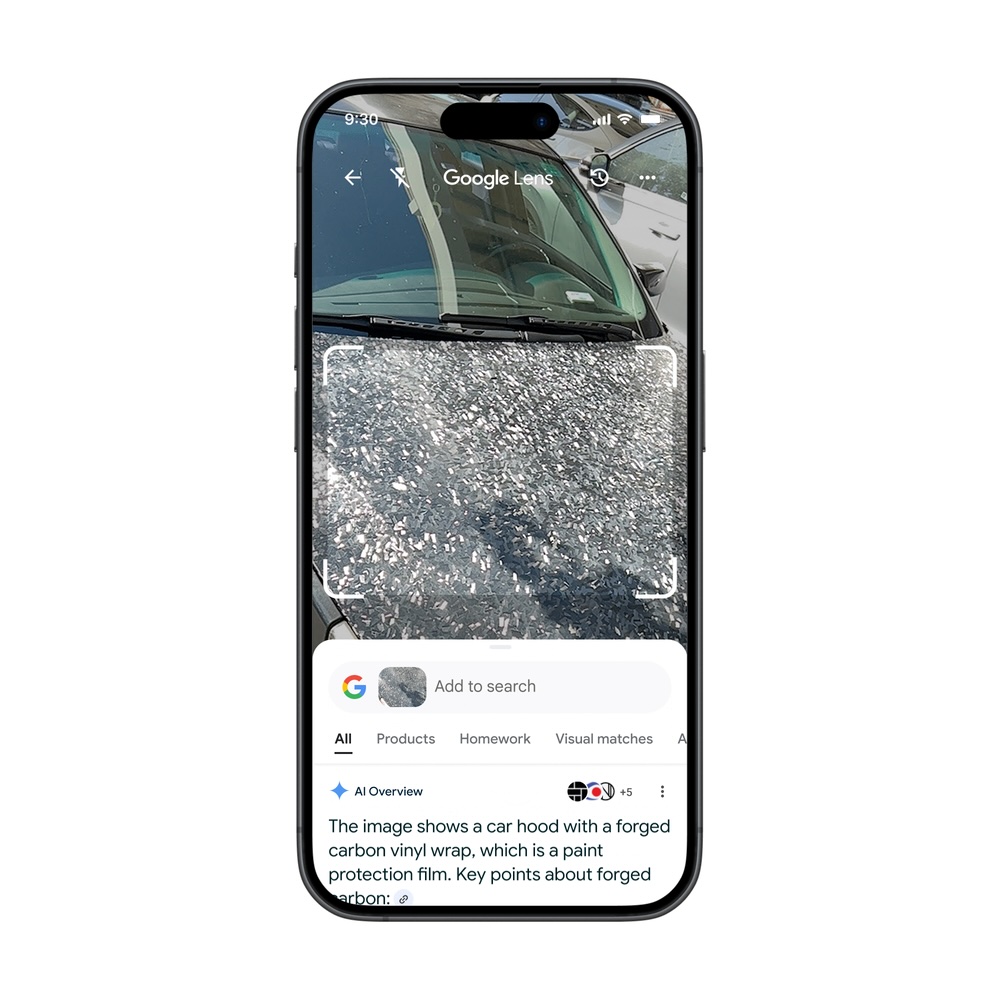
These updates are rolling out this week to both Chrome and the Google app on iOS. The AI Overviews will initially be available for English-language users in countries where the feature is currently supported, starting with the Google app for Android and iOS. Support for Chrome on desktop and mobile devices is expected to follow soon.  

Featured Videos

Xremove ads

With these new features, Google Lens only continues to become an even more indispensable tool for exploring the world around us. Whether you’re looking to learn more about a specific object or simply want to satisfy your curiosity, Lens provides a quick and easy way to access a wealth of information at your fingertips. So, the next time you encounter something that piques your interest, don’t hesitate to give Google Lens a try. You might be surprised at what you discover.

SUBSCRIBE TO UPSTREAM

Get Chrome Unboxed delivered straight to your inbox

Upstream is our flagship, curated newsletter with the top stories, most click-worthy deals, giveaways, and trending articles from Chrome Unboxed sent directly to your inbox a few times a week. Join 31,000+ subscribers.

SUBSCRIBE HERE!

Filed Under: AI, New & Upcoming Features, News Tagged With: videos

About Robby Payne

As the founder of Chrome Unboxed, Robby has been reviewing Chromebooks for over a decade. His passion for ChromeOS and the devices it runs on drives his relentless pursuit to find the best Chromebooks, best services, and best tips for those looking to adopt ChromeOS and those who've already made the switch.

Primary Sidebar

Xremove ads

Deals

The best Chromebook deals today

By Robby Payne
May 5, 2026

Save $40 on the Google Pixel Watch 4 before the Spring Sale ends

By Joseph Humphrey
April 24, 2026

Deal Alert: the excellent Lenovo Chromebook Plus 2-in-1 returns to $429

By Robby Payne
April 20, 2026

Lenovo Legion Tab Gen 3 drops to $399, ahead of the much pricier Gen 5 release

By Joseph Humphrey
April 18, 2026

How to get 50% off YouTube Premium for a full year with Google One

By Robby Payne
April 16, 2026

More Deals

Xremove ads

Reviews

Lenovo Chromebook Plus 2-in-1 Review: pretty great in a vacuum

By Robby Payne
April 23, 2026

Acer Chromebook Plus Spin 514 Review: Kompanio Ultra power in a convertible

By Robby Payne
December 24, 2025

My review after 6 weeks with the Lenovo Chromebook Plus 14 [VIDEO]

By Robby Payne
August 11, 2025

One week with the best small Android tablet you can buy, and I’m sold

By Robby Payne
May 9, 2025

Best Chromebooks of 2024 [VIDEO]

By Robby Payne
November 28, 2024

More Reviews

Xremove ads

Guides

This Chromebook trackpad shortcut is definitely not new, but is blowing my mind

By Robby Payne
March 11, 2024

How to reduce broadcast delay on YouTube TV to stop live spoilers

By Robby Payne
December 8, 2023

Windows PC keyboard and Chromebook

How to use a Windows keyboard with a Chromebook

By Joseph Humphrey
December 8, 2023

How reset and revert your Chromebook to the previous version of Chrome OS

By Robby Payne
November 29, 2023

My Chromebook Plus features disappeared: here’s how I fixed it

By Robby Payne
November 24, 2023

More Guides

TWITTER · FACEBOOK · INSTAGRAM · YOUTUBE · EMAIL · ABOUT

Copyright © 2026 · Chrome Unboxed · Chrome is a registered trademark of Google Inc.
We are participants in various affiliate advertising programs designed to provide a means for us to earn fees by linking to affiliated sites.

PRIVACY POLICY