
Support our independent tech coverage. Chrome Unboxed is written by real people, for real people—not search algorithms. Join Chrome Unboxed Plus for just $2 a month to get an ad-free experience, access to our private Discord, and more. Learn more about membership here.
START FREE TRIAL (MONTHLY)START FREE TRIAL (ANNUAL)
For a long time now, ChromeOS has made turning a standard website into an app relatively straightforward. But the workflow for doing this hasn’t always been the clearest process for end users and has always come with some odd UX decisions over the years.
For instance, prior to this latest update, you’d click install, the browser tab would immediately disappear, and boom – you were suddenly now in a new standalone window. It got the job done, but it lacked the visual polish and user control that helps to make processes like this a bit simpler to understand.
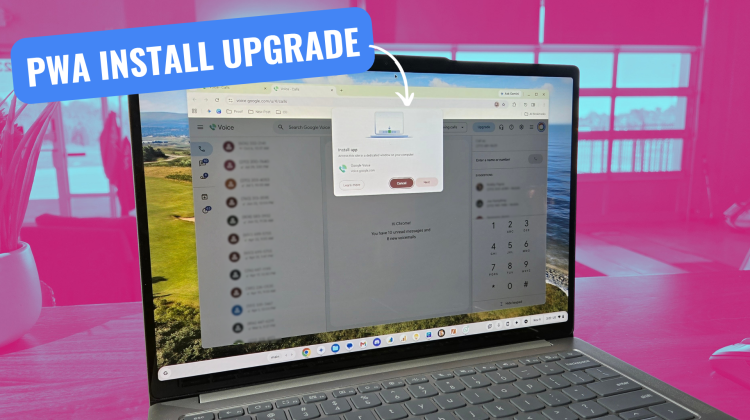
With the latest update rolling out in ChromeOS M156, however, Google is finally giving this entire flow an upgrade that makes the entire process far more clear and satisfying as the user.
An intentional setup that actually shows you what’s happening
The first thing you’ll notice when triggering a web app installation now is a clean, multi-step dialog box that walks you through the setup instead of rushing you through it. Right off the bat, you get an illustrative graphic making it crystal clear that you’re pulling a web experience down into a dedicated application window on your laptop.
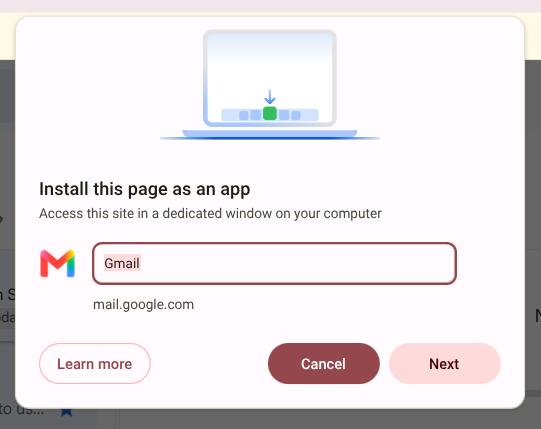
Alongside that visual, Google gives you the option right upfront to rename the application before it lands on your system. It’s a subtle touch, but being able to clean up messy page titles into something concise like “Gmail” or “Slack” without digging into shortcut properties later is a welcome touch.
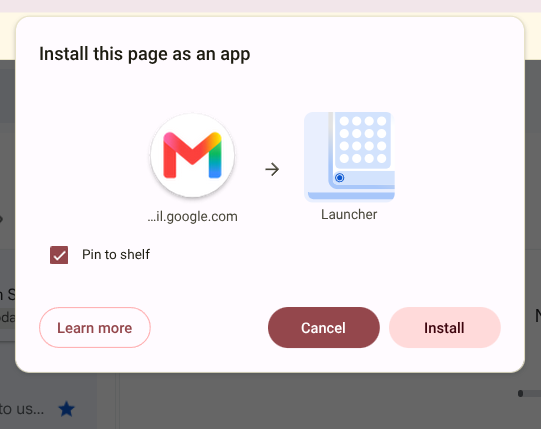
From there, clicking “Next” leads into a secondary prompt that explicitly details where this new app is headed. It features an arrow pointing from the web app icon directly toward an illustrated launcher grid, accompanied by a quick checkbox asking if you want to pin it straight to your shelf. For users who might not fully grasp what a PWA actually does under the hood, this visual feedback does a ton of heavy lifting to explain how the app integrates into their Chromebook.
Goodbye to the jarring window jump
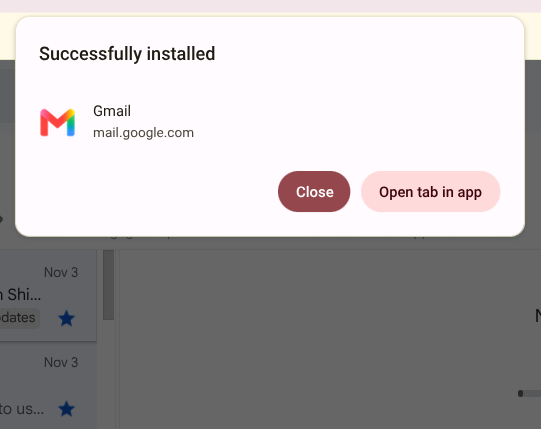
As nice as the new graphics and naming controls are, the best change happens at the very end of the sequence. Instead of instantly taking over your current tab and ripping it off to an independent window, ChromeOS M156 now concludes with a dedicated “Successfully installed” prompt – and from this card, you are presented with two simple choices: Close or Open tab in app.
It’s hard to overstate how much better this feels in daily use. ChromeOS continues to quietly refine these little papercuts across the UI even amidst the launch of Googlebook. While a revamped installation prompt might not grab the headlines like a major AI feature or platform overhaul, these small quality-of-life adjustments go a long way toward making web apps feel truly native on Chromebooks. And I wish it was just as good on Googlebook.
SUBSCRIBE TO UPSTREAM
Get Chrome Unboxed delivered straight to your inbox
Upstream is our flagship, curated newsletter with the top stories, most click-worthy deals, giveaways, and trending articles from Chrome Unboxed sent directly to your inbox a few times a week. Join 31,000+ subscribers.

