
• Skip to main content
  • Skip to primary sidebar
  • Deals
  • Features
  • Guides
  • Chromebooks
  • Videos
  • Podcast
  • More +
    • Reviews
    • Unboxing
    • Upcoming Devices
    • Chromebook Plus
    • Chrome
    • ChromeOS
    • Chrome OS Flex
  • Search
  • Sign Up
  • Log In
Chrome Unboxed – The Latest Chrome OS News

Chrome Unboxed - The Latest Chrome OS News

A Space for All Things Chrome, Google, and More!

  • Deals
  • Features
  • Guides
  • Chromebooks
  • Videos
  • Podcast
  • More +
    • Reviews
    • Unboxing
    • Upcoming Devices
    • Chromebook Plus
    • Chrome
    • ChromeOS
    • Chrome OS Flex
  • Search
  • Sign Up
  • Log In

You’ll soon be able to measure your heart and respiratory rate with your Pixel camera

February 6, 2021 By Johanna Romero View Comments

Heart Rate Monitor

Support our independent tech coverage. Chrome Unboxed is written by real people, for real people—not search algorithms. Join Chrome Unboxed Plus for just $2 a month to get an ad-free experience, access to our private Discord, and more. Learn more about membership here.
START FREE TRIAL (MONTHLY)START FREE TRIAL (ANNUAL)

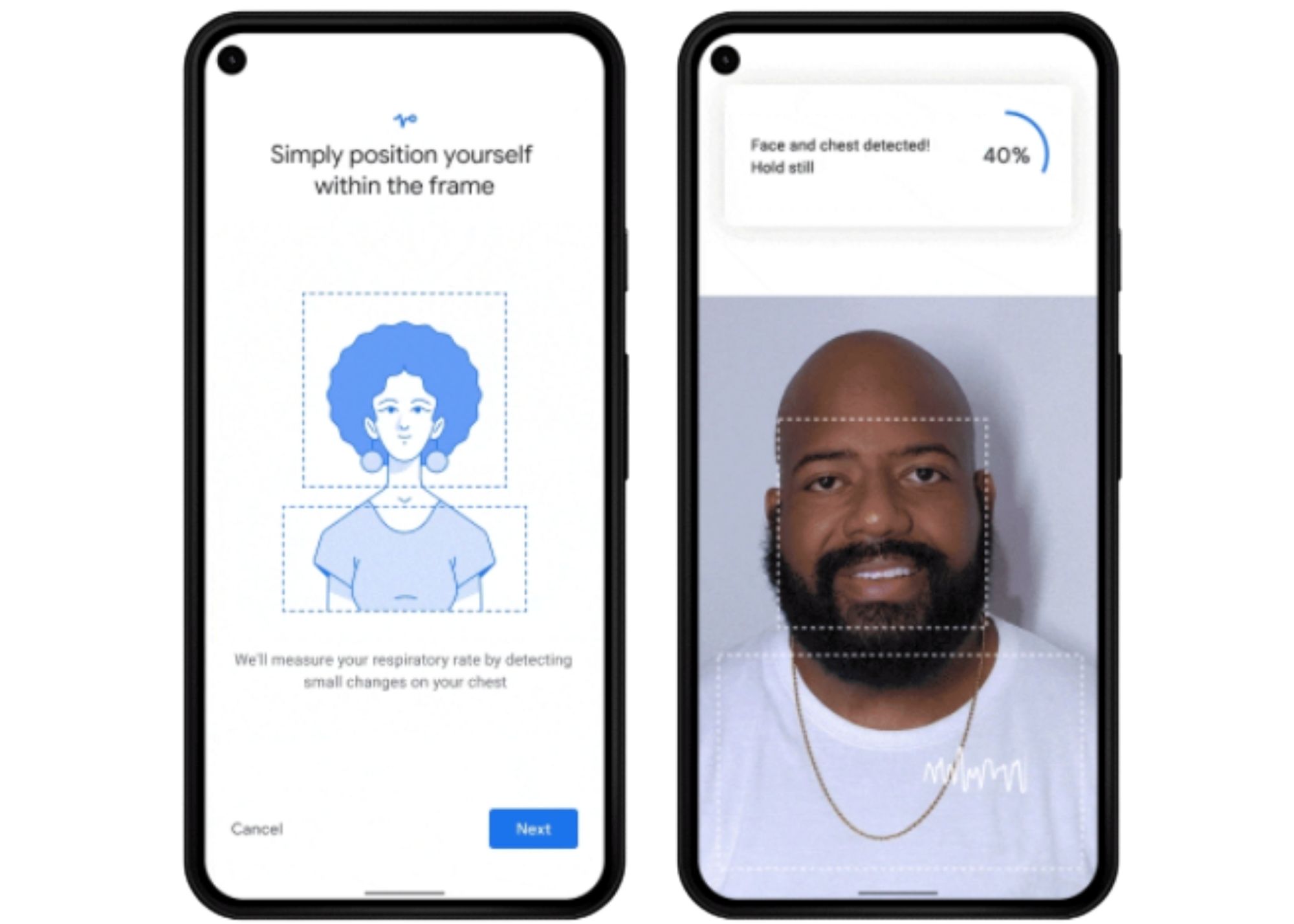
Been shopping around for a new smartwatch that can track your vitals? If you have a Pixel phone, you may not need to look anymore because Google has announced via the The Keyword that you’ll soon be able to check those stats using the camera on your Pixel phone. In fact, this update will be hitting the Google Fit app on Pixels as early as next month with plans to eventually expand to other Android devices. According to Google, the new feature will work as follows:

To measure your respiratory rate, you just need to place your head and upper torso in view of your phone’s front-facing camera and breathe normally. To measure your heart rate, simply place your finger on the rear-facing camera lens
Source: Google

The technology uses your phone’s camera to track tiny physical signals such as chest movements or subtle color changes on your fingertips. Google says their clinical studies included people of different skin tones and ages in order to approximate it as much as possible to a real-world application.

Xremove ads

This isn’t the first time that we’ve seen a smartphone incorporate a heart rate sensor into its camera bump. The Galaxy S8 and Note 8 – both released in 2017 – incorporated an actual biometric sensor next to the back camera module. This feature only tracked your heart rate and didn’t hang around too long with Samsung nixing it in their follow-up S/Note iterations. Other than that, we have only seen this come to phones via a combo of a wearables and an app; definitely not by using the standard phone camera. I just love it when smartphone features are actually helpful in real people’s lives.

It will be interesting to test this feature out once it goes live. Of course, it goes without saying that you should never treat these readings as a substitute for real medical advice nor as a diagnosis. However, they can prove useful to identify patterns that can be seen as red flags and get you to book that Doctor’s appointment sooner rather than later.

Featured Videos

Xremove ads

SUBSCRIBE TO UPSTREAM

Get Chrome Unboxed delivered straight to your inbox

Upstream is our flagship, curated newsletter with the top stories, most click-worthy deals, giveaways, and trending articles from Chrome Unboxed sent directly to your inbox a few times a week. Join 31,000+ subscribers.

SUBSCRIBE HERE!

Filed Under: Android, New & Upcoming Features

Primary Sidebar

Xremove ads

Deals

The best Chromebook deals today

By Robby Payne
March 30, 2026

The Acer Chromebook Plus Spin 714 hits a new all-time low at $270 off

By Robby Payne
March 25, 2026

You can score $40 off Google’s battery-powered Nest Doorbell right now

By Joseph Humphrey
March 20, 2026

The touchscreen Lenovo Chromebook Slim 3 is a steal at under $200

By Robby Payne
March 16, 2026

Google TV Streamer and Remote held in front of a wall-mounted TV

The premium Google TV Streamer 4K is back down to $80

By Joseph Humphrey
March 16, 2026

More Deals

Xremove ads

Reviews

Acer Chromebook Plus Spin 514 Review: Kompanio Ultra power in a convertible

By Robby Payne
December 24, 2025

My review after 6 weeks with the Lenovo Chromebook Plus 14 [VIDEO]

By Robby Payne
August 11, 2025

One week with the best small Android tablet you can buy, and I’m sold

By Robby Payne
May 9, 2025

Best Chromebooks of 2024 [VIDEO]

By Robby Payne
November 28, 2024

Samsung Galaxy Chromebook Plus Review: Samsung is back! [VIDEO]

By Robby Payne
October 28, 2024

More Reviews

Xremove ads

Guides

This Chromebook trackpad shortcut is definitely not new, but is blowing my mind

By Robby Payne
March 11, 2024

How to reduce broadcast delay on YouTube TV to stop live spoilers

By Robby Payne
December 8, 2023

Windows PC keyboard and Chromebook

How to use a Windows keyboard with a Chromebook

By Joseph Humphrey
December 8, 2023

How reset and revert your Chromebook to the previous version of Chrome OS

By Robby Payne
November 29, 2023

My Chromebook Plus features disappeared: here’s how I fixed it

By Robby Payne
November 24, 2023

More Guides

TWITTER · FACEBOOK · INSTAGRAM · YOUTUBE · EMAIL · ABOUT

Copyright © 2026 · Chrome Unboxed · Chrome is a registered trademark of Google Inc.
We are participants in various affiliate advertising programs designed to provide a means for us to earn fees by linking to affiliated sites.

PRIVACY POLICY