


Support our independent tech coverage. Chrome Unboxed is written by real people, for real people—not search algorithms. Join Chrome Unboxed Plus for just $2 a month to get an ad-free experience, access to our private Discord, and more. Learn more about membership here.
START FREE TRIAL (MONTHLY)START FREE TRIAL (ANNUAL)
It’s no secret that many fans of Google’s own in-house Chromebooks want a return to Chrome OS hardware from the maker of the OS. Though not always massive consumer hits, the Google-made Chromebooks over the years have held up well as reference devices that others tried to aim for. From the early days of the Chromebook Pixel (2013 and 2015) to the Pixelbook, Pixel Slate and Pixelbook Go, Google’s own Chromebooks have always had that extra little something that made them stand out. With solid build quality, small unique features, and attention to detail, these Chromebooks have always held a special place with all of us who are fans of Chrome OS.
Our last Google-y Chromebook came in the form of the Pixelbook Go and we still reference that device and it’s nearly 3-year-old processor on a very regular basis. Though not the most powerful Chromebook around the office, there’s something inherently special about that Chromebook that comes from Google’s in-house design and attention to the finer details of building a laptop. Since it’s release in the fall of 2019, it’s been pretty quiet on the Google-made Chromebook front and we’ve only had small hopes of another Pixelbook-type device in the works. ‘Halvor’ and its Assistant Key on the keyboard is about all we’ve had to go on thus far, but that Chromebook has seriously slowed in development and we don’t really know what’s going on with that baseboard currently.
Enter the Google Lightbar
A bit of history might be necessary before we proceed. Google’s signature lightbar started on the original Chromebook Pixel, was carried over to the 2015 version of that Chromebook, was built into the Pixel C Android tablet, and is most currently being used as a Google Assistant animation on most Android phones at the bottom of your display when you call up the Assistant.. It is also the highlight of the limited-edition Chromebook sleeves we are in the process of giving away this month to celebrate Chrome OS’ 10th birthday and part of our own logo in a bit of a varied interpretation. Simply put, the lightbar is Google through-and-through, so it’s inclusion on a device signals Google’s heavy hardware involvement.

There is one technically non-Google piece of hardware that had the lightbar up top, but it exists as a bit of an anomaly. The HP Chromebook 11 from 2013 was clearly a Google-inspired piece of hardware. There was even a swanky little launch event for the device that no other Chromebook had back then. From the curved lines to the specialty box to the colors, this device nearly felt like a smaller, cheaper Chromebook Pixel at the time. It had a killer keyboard, speakers that came up through the keys (just like the Pixel) and the signature lightbar up top. There was no question that the HP Chromebook 11 was created in a very, very close partnership with Google. I mean, look at it!
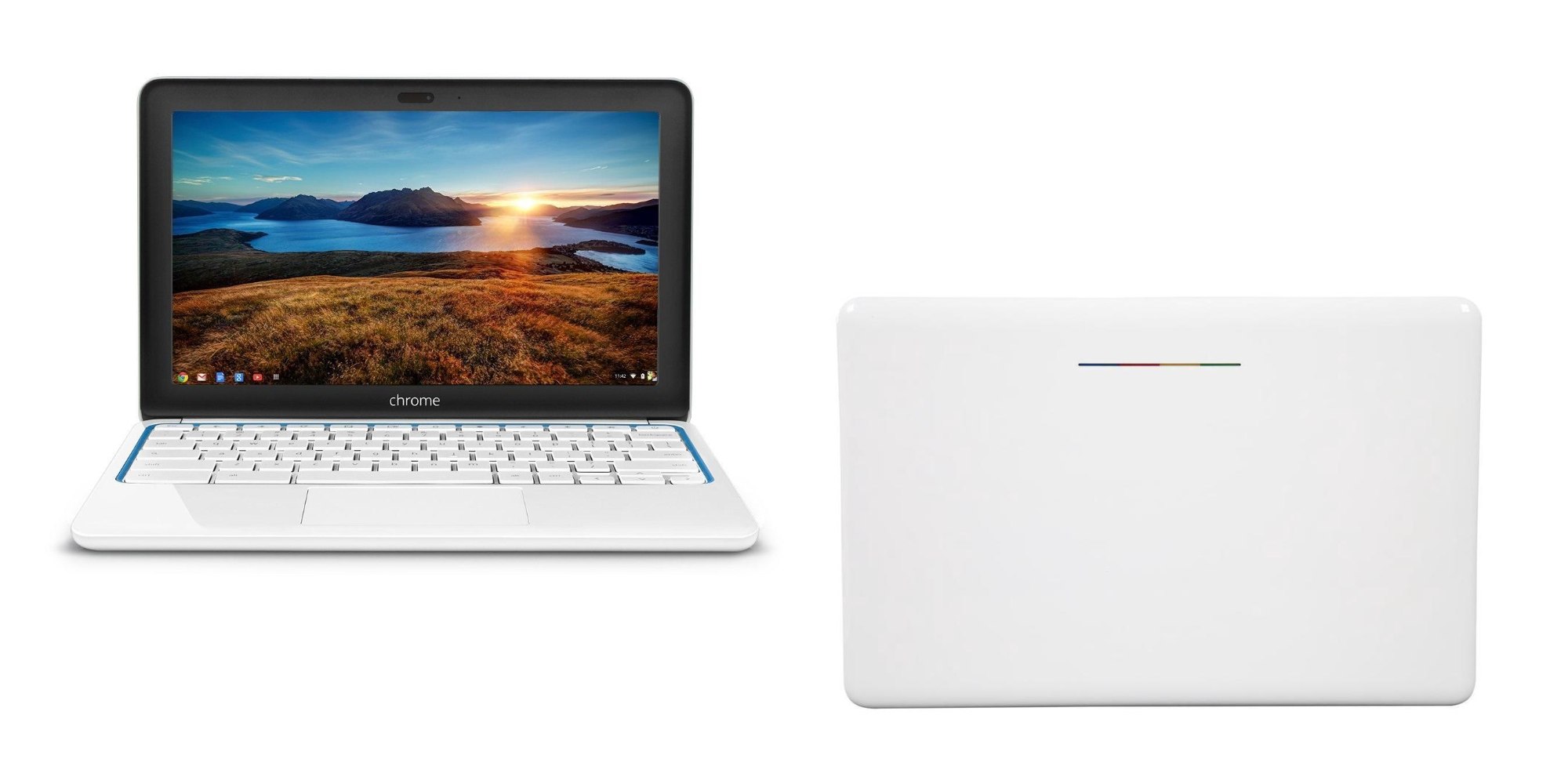
Apart from this device – which, again is clearly Google inspired/designed – no Chromebook or tablet has been adorned with the lightbar if it wasn’t something directly from Google. Just like the Assistant key has become, the lightbar is a pretty clear indicator that Google is heavily involved in a piece of Chrome OS hardware. And it just so happens that we have a Chromebook in development that looks to be getting the official Google lightbar treatment.
‘Lindar’ is the next Google-y Chromebook
First up, I don’t want to imply that ‘Lindar’ will be a Pixel or Pixelbook. I don’t know for sure, obviously, but we’ve found some pretty clear evidence that Lenovo is involved, here. Let’s start with the lightbar, though. There are very few references of it in the Chromium repositories, and those references to ‘lightbar’ only appear on the devices I listed above. This isn’t a feature that is thrown around lightly for Chromebooks, so clearly there’s something a bit special about ‘Lindar’.
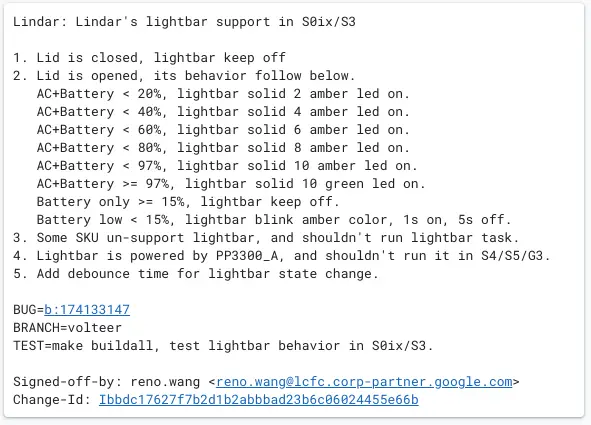
First, we have this general lightbar commit that is adding a feature you’ll remember from the 2015 Chromebook Pixel. That device had a handy way of checking the battery even when the lid was shut, and it was done by a small tap or knock on the top. This would alert the lightbar to give off the amber/gold color and fill the bar according to the charge on the battery. As you can see in the commit, this is exactly what is being added for ‘Lindar’.
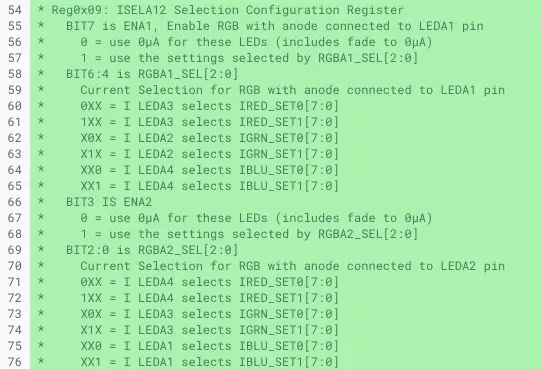
Digging a tad deeper into the files in this change, the ktd20xx.h file has a few references to not only the amber color mentioned above, but to the red, blue and green colors needed to create the rest of the lightbar look on the Chromebook lid. There’s no questioning that ‘Lindar’ will have the full-blown lightbar just like the original Chromebook Pixel and 2015 version, but it is a bit more interesting to wonder exactly how this thing will actually come to market. The only thing for sure at this point is ‘Lindar’ being based on the ‘Volteer’ baseboard, meaning it will come with the latest Intel Tiger Lake chips inside.
Lenovo is clearly involved
All over the commits for ‘Lindar’ (including the one we’ve referenced), there are emails that end in @lcfc.corp-partner.google.com. The corp-partner.google.com part of the email is not new and very expected. With companies like Huaqin, Compal or Quanta making all sorts of Chromebooks for all sorts of companies, emails like this one are not unique at all. What is unique, however, is the ‘lcfc’ part. LCFC Electronics is one of Lenovo’s top suppliers and Lenovo is clearly heavily invested in the company with LCFC being their ‘largest computer research and manufacturing base globally.’ There’s no doubt that LCFC is making ‘Lindar’ at this point, and at this point, I can’t find any evidence suggesting LCFC makes anything other than Lenovo products.
So, with this in mind, I believe ‘Lindar’ will be made by Lenovo, but marketed possibly as a Google device. It is unclear if it will go the route of a more substantial partnership between Lenovo and Google (like the HP 11 was) or if ‘Lindar’ will simply be another Google Chromebook with Lenovo only providing the physical build. With Google’s relative silence in the Chromebook manufacturing realm, I wouldn’t be surprised to start seeing this sort of activity more often. It would allow Google to shape a particular device and control the branding a bit while still working with a hardware partner like Lenovo. The HP 11 was actually pretty great (aside from a terrible processor) and maybe Google working with OEMs will become a more normalized thing moving forward.
Right now it’s simply hard to get a grip on and tough to say how it will shake out. Regardless, it is quite clear that Google is making moves in the Chromebook hardware space again and that alone is reason for excitement. As I said before, there’s just something a bit special about Google’s in-house hardware designs, and I absolutely cannot wait to see what ‘Lindar’ turns out to be. As always, we’ll keep digging and as we learn more, you’ll be the first to know!
SUBSCRIBE TO UPSTREAM
Get Chrome Unboxed delivered straight to your inbox
Upstream is our flagship, curated newsletter with the top stories, most click-worthy deals, giveaways, and trending articles from Chrome Unboxed sent directly to your inbox a few times a week. Join 31,000+ subscribers.

