


Support our independent tech coverage. Chrome Unboxed is written by real people, for real people—not search algorithms. Join Chrome Unboxed Plus for just $2 a month to get an ad-free experience, access to our private Discord, and more. Learn more about membership here.
START FREE TRIAL (MONTHLY)START FREE TRIAL (ANNUAL)
The internet collectively mourned the death of Google Reader back in 2013, and ever since then, we have been trying to come up with ways to bring some form of it back into our lives via Twitter feeds, Reddit, or using other RSS readers. However, it’s looking like 9 years later Google is experimenting with a very similar feature right within Chrome.
Back in February of last year, Chrome Story spotted a way to follow websites and topics using Google Chrome on Android. It simply required you to navigate to the site, tap the 3-dot menu on the top right, scroll down to the bottom, and tap on “Follow”. Once a website was added to your list of followed sites, you were then able to view it on the Chrome for Android New Tab page right beside the “Discover” section as seen below. This “Following” feed doesn’t exactly replace Google Reader as it missing features such as the ability to mark articles as read, but it is a step in the right direction.
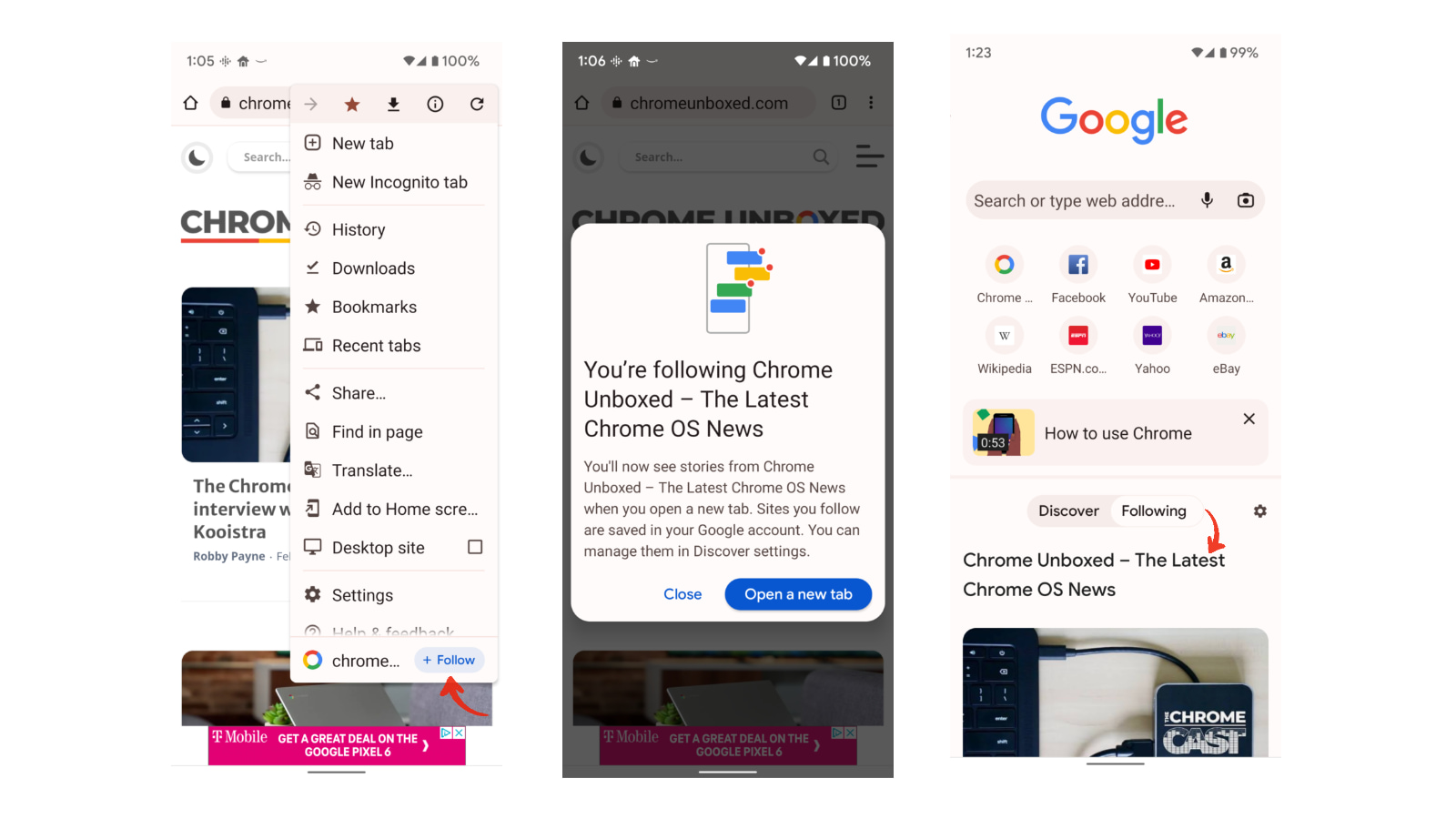
Since then, this experiment was announced by Google in the Chromium Blog as “an experiment in helping users and web publishers create deeper connections on Chrome”. However, to make matters more interesting, it was recently discovered that this feature will be spreading to the desktop version of Chrome as well, allowing those of us that use Chrome OS to fully take advantage of it. The discovery was made due to a new patch in Chromium Gerrit that reads:
Add menu item to follow a site for desktop feed
Also move some files out of android directory so that they can be used for desktop version.
This finding was posted by user Leopeva64 on Reddit, who adds that according to the code changes for the desktop version of Chrome, the “Follow site” option will be located in the tab’s context menu.

It is unclear at this time when this feature will be making its way to the desktop version of Chrome, but we will be keeping an eye on it and let you know when this becomes available. For now, you should be able to get a sneak peek of it using Chrome on your Android device.
SUBSCRIBE TO UPSTREAM
Get Chrome Unboxed delivered straight to your inbox
Upstream is our flagship, curated newsletter with the top stories, most click-worthy deals, giveaways, and trending articles from Chrome Unboxed sent directly to your inbox a few times a week. Join 31,000+ subscribers.
