


Support our independent tech coverage. Chrome Unboxed is written by real people, for real people—not search algorithms. Join Chrome Unboxed Plus for just $2 a month to get an ad-free experience, access to our private Discord, and more. Learn more about membership here.
START FREE TRIAL (MONTHLY)START FREE TRIAL (ANNUAL)
It’s happened to the best of us. You are in the middle of presenting a deck to your team when suddenly, a chat message pops up, interrupting your flow and possibly revealing info you did not want to be displayed to all. Fortunately, there is a way to set up “Do Not Disturb” in Google Chat so you can mute those unwanted notifications.
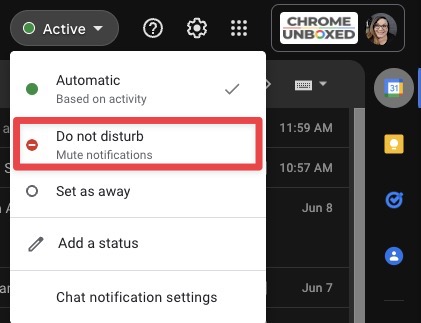
To temporarily mute chat notifications on all your devices, open Google Chat or Gmail on your desktop browser. Note: You can also do this from the Google Chat application on Android and iOS. On the top right, click the down arrow next to your status indicator and choose “Do not disturb” from the dropdown.
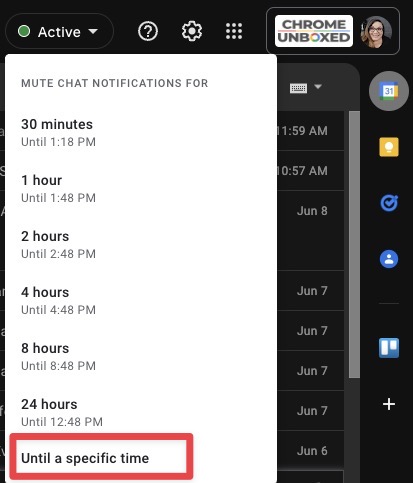
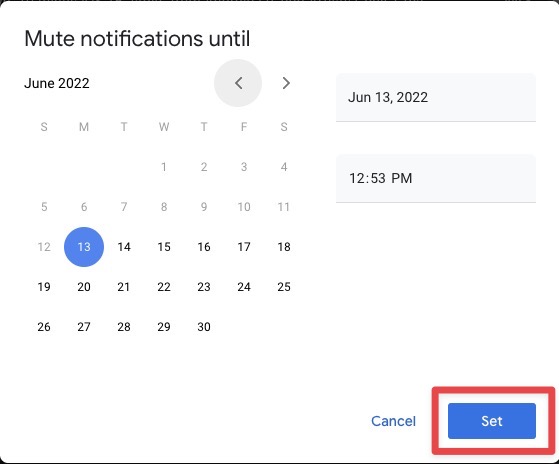
Once you have made your selection, you will be asked how long you want to mute your chat notifications, and you are given some preset options such as 30 minutes, one hour, etc. If you want to specify a certain amount of time you prefer to be undisturbed, select “Until a specific time.” Next, you will see a popup with a calendar where you can select the date and time you would like your notifications to resume.
I just want the steps!
- Open Google Chat or Gmail
- On the top right, click the down arrow next to your status indicator.
- Choose “Do not disturb” from the dropdown.
- Choose from a preset amount of time or select “Until a specific time” then select the exact time/day you want notifications to resume.
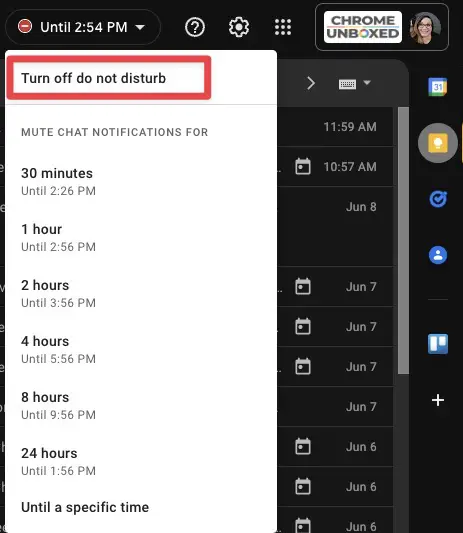
Once the selected time has elapsed, your chat status will return to “Automatic,” which is based on your activity. If you want to turn “Do Not Disturb” off before the selected time, follow the same steps above, then select “Turn off do not disturb” when asked how long you want to mute notifications.
SUBSCRIBE TO UPSTREAM
Get Chrome Unboxed delivered straight to your inbox
Upstream is our flagship, curated newsletter with the top stories, most click-worthy deals, giveaways, and trending articles from Chrome Unboxed sent directly to your inbox a few times a week. Join 31,000+ subscribers.
