


Support our independent tech coverage. Chrome Unboxed is written by real people, for real people—not search algorithms. Join Chrome Unboxed Plus for just $2 a month to get an ad-free experience, access to our private Discord, and more. Learn more about membership here.
START FREE TRIAL (MONTHLY)START FREE TRIAL (ANNUAL)
We’re still a day out from the “official” launch of ChromeOS 100 but it appears that Google couldn’t wait any longer to share the news. For an operating system with humble and highly-criticized beginnings, ChromeOS has grown light-years beyond the “browser-in-a-box” that made its debut all the way back in 2009. While version 100 does bring with it some useful updates, Google has taken some time to look back at how ChromeOS has evolved over the past few years with some key highlights from the ecosystem.
Before we take that walk down memory lane, let’s take a look at what’s coming with ChromeOS 100. There are not a ton of new features to look for but the updates here are useful and only help to solidify ChromeOS as a well-rounded platform that’s a great option for a wide variety of users. Here’s a look at what’s new.
Launcher overhaul
We’ve been talking about this one for months and Google has finally delivered the goods. The ChromeOS launcher is finally returning to the left side of the screen and getting some much-needed enhancements. Now, when you press the “Everything” key, the launcher will pop up on the left side of your screen as not to cannibalize your screen real estate.
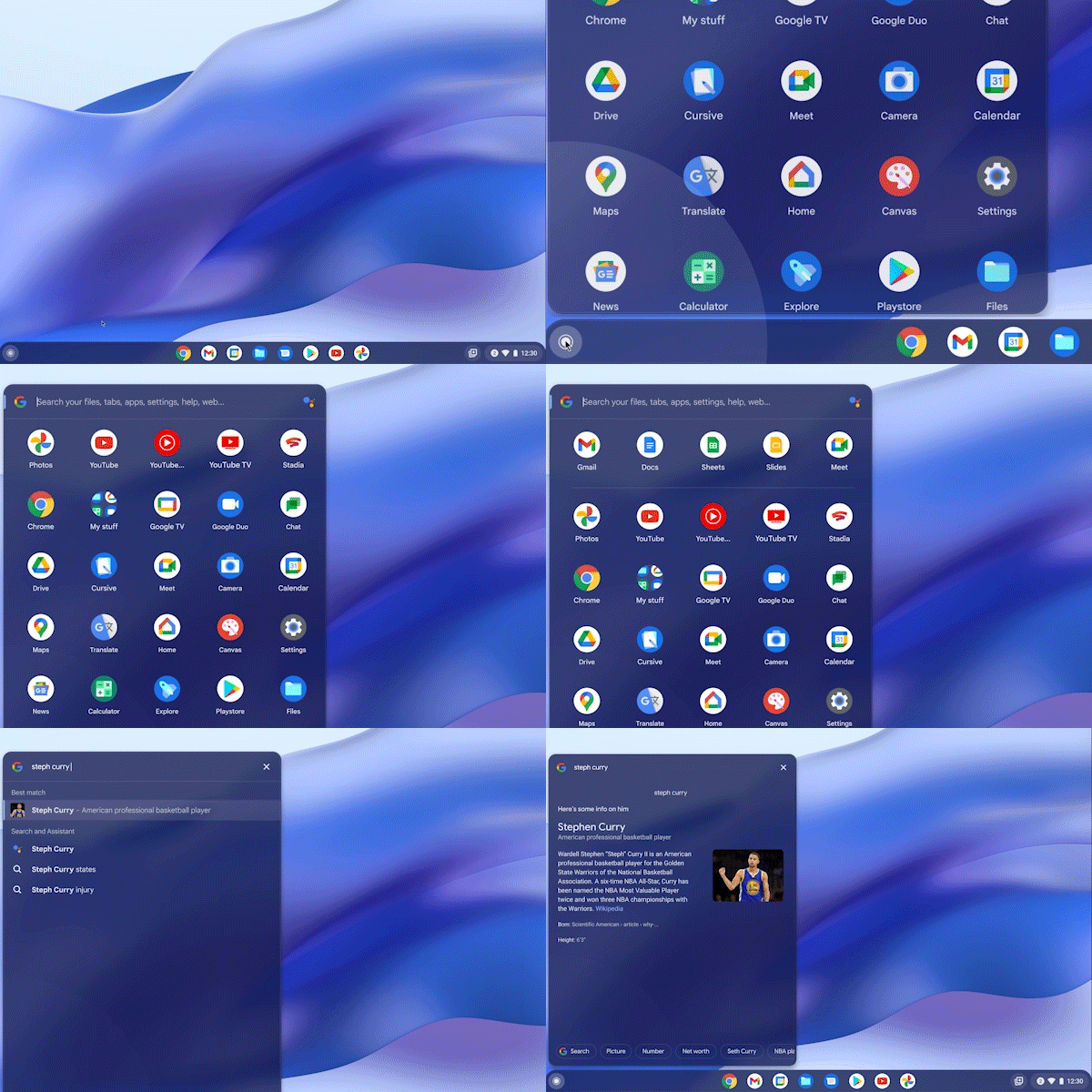
In addition to the new look, the launcher has learned some new tricks to make it way more useful than ever before. First and foremost, you will finally have the ability to sort your apps in the launcher. This update will give you the option to sort by name or app color as well as organize apps manually. The search bar is getting a power-up as well. Instead of truncated search results, the launcher’s search bar will now present more detailed preview information when searching weather, news, or other useful information. This lets you see your results without the need to leave the launcher at all. It will even show you results from open Chrome tabs to make it easier to find that one particular page you’ve buried amongst the hoard.
Dictation Editing
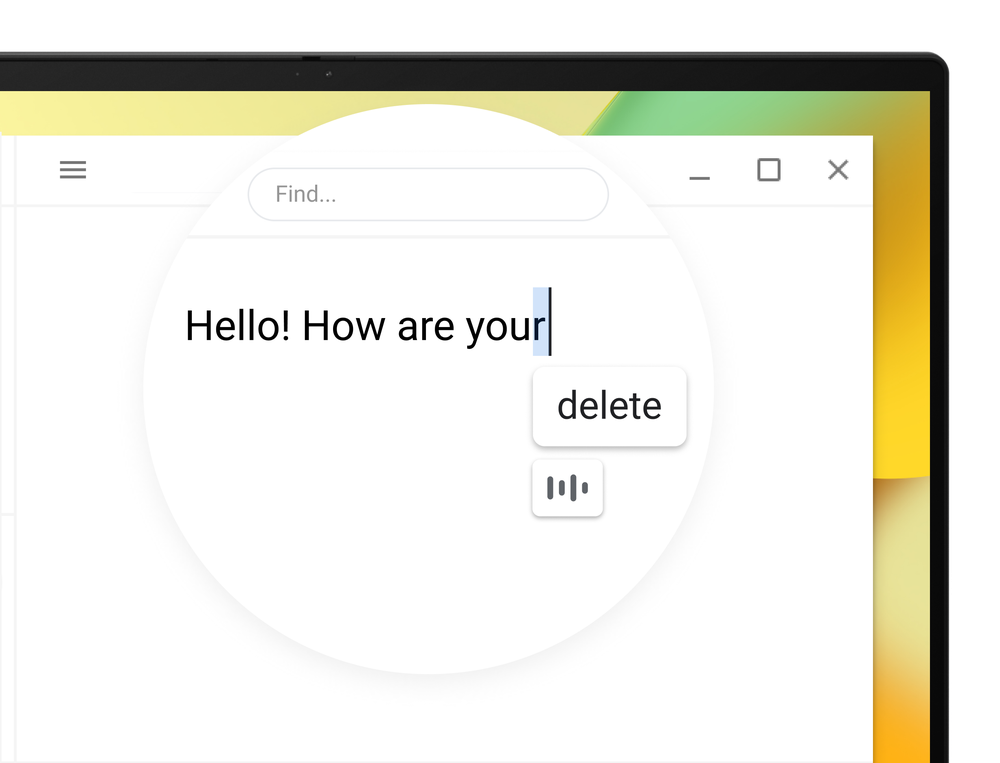
The dictation feature on ChromeOS is a powerful way to boost your productivity by giving you the ability to convert your text to speech in any field where you may normally type. With ChromeOS 100, users will now have the ability to edit their dictation hands-free. You can say “delete” to remove the last character or “move to the next character” to advance your cursor. Saying “help” while dictating will open the corresponding help menu for a full list of commands
Gif Creation
As discovered last year, the ChromeOS camera app will now allow you to take short, five-second videos to create a gif. The video is automatically converted to a Gif file and you can share it directly from the app to your email, Share Sheet, and even using Nearby Share.
School accounts on Family Link
This feature was actually announced back in December of 2020. That said, Google has added some much-needed supervision tools to Family Link that allows parents to manage YouTube usage via the app while a student is signed into a Google for Education account. Students can also access YouTube videos for school even when offline thanks to a new version of the YouTube app designed specifically for ChromeOS
Admin Device Insights
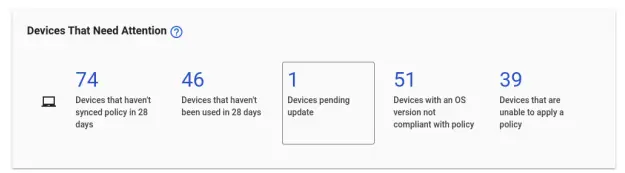
On the admin side of things, Google is rolling out a new report that gives IT administrators an at-a-glance view of enrolled devices that need attention. Additionally, the new Chrome Telemetry API allows admins to view more detailed device information as well as create personalized reports for said devices.
Developer Highlight
That wraps up what you can expect to see as ChromeOS 100 begins rolling out to users. With this landmark release, Google wants to spotlight the developer tools available for ChromeOS. This includes advances made not only for but on the ChromeOS platform over the past few years. Much of that work began in 2020 with the rollout of the ChromeOS.dev website where developers can find tools for creating apps for larger displays, gain insight on best practices, and even find sample code to help accelerate the development process.
ChromeOS.dev now has a new look and will be home to even more content for developers. This will include dedicated resources for Education-specific app developers and those building apps for the Enterprise sector. In typical Google fashion, there’s even an Easter Egg somewhere on the site to be found as you explore the new content. Check out the revamped site here.
Continuing the ChromeOS highlights, Google points out that Android app usage on Chromebooks has increased by 50%.
Android apps have quickly evolved beyond mobile — more and more people are using them on larger screens. On Chromebooks alone, the number of Android app users increased 50% year over year in 2021.
Google Internal Data, 2020-2021.
New Android Container
It’s been a long road for Android applications on ChromeOS but the experience is finally coming into its own. This experience should be bolstered as more devices make the transition from the dated ARC framework to the long-awaited ARCVM that will begin rolling out more widely with ChromeOS 100.
The latest version of ARC, ARCVM, launched in 2021 with Android 11 and is currently rolling out to devices. As you may guess from the name, it uses virtual machines (VM) to enhance the isolation of the Android environment in order to improve security and maintainability.
ChromeOS.dev Blog
The new virtual machine version of ARC will allow developers to increase security with a fully sandboxed environment while keeping things fast with updates that can be launched independently of ChromeOS updates. To learn more about ARCVM and what it means for ChromeOS, check out the blog post from ChromeOS.dev.
PWAs
Google has been hot and heavy on Progressive Web Apps and ChromeOS.dev is making it even easier for developers to take their web-based software and package it for the Google Play Store. This blurs the lines between PWAs and traditional Android apps by allowing the Progressive Web Apps to be discovered and delivered exactly the same way you would any other app from the Play Store.
In today’s ChromeOS.dev news, you can find case studies from the popular platforms Codecademy and Quicken’s Simplifi on how the developers were able to increase monetization and user engagement through newly-designed Progressive Web Apps. You’ll also hear about the evolution of Google’s in-house PWA Cursive. Below, you can see other popular applications that are leveraging the powerful PWA web technology.

Linux and Gaming on ChromeOS
Just in case you missed it, Google wanted to take a moment to point out the fact that Chromebooks have rapidly become a place for developers and gamers alike. With the Linux tools on compatible Chromebooks, developers can run Android Studio as well as many other code editors to compile and test their products. Web apps and Android apks can then be tested right there on the same machine. Thanks to Linux and Android, web apps can be tested in a wide variety of browsers, mobile and desktop alike.
Gaming, if you hadn’t heard, has taken a huge leap forward as well for Chromebooks. Not only can you play your favorite mobile games via the Play Store, streaming services like Stadia, GeForce Now and Luna give users access to thousands of AAA game titles. Google has taken things a step further with the recent announcement of Steam Alpha for ChromeOS. This collaboration with Valve will bring tens of thousands of PC games directly to ChromeOS via a customized container designed specifically for Steam. It’s still in the early stages but things are looking really good at this point and this could make ChromeOS the most widely-available gaming platform on the market.
That’s about it for ChromeOS 100. I’m sure that there will be some more hidden features to unearth and we’ll gather those up for a later post. For now, we’re excited to celebrate this monumental release with Google and look forward to what the next one hundred iterations of our favorite OS will bring. Hope you join us for the ride. You can read the full announcement on The Keyword here and stay tuned for an exclusive interview in which we sit down with Google’s Senior Director of Software Development Alexander Kuscher. It’s always a pleasure chatting with Alex and he’s just as excited about the future of ChromeOS as we are.
SUBSCRIBE TO UPSTREAM
Get Chrome Unboxed delivered straight to your inbox
Upstream is our flagship, curated newsletter with the top stories, most click-worthy deals, giveaways, and trending articles from Chrome Unboxed sent directly to your inbox a few times a week. Join 31,000+ subscribers.

