

Support our independent tech coverage. Chrome Unboxed is written by real people, for real people—not search algorithms. Join Chrome Unboxed Plus for just $2 a month to get an ad-free experience, access to our private Discord, and more. Learn more about membership here.
START FREE TRIAL (MONTHLY)START FREE TRIAL (ANNUAL)
Last month, a test rollout was discovered that prompted users to pause their Gmail mobile notifications in favor of Gmail notifications on the full browser. The feature simply paused notifications on your phone when it detected that you were using the desktop version of Gmail. At the time, we didn’t know how wide the rollout was or whether it would continue along as it seemed it was only available to a small subset of users.
It seems that a decision has been made to continue rolling this out more widely. According to Android Police, reports of more users getting the notification (shown below) to enable this feature have increased. I was even one of the lucky ones who recently got the notification when logging in to my Workspace Gmail, though I haven’t seen it yet on my personal account.
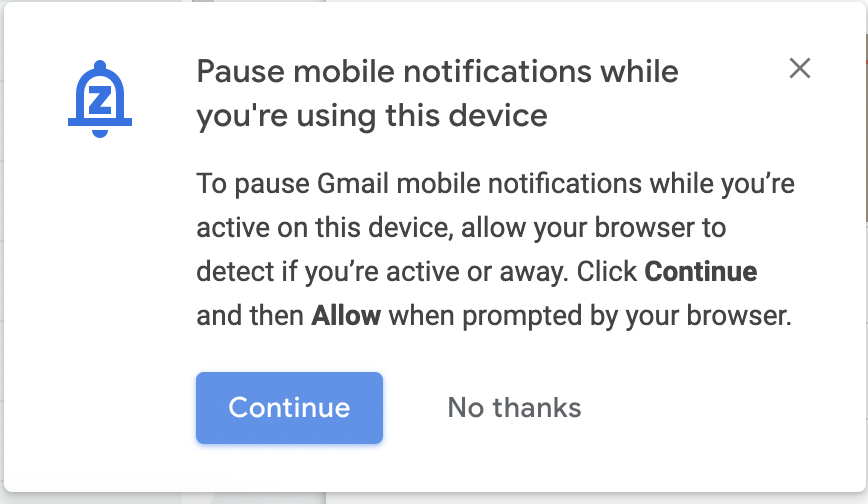
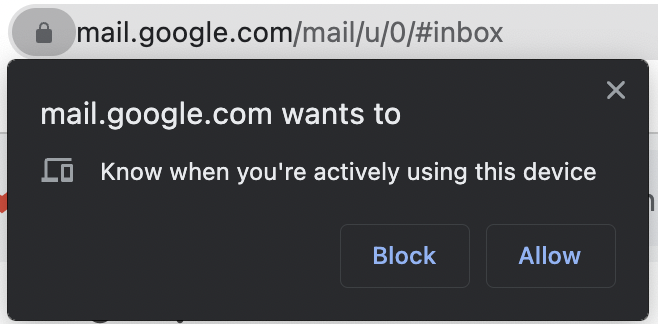
Just as when the feature first appeared last month, clicking on “Continue” on this notification will invoke a Chrome permissions prompt asking to grant mail.google.com access to know when you’re actively using the device. It also remains the case that there doesn’t seem to be any user controls inside of Gmail to manually turn this feature on or off. However, if you turn it on via this prompt, but then want to get rid of it, you can always remove the permissions by going to Settings > Security and Privacy > Site Settings > Additional Permissions.
I do hope this continues to roll out to all Gmail accounts and that more refined user controls are added in the future. I like the idea of having a way to avoid notification overload as I usually have both my laptop and my mobile device next to each other, thus getting my notifications from both devices simultaneously, which can get annoying when you are trying to focus. We’ll continue to monitor this as the rollout continues and hits more Google accounts.
SUBSCRIBE TO UPSTREAM
Get Chrome Unboxed delivered straight to your inbox
Upstream is our flagship, curated newsletter with the top stories, most click-worthy deals, giveaways, and trending articles from Chrome Unboxed sent directly to your inbox a few times a week. Join 31,000+ subscribers.
