

• Skip to main content
  • Skip to primary sidebar
  • Deals
  • Features
  • Guides
  • Chromebooks
  • Videos
  • Podcast
  • More +
    • Reviews
    • Unboxing
    • Upcoming Devices
    • Chromebook Plus
    • Chrome
    • ChromeOS
    • Chrome OS Flex
  • Search
  • Sign Up
  • Log In
Chrome Unboxed – The Latest Chrome OS News

Chrome Unboxed - The Latest Chrome OS News

A Space for All Things Chrome, Google, and More!

  • Deals
  • Features
  • Guides
  • Chromebooks
  • Videos
  • Podcast
  • More +
    • Reviews
    • Unboxing
    • Upcoming Devices
    • Chromebook Plus
    • Chrome
    • ChromeOS
    • Chrome OS Flex
  • Search
  • Sign Up
  • Log In

Gmail expands mobile notifications pause to favor desktop ones

March 28, 2022 By Johanna Romero View Comments

Support our independent tech coverage. Chrome Unboxed is written by real people, for real people—not search algorithms. Join Chrome Unboxed Plus for just $2 a month to get an ad-free experience, access to our private Discord, and more. Learn more about membership here.
START FREE TRIAL (MONTHLY)START FREE TRIAL (ANNUAL)

Last month, a test rollout was discovered that prompted users to pause their Gmail mobile notifications in favor of Gmail notifications on the full browser. The feature simply paused notifications on your phone when it detected that you were using the desktop version of Gmail. At the time, we didn’t know how wide the rollout was or whether it would continue along as it seemed it was only available to a small subset of users.

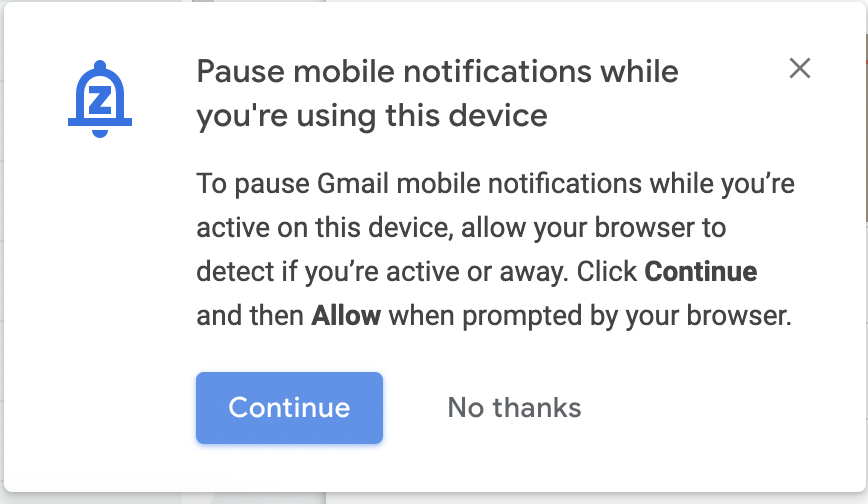
It seems that a decision has been made to continue rolling this out more widely. According to Android Police, reports of more users getting the notification (shown below) to enable this feature have increased. I was even one of the lucky ones who recently got the notification when logging in to my Workspace Gmail, though I haven’t seen it yet on my personal account.
Xremove ads
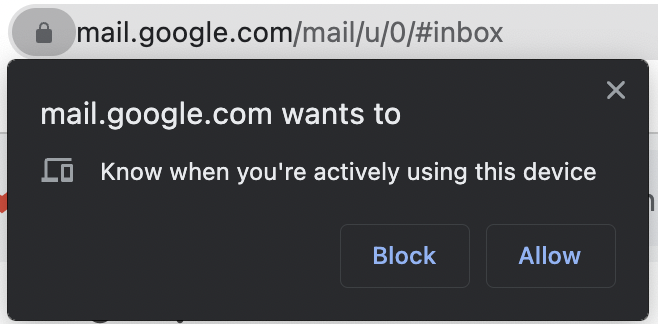
Notification in Gmail to pause mobile notifications and prompt to allow presence sharing

Just as when the feature first appeared last month, clicking on “Continue” on this notification will invoke a Chrome permissions prompt asking to grant mail.google.com access to know when you’re actively using the device. It also remains the case that there doesn’t seem to be any user controls inside of Gmail to manually turn this feature on or off. However, if you turn it on via this prompt, but then want to get rid of it, you can always remove the permissions by going to Settings > Security and Privacy > Site Settings > Additional Permissions.

I do hope this continues to roll out to all Gmail accounts and that more refined user controls are added in the future. I like the idea of having a way to avoid notification overload as I usually have both my laptop and my mobile device next to each other, thus getting my notifications from both devices simultaneously, which can get annoying when you are trying to focus. We’ll continue to monitor this as the rollout continues and hits more Google accounts.

Featured Videos

Xremove ads

SUBSCRIBE TO UPSTREAM

Get Chrome Unboxed delivered straight to your inbox

Upstream is our flagship, curated newsletter with the top stories, most click-worthy deals, giveaways, and trending articles from Chrome Unboxed sent directly to your inbox a few times a week. Join 31,000+ subscribers.

SUBSCRIBE HERE!

Filed Under: Android, Apps, Chrome, New & Upcoming Features Tagged With: desktop notifications, gmail, mobile notifications, new features

Primary Sidebar

Googlebook

Controversial Adobe clones prove desktop Googlebook apps are closer than I thought

By Robby Payne
October 19, 2026

Googlebooks are incredible phone companions, but they left too much of ChromeOS behind

By Robby Payne
October 19, 2026

If your Googlebook ‘Better Together’ features stopped working, you need to check this

By Robby Payne
October 16, 2026

One of the best Pixel-exclusive apps is quietly available on your new Googlebook

By Robby Payne
October 16, 2026

One of the biggest missing features in Googlebook’s Chrome browser is getting fixed

By Robby Payne
October 15, 2026

More Googlebook

Xremove ads

Deals

My favorite convertible Chromebook is $150 off right now and primed for Googlebook OS

By Robby Payne
September 29, 2026

Google Pixel Buds 2a in Hazel bundled with a new Googlebook laptop at Best Buy

Score a free $129 pair of Pixel Buds 2a with any Googlebook pre-order at Best Buy

By Robby Payne
September 28, 2026

The best Chromebook deals today

By Robby Payne
September 2, 2026

The best Chromebook ever made is $350 off at Best Buy right now

By Robby Payne
August 21, 2026

The excellent, powerful Acer Chromebook Plus Spin 514 is $150 off right now

By Robby Payne
August 12, 2026

More Deals

Xremove ads

Reviews

Acer Chromebook Plus Spin 514 Review: the best convertible you can buy [VIDEO]

By Robby Payne
July 1, 2026

Lenovo Chromebook Plus 2-in-1 Review: pretty great in a vacuum

By Robby Payne
April 23, 2026

My review after 6 weeks with the Lenovo Chromebook Plus 14 [VIDEO]

By Robby Payne
August 11, 2025

One week with the best small Android tablet you can buy, and I’m sold

By Robby Payne
May 9, 2025

Best Chromebooks of 2024 [VIDEO]

By Robby Payne
November 28, 2024

More Reviews

Xremove ads

TWITTER · FACEBOOK · INSTAGRAM · YOUTUBE · EMAIL · ABOUT

Copyright © 2026 · Chrome Unboxed · Chrome is a registered trademark of Google Inc.
We are participants in various affiliate advertising programs designed to provide a means for us to earn fees by linking to affiliated sites.

PRIVACY POLICY