

Support our independent tech coverage. Chrome Unboxed is written by real people, for real people—not search algorithms. Join Chrome Unboxed Plus for just $2 a month to get an ad-free experience, access to our private Discord, and more. Learn more about membership here.
START FREE TRIAL (MONTHLY)START FREE TRIAL (ANNUAL)
We talk a lot around here about AI benchmarks, new model rollouts, and whatever Google happens to be baking into Android, Googlebook OS or ChromeOS on a given week. Those updates are great to track, sure, but the moments that actually stick with me are when these tools solve a real, annoying problem right in front of me without eating up an entire weekend.
That happened earlier this week with our indoor golf simulator facility, Proof Golf. We’re right in the middle of our Fall 2-man Scramble League, and while Trackman actually provides a built-in leaderboard and a way to run a dynamic slideshow right from their dashboard, its default leaderboard is frustratingly limited as it only shows total points accumulated.
Our players want to see the full picture, and we wanted a clean way to display all the stats that actually matter both on players’ phones and on the main TVs inside the facility. Having something direct from Trackman would be fantastic, but it just isn’t available at the moment.
Normally, replacing a vendor’s out-of-the-box system with a custom-branded, data-rich web page and tying it into an automated display loop would mean carving out hours of my week to wrestle with CSS media queries, WordPress hooks, and JavaScript rotation timers. Instead, I opened up Gemini and knocked the entire thing out in about an hour.
Building a better leaderboard and custom slideshow to match
What impressed me most wasn’t just that Gemini could spit out some boilerplate HTML. Anyone who has played with an LLM over the past couple of years knows it can do that. It was the iterative back-and-forth of treating Gemini like a front-end and WordPress developer sitting right next to me that really made this process feel amazing from start to finish.
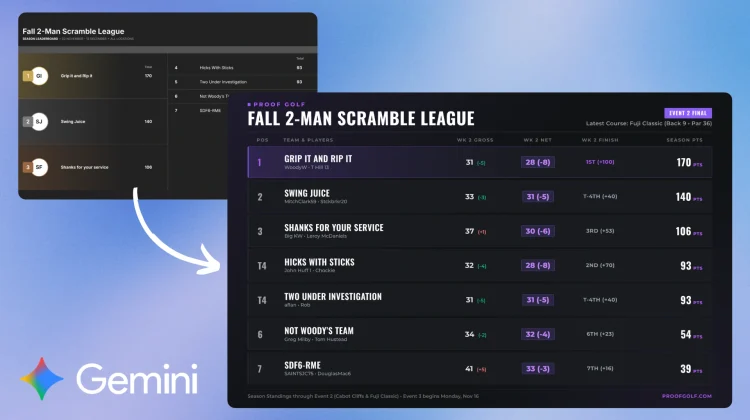
I started with the raw data structure from our weekly events and asked Gemini to build a 1920×1080 display-ready leaderboard (now live at proofgolf.com/leaderboards/fallScramble.html) that matched Proof Golf’s specific dark theme and signature purple accents. Instead of just showing a single points column like Trackman’s default view, our new board breaks down team names, individual players, gross and net scores, and cumulative points in one clean glance.
Gemini even threw in extra little details like the current event location, the par of the course, the 9 holes we’re playing, and more. Once it had created this awesome-looking HTML document, it was just a matter of conversational tweaks to make everything work together right on our own site:
- Mobile responsiveness: A layout built for a 16:9 TV screen looks terrible on a phone, so I had Gemini rework the CSS so players checking standings from the couch got a clean, legible mobile view automatically. I know CSS very well, but I didn’t have to touch a thing.
- Live data updates: Because league standings change every time a group finishes their weekly nine holes, we wired it up to pull from updated spreadsheet exports – complete with proper no-cache meta tags so browsers and TV displays wouldn’t get stuck showing last week’s numbers.
- Custom WordPress slideshow integration: Rather than relying on Trackman’s slideshow tool or Google Sheets (like we used to), Gemini also helped me build a custom WordPress plugin that lets us tag specific images directly on our website and pull them—alongside this new, data-rich leaderboard—into one unified HTML rotation loop living right on the site (https://proofgolf.com/leaderboards/TV-display.html).
Why practical AI workflows matter more than specs
I am not a full-time software engineer. I know my way around HTML, CSS, and WordPress well enough to maintain Chrome Unboxed and build the occasional custom plugin, so I understand what the code is doing under the hood. That baseline knowledge definitely helps when you’re steering an AI – you know what to ask for and you can spot immediately when a layout rule is slightly off.
Even so, the sheer speed of going from Trackman’s default leaderboard that doesn’t show enough data to hosting a live, responsive web app and a custom-tagged slideshow system all under our own domain is wild. Without Gemini handling the heavy lifting on the syntax and plugin logic, that’s easily a four- or five-hour project that gets pushed to the bottom of my to-do list for weeks.
We get caught up in the hype cycle of AI pretty easily in the tech world, and plenty of AI features still feel like solutions looking for a problem. This wasn’t one of them. When you use tools like Gemini to bridge the gap between an idea you have in your head and a finished, functional upgrade for your business in 60 minutes, it’s hard not to appreciate just how useful this stuff has actually become.
SUBSCRIBE TO UPSTREAM
Get Chrome Unboxed delivered straight to your inbox
Upstream is our flagship, curated newsletter with the top stories, most click-worthy deals, giveaways, and trending articles from Chrome Unboxed sent directly to your inbox a few times a week. Join 31,000+ subscribers.

