


Support our independent tech coverage. Chrome Unboxed is written by real people, for real people—not search algorithms. Join Chrome Unboxed Plus for just $2 a month to get an ad-free experience, access to our private Discord, and more. Learn more about membership here.
START FREE TRIAL (MONTHLY)START FREE TRIAL (ANNUAL)
The new Gemini 2.0 is now here for everyone to try. Google has announced that the latest version of their flagship AI model is now available for all users of the app (on the web or in the native app) and while this is yet another big step for all users of Google’s latest, greatest AI model, the entire thing is becoming more and more confusing by the day.
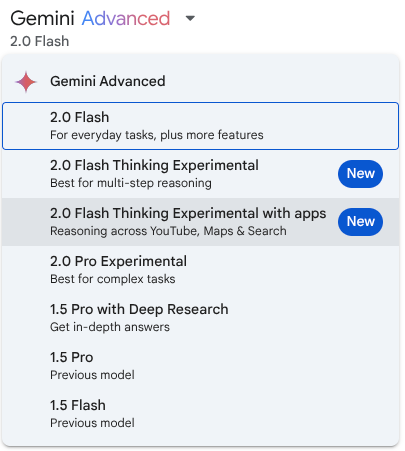
Right now, if I open my Gemini app on the web, I get a whole host of options that aren’t exactly clear as to what they offer. The whole segment (not just Google’s AI) is moving fast – very fast – so here’s where we are at least in the early stages of 2025 with Google’s Gemini. We hope this can quickly help you to make sense of what is on offer in the Gemini portion of the AI world.
Making sense of the different Gemini versions
First up is the updated Gemini 2.0 Flash. Initially introduced at Google I/O 2024, Flash has become a developer favorite for high-volume, high-frequency tasks. Its strength lies in multimodal reasoning and a massive 1 million token context window. This allows it to process and understand vast amounts of information.
The latest 2.0 Flash is now generally available across Google’s AI products, boasting improved performance and the promise of image generation and text-to-speech capabilities coming soon. This means wider access and more powerful tools for developers and everyday users alike. You can experience 2.0 Flash through the Gemini app or via the Gemini API in Google AI Studio and Vertex AI.
For those pushing the boundaries of AI capabilities, the experimental Gemini 2.0 Pro is now available. Built upon feedback from earlier experimental versions, 2.0 Pro shines with the strongest coding performance, ability to handle complex prompts, and excels in understanding and reasoning with world knowledge.
Sporting a 2 million token context window, it can comprehensively analyze massive datasets. Crucially, 2.0 Pro includes access to tools like Google Search and code execution, opening up new possibilities for AI-driven applications. Gemini 2.0 Pro is accessible as an experimental model in Google AI Studio and Vertex AI, and for Gemini Advanced users, it’s available in the Gemini app.
Finally, Google has introduced Gemini 2.0 Flash-Lite, a model focused on cost-efficiency. Building on the positive reception of 1.5 Flash, the new 2.0 Flash-Lite improves quality while maintaining the same speed and cost. It outperforms 1.5 Flash in most benchmarks, making it a compelling option for budget-conscious developers.
Like 2.0 Flash, it offers a 1 million token context window and multimodal input. As an example of its cost effectiveness, Google says it can generate captions for 40,000 photos for under a dollar. That’s wildly-efficient. Gemini 2.0 Flash-Lite is available in public preview in Google AI Studio and Vertex AI.
Hopefully that can – for the time being, anyway – help you sort through the somewhat-confusing options Google now has with Gemini across the board. As always, Google is continuing to emphasize safety and responsibility in AI development, employing advanced techniques like reinforcement learning and automated red teaming to ensure these powerful models are used responsibly. As things continue to progress at a wildly-rapid rate, here’s hoping responsibility and ethical use of AI continues to stay as a priority.
SUBSCRIBE TO UPSTREAM
Get Chrome Unboxed delivered straight to your inbox
Upstream is our flagship, curated newsletter with the top stories, most click-worthy deals, giveaways, and trending articles from Chrome Unboxed sent directly to your inbox a few times a week. Join 31,000+ subscribers.

