• Skip to main content
  • Skip to primary sidebar
  • Deals
  • Features
  • Guides
  • Chromebooks
  • Videos
  • Podcast
  • More +
    • Reviews
    • Unboxing
    • Upcoming Devices
    • Chromebook Plus
    • Chrome
    • ChromeOS
    • Chrome OS Flex
  • Search
  • Sign Up
  • Log In
Chrome Unboxed – The Latest Chrome OS News

Chrome Unboxed - The Latest Chrome OS News

A Space for All Things Chrome, Google, and More!

  • Deals
  • Features
  • Guides
  • Chromebooks
  • Videos
  • Podcast
  • More +
    • Reviews
    • Unboxing
    • Upcoming Devices
    • Chromebook Plus
    • Chrome
    • ChromeOS
    • Chrome OS Flex
  • Search
  • Sign Up
  • Log In

How to opt-in for emergency weather alerts on Android

September 27, 2022 By Johanna Romero View Comments

Featured image of pixel phone with a tornado watch alert

Support our independent tech coverage. Chrome Unboxed is written by real people, for real people—not search algorithms. Join Chrome Unboxed Plus for just $2 a month to get an ad-free experience, access to our private Discord, and more. Learn more about membership here.
START FREE TRIAL (MONTHLY)START FREE TRIAL (ANNUAL)

Presently, as powerful Hurricane Ian continues its track toward Florida, many residents are scrambling to find the most up-to-date information in order to stay safe. The simplest way of staying in the know is by registering to get local weather alerts by using Wireless Emergency Alerts (WEA), which was formerly known as Commercial Mobile Alert System (CMAS). These alerts are sent by the National Weather Service (NWS) and are supported by most modern smartphones.

This setting should be available on more recent models of Apple iOS and Android phones, as well as on older phones that have been upgraded to a more recent operating system. However, the setting is normally disabled before these phones are sent out to be sold to customers, which means the phone owner is required to enable it manually. In Android phones, the exact location of the setting can vary. However, in the interest of making these instructions as simple as possible, we will narrow them down to enabling them from within the Google Messages app on a Pixel device.

Xremove ads

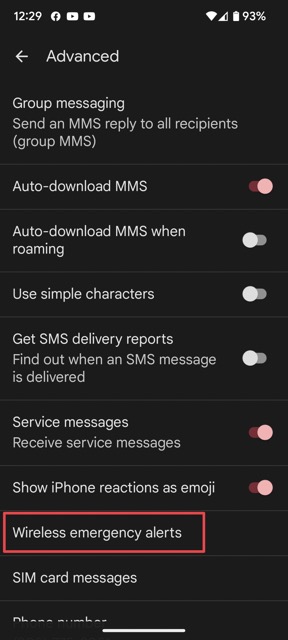
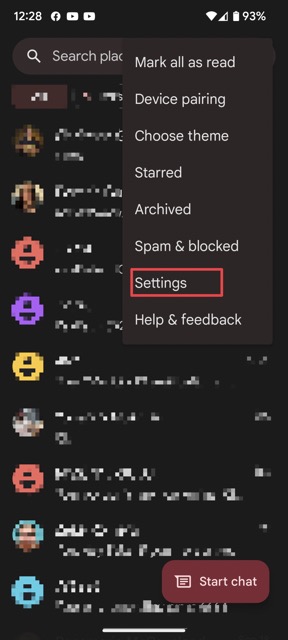
To turn on WEA (Wireless Emergency Alerts) from the “Messages” app, tap on the three-dot menu and tap on “Settings.” Next, from the settings section, select “Advanced,” followed by “Wireless emergency alerts.”
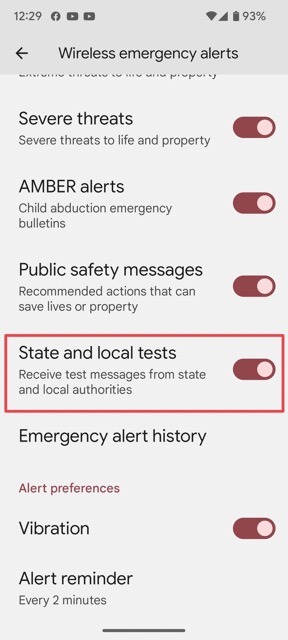
You will then see several options for emergency alerts. The one that alerts you on weather events is called “State and local tests,” which, in my opinion, is poorly named. Since that alert is not enabled by default, you will most likely find it disabled. Go ahead and enable it. Once enabled, you should start receiving alerts for local weather emergencies.
Featured Videos

Xremove ads

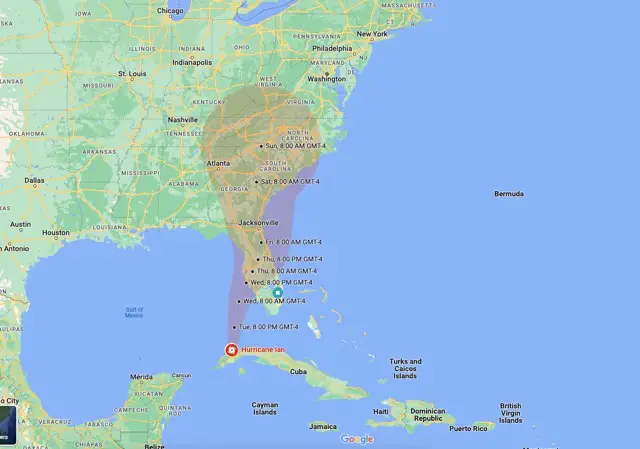
For those that are currently awaiting the landfall of Hurricane Ian, here’s a neat little trick: Search for “Hurricane Ian” in Google Maps, and you will see the real-time location of the storm along with its projected track. This works for both desktop and mobile.

I just want the steps!

1. Open the Messages app

2. Tap on the three-dot menu

3. Tap on Settings

4. Select Advanced

5. Select Wireless emergency alerts

6. Enable State and local tests

Filed Under: Android, Guides and How-To's Tagged With: android, pixel, wea, weather

Primary Sidebar

Xremove ads

Deals

The best Chromebook deals today

By Robby Payne
April 20, 2026

Deal Alert: the excellent Lenovo Chromebook Plus 2-in-1 returns to $429

By Robby Payne
April 20, 2026

Lenovo Legion Tab Gen 3 drops to $399, ahead of the much pricier Gen 5 release

By Joseph Humphrey
April 18, 2026

How to get 50% off YouTube Premium for a full year with Google One

By Robby Payne
April 16, 2026

The Pixel 10a just dropped to $449, but here’s why you should buy the Pixel 10 instead

By Joseph Humphrey
April 13, 2026

More Deals

Xremove ads

Reviews

Acer Chromebook Plus Spin 514 Review: Kompanio Ultra power in a convertible

By Robby Payne
December 24, 2025

My review after 6 weeks with the Lenovo Chromebook Plus 14 [VIDEO]

By Robby Payne
August 11, 2025

One week with the best small Android tablet you can buy, and I’m sold

By Robby Payne
May 9, 2025

Best Chromebooks of 2024 [VIDEO]

By Robby Payne
November 28, 2024

Samsung Galaxy Chromebook Plus Review: Samsung is back! [VIDEO]

By Robby Payne
October 28, 2024

More Reviews

Xremove ads

Guides

This Chromebook trackpad shortcut is definitely not new, but is blowing my mind

By Robby Payne
March 11, 2024

How to reduce broadcast delay on YouTube TV to stop live spoilers

By Robby Payne
December 8, 2023

Windows PC keyboard and Chromebook

How to use a Windows keyboard with a Chromebook

By Joseph Humphrey
December 8, 2023

How reset and revert your Chromebook to the previous version of Chrome OS

By Robby Payne
November 29, 2023

My Chromebook Plus features disappeared: here’s how I fixed it

By Robby Payne
November 24, 2023

More Guides

TWITTER · FACEBOOK · INSTAGRAM · YOUTUBE · EMAIL · ABOUT

Copyright © 2026 · Chrome Unboxed · Chrome is a registered trademark of Google Inc.
We are participants in various affiliate advertising programs designed to provide a means for us to earn fees by linking to affiliated sites.

PRIVACY POLICY