

• Skip to main content
  • Skip to primary sidebar
  • Deals
  • Features
  • Guides
  • Chromebooks
  • Videos
  • Podcast
  • More +
    • Reviews
    • Unboxing
    • Upcoming Devices
    • Chromebook Plus
    • Chrome
    • ChromeOS
    • Chrome OS Flex
  • Search
  • Sign Up
  • Log In
Chrome Unboxed – The Latest Chrome OS News

Chrome Unboxed - The Latest Chrome OS News

A Space for All Things Chrome, Google, and More!

  • Deals
  • Features
  • Guides
  • Chromebooks
  • Videos
  • Podcast
  • More +
    • Reviews
    • Unboxing
    • Upcoming Devices
    • Chromebook Plus
    • Chrome
    • ChromeOS
    • Chrome OS Flex
  • Search
  • Sign Up
  • Log In

Don’t miss this awesome Chromebook Plus feature on your device

October 10, 2023 By Robby Payne View Comments

Support our independent tech coverage. Chrome Unboxed is written by real people, for real people—not search algorithms. Join Chrome Unboxed Plus for just $2 a month to get an ad-free experience, access to our private Discord, and more. Learn more about membership here.
START FREE TRIAL (MONTHLY)START FREE TRIAL (ANNUAL)

Yesterday we covered the fact that Chromebook Plus was arriving for all certified devices in the Beta Channel of ChromeOS 118. The move to the Beta channel is an easy one and if you follow the directions in that post and are on a supported device, you’ll have all the new Chromebook Plus goodies at your fingertips in no time.

A sneaky-fun addition to Chromebook Plus

While we knew about all the features on the way for Chromebook Plus and we know that a bunch of fun AI stuff is on the way in the coming weeks, one of the feature additions didn’t really spark much interest in me when we first heard about it: new wallpapers and screen savers.

Xremove ads

While I’m very much looking forward to playing with the AI-created wallpapers down the road a bit on Chromebook Plus, I honestly figured a few new, exclusive wallpapers and screensavers weren’t that big of a deal. And while I’m still on the fence about the ‘Dawn to Dark’ wallpapers that change color to match the time of day, I’m absolutely blown away by the two new screensavers on offer.

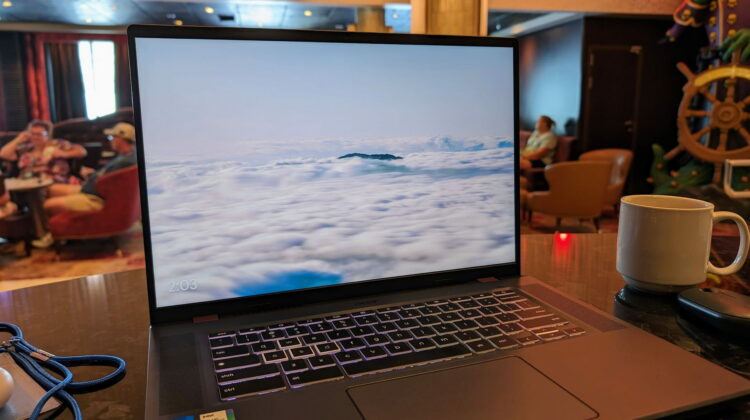
Both ‘Cloud Flow’ and ‘Earth Flow’ give you an animated screen saver that not only moves the entire time your Chromebook is locked, but both look fantastic doing so as well. Seriously, these slowly-evolving video loops are pretty mesmerizing and the fade in and fade out when they kick in is such a nice overall touch. If you have a Chromebook Plus model up and running, I’d go turn them on right now and check it out.

Featured Videos

Xremove ads

It’s fairly simple, too. Just right-click anywhere on the open desktop and select Set wallpaper & style > Screen saver > Dawn to dark > ‘Cloud Flow’ or ‘Earth Flow’ and you’re all set. After choosing either one, you can opt to preview the effect up top and see it for yourself without the need of locking your device.

The overall effect is quite nice and one I can’t wait to see replicated by more and more of these gorgeous screensavers over time. The slideshows and such in the past have been nice, but these new screensavers really make me want to take advantage of the feature on my Chromebook Plus for sure. And like I expect most Chromebook Plus features to be in the future, the addition is delightful even if not 100% necessary. The point of Chromebook Plus is to enhance the end user experience, and little touches like this do exactly that.

SUBSCRIBE TO UPSTREAM

Get Chrome Unboxed delivered straight to your inbox

Upstream is our flagship, curated newsletter with the top stories, most click-worthy deals, giveaways, and trending articles from Chrome Unboxed sent directly to your inbox a few times a week. Join 31,000+ subscribers.

Xremove ads
SUBSCRIBE HERE!

Filed Under: Chromebook Plus

About Robby Payne

As the founder of Chrome Unboxed, Robby has been reviewing Chromebooks for over a decade. His passion for ChromeOS and the devices it runs on drives his relentless pursuit to find the best Chromebooks, best services, and best tips for those looking to adopt ChromeOS and those who've already made the switch.

Primary Sidebar

Googlebook

New ‘Aneto’ Googlebook development board points to a 14-inch Snapdragon X convertible

By Robby Payne
August 26, 2026

Google is prepping your phone apps for Googlebook with a new Play Services update

By Robby Payne
August 26, 2026

Googlebook is launching with a hardware lineup unlike anything in laptop history

By Robby Payne
August 24, 2026

ASUS Googlebook CX9406 leak reveals early pricing, Core Ultra 5 and a 16GB RAM model

By Robby Payne
August 20, 2026

Googlebook leak reveals ‘Continue On’, Google’s built-in answer to Apple Handoff

By Robby Payne
August 19, 2026

More Googlebook

Xremove ads

Deals

The best Chromebook deals today

By Robby Payne
August 27, 2026

The best Chromebook ever made is $350 off at Best Buy right now

By Robby Payne
August 21, 2026

The excellent, powerful Acer Chromebook Plus Spin 514 is $150 off right now

By Robby Payne
August 12, 2026

Acer’s new Chromebook 315 is wildly affordable and points to the real future of Chromebooks

By Robby Payne
August 11, 2026

You can score the massively upgraded ASUS CX54 Chromebook Plus for just $599 right now

By Joseph Humphrey
July 28, 2026

More Deals

Xremove ads

Reviews

Acer Chromebook Plus Spin 514 Review: the best convertible you can buy [VIDEO]

By Robby Payne
July 1, 2026

Lenovo Chromebook Plus 2-in-1 Review: pretty great in a vacuum

By Robby Payne
April 23, 2026

My review after 6 weeks with the Lenovo Chromebook Plus 14 [VIDEO]

By Robby Payne
August 11, 2025

One week with the best small Android tablet you can buy, and I’m sold

By Robby Payne
May 9, 2025

Best Chromebooks of 2024 [VIDEO]

By Robby Payne
November 28, 2024

More Reviews

Xremove ads

TWITTER · FACEBOOK · INSTAGRAM · YOUTUBE · EMAIL · ABOUT

Copyright © 2026 · Chrome Unboxed · Chrome is a registered trademark of Google Inc.
We are participants in various affiliate advertising programs designed to provide a means for us to earn fees by linking to affiliated sites.

PRIVACY POLICY