



Support our independent tech coverage. Chrome Unboxed is written by real people, for real people—not search algorithms. Join Chrome Unboxed Plus for just $2 a month to get an ad-free experience, access to our private Discord, and more. Learn more about membership here.
START FREE TRIAL (MONTHLY)START FREE TRIAL (ANNUAL)
It’s about time! I know, I say that a lot, don’t I? I’m still a bit confused as to why Google implements essential features well after the release of a product. Believe it or not, you can finally delete Google Chat Rooms Space – hooray! Ever since their launch, the new “Chat” has had these “Rooms” (cleverly spoken as “chat rooms”. Where are my 90’s kids at?) which were later called “Spaces”. For some reason though, they could be archived, but not deleted entirely.
The reason behind this was never explained, and to be honest, it’s always really annoyed me. As someone who accidentally created a few spaces to test them out and to explore the possibilities, and by extension, someone who has to keep things clean and tidy, I was baffled to find that unused rooms would linger in the archives of my Chat account so they could be pulled up later. You know, even though I would never have intentions to do so.
Just a few months ago, Google added discoverable Spaces with in-line topic threading and more, and you would think that deleting an unused Space would have been a feature the company launched at exactly that time, but unfortunately, this was not the case.
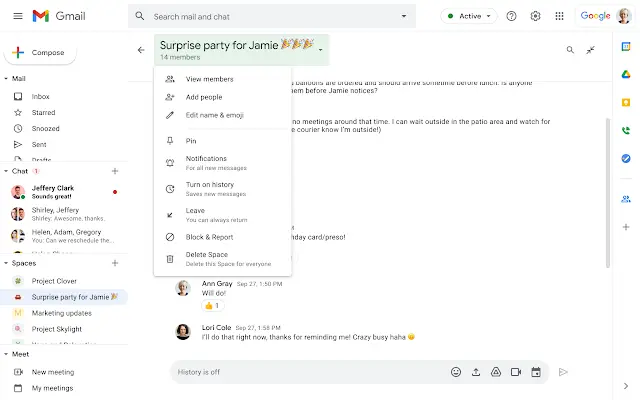
Now that you actually can, let’s talk about how! In order to delete a Google Chat “Space”, you’ll first need to be the owner of it, of course. You can’t go getting in other people’s Spaces and deleting them (the Spaces, not the people). If you meet that requirement, visit the Space itself, click on its name to see the settings, and choose “Delete Space” – it’s the last option at the bottom. Are you tired of hearing me say the word “Space” yet? Well, you’re the one subvocalizing it, not me!
Be aware, however, that once you delete said Space, all of its contents – tasks, files, attachments, and so on will also be deleted. If they were imported from elsewhere though, they’re safe. Oh, and anyone who was a member will no longer be able to access it or its files or even the list of other members once it’s gone, but you probably already guessed that.
Google hopes that by allowing you to tidy up a bit, you and those in your organization who use Chat to collaborate will be able to navigate their list of Spaces, and locate, and access the most relevant ones with ease. I’m inclined to agree! Most people probably won’t have as many as I do, but again, I like to test things out and over-organize, so my personal Spaces look a lot like my personal space…often cluttered, but organized in my own useful way.
Anyway, both Rapid release and Scheduled release domains can expect this feature to roll out at the same time. Availability began just yesterday, and will continue to become visible for everyone in the following Workspace tiers over the next two weeks.
Business Standard
Available
Business Starter
G Suite Basic
Workspace Essentials
NOT Available
Business Plus
Enterprise Essentials
Enterprise Standard
Enterprise Plus
Education Fundamentals
Education Plus
Frontline
Nonprofits
SUBSCRIBE TO UPSTREAM
Get Chrome Unboxed delivered straight to your inbox
Upstream is our flagship, curated newsletter with the top stories, most click-worthy deals, giveaways, and trending articles from Chrome Unboxed sent directly to your inbox a few times a week. Join 31,000+ subscribers.

