

Support our independent tech coverage. Chrome Unboxed is written by real people, for real people—not search algorithms. Join Chrome Unboxed Plus for just $2 a month to get an ad-free experience, access to our private Discord, and more. Learn more about membership here.
START FREE TRIAL (MONTHLY)START FREE TRIAL (ANNUAL)
Google is pushing a major productivity update to the Chrome browser today, introducing three long-requested features that we’ve seen being tested in Canary and Dev channels over the past few months: native Split View, PDF annotations, and a streamlined “Save to Drive” integration
These updates aren’t just minor UI tweaks; they represent a concerted effort to keep users within the Chrome environment without needing to jump to secondary apps or third-party extensions for basic workflow tasks. Whether you’re a student taking notes on a lecture or a developer referencing documentation, the browser is becoming much more capable of handling complex layouts natively.
Native Split View arrives for the masses
The headliner here is undoubtedly Split View. While ChromeOS has had robust window snapping for years, this feature brings that same logic directly into the browser tabs themselves. Instead of managing two separate windows side-by-side, you can now right-click a tab and select “Add tab to new split view.”
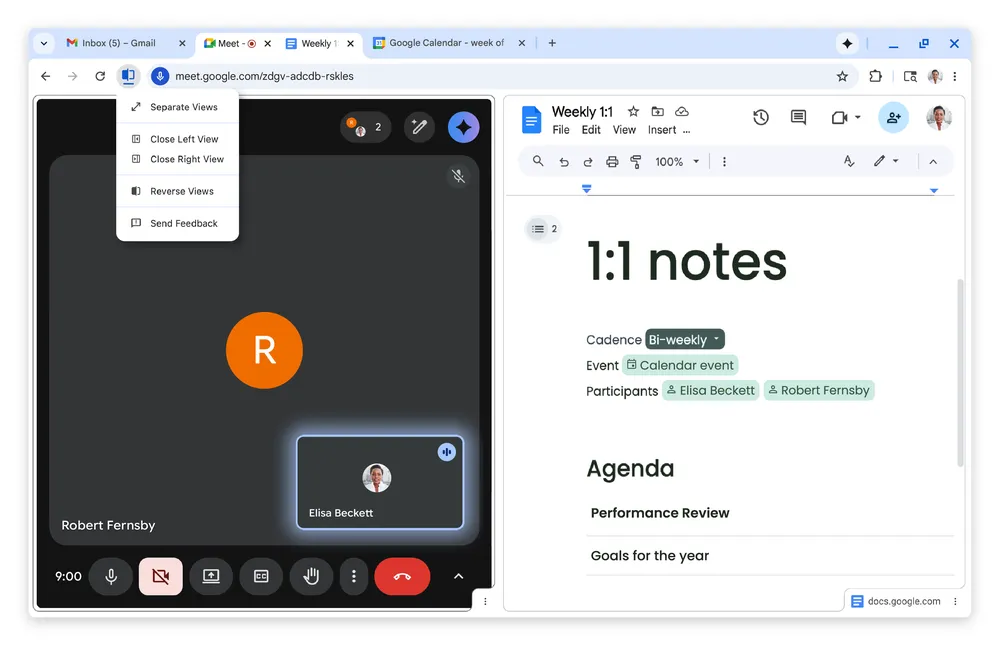
This merges two pages into a single tab container, allowing them to live side-by-side with a shared address bar and navigation controls. You can grab the divider between the two pages to adjust the width, and it is an incredibly slick implementation that solves some of the tab switching fatigue many feel when cross-referencing data between two different websites.
PDF Annotations finally go native
For years, the Chrome PDF viewer has been a “read-only” affair, forcing users to download files and open them in Adobe or another editor just to make a quick note. With this update, Chrome is adding native PDF annotations.
You can now highlight text, add sticky notes, and even handle basic digital signatures directly from the browser’s built-in viewer. This is a massive quality of life improvement for anyone who deals with digital paperwork daily. It eliminates the friction of the download-edit-reupload cycle, keeping your workflow entirely contained within the browser tab.
More seamless Save to Google Drive integration
Finally, Google is introducing a native Save to Google Drive feature for downloads. Instead of cluttering your local “Downloads” folder with edited PDFs and images, you can now send files directly to a dedicated Saved from Chrome folder in your Drive account.
This works directly from the PDF viewer and the standard download prompt. It ensures that your important documents are backed up, searchable, and accessible across all your devices the moment you save them.
These features are rolling out now for Chrome on desktop. If you don’t see them yet, a quick check for updates in the About Chrome menu should bring you up to version 145, where these tools are becoming standard. It’s an exciting time for the browser as it continues to evolve into a more powerful, all-in-one productivity hub.
SUBSCRIBE TO UPSTREAM
Get Chrome Unboxed delivered straight to your inbox
Upstream is our flagship, curated newsletter with the top stories, most click-worthy deals, giveaways, and trending articles from Chrome Unboxed sent directly to your inbox a few times a week. Join 31,000+ subscribers.

