

Support our independent tech coverage. Chrome Unboxed is written by real people, for real people—not search algorithms. Join Chrome Unboxed Plus for just $2 a month to get an ad-free experience, access to our private Discord, and more. Learn more about membership here.
START FREE TRIAL (MONTHLY)START FREE TRIAL (ANNUAL)
 Since the beginning of the Android Apps on Chromebooks transition, we’ve seen a handful of landing pages for specific devices tout the coming ability of their Chromebook to run Android Apps. Now, we are beginning to see developers follow suite with software.
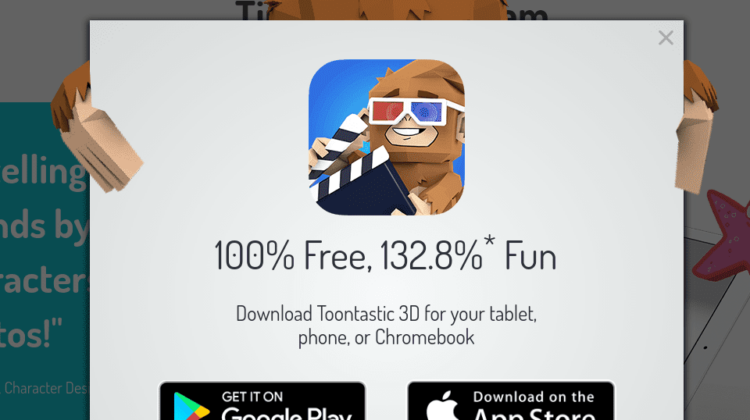
On the website for the Toontastic 3D app, when you click “Get The App” at the top of the screen, you are met with this:
Download Toontastic 3D for your tablet, phone, or Chromebook
You read that right! Included right along mention of a phones and tablets we see Chromebooks getting a nod as well.
While we’ve seen a different version of this language before with the Acer R13, ASUS Chromebook Flip C302 and the Samsung Chromebook Pro/Plus, they have always been from the hardware manufacturer promoting support for apps on their particular Chromebook.
With this development, we have a software developer not only taking the time to be sure their app runs well in the Chrome OS environment, but also making that fact prominent in its display.
Sure, by saying, “You can get this in the App Store or Google Play,” they are essentially implying that Chromebooks with Android Apps will be able to take advantage.
However, by implicitly stating that you can download this app for use on a Chromebook, we have the first instance (to my knowledge) of a developer group looking at the Chrome OS platform as a legitimate app delivery mechanism. Otherwise, why bother putting that in the description?
Sure, this may come off as a small thing to many, but to me this is a great sign. I’ve long stated that Android Apps – in their current state, anyway – are not the software answer Chrome OS needs right away. Sure, there will be fun and useful stuff from the get-go, but the potential lies in the commercial success of devices like Samsung’s Chromebook Pro and ASUS’ Chromebook Flip C302. As those devices sell, developers will begin to take notice and develop apps that take full advantage of all a Chromebook has to offer.
Isn’t This From Google?
Granted, it doesn’t take much digging to see that this app is developed by a team inside Google. While that doesn’t mean they are forced to include Chromebooks in their scope, it does mean that they are likely encouraged to do so.
It may make some people think that my excitement over this is not legit. However, if anyone is going to start the trend of showcasing apps made with Chromebooks in mind, Google needs to be that group.
Combined with Samsung, the marketing reach of these two companies could propel Chromebooks to places we’ve never considered. And that, my friends, is exciting indeed!

