


Support our independent tech coverage. Chrome Unboxed is written by real people, for real people—not search algorithms. Join Chrome Unboxed Plus for just $2 a month to get an ad-free experience, access to our private Discord, and more. Learn more about membership here.
START FREE TRIAL (MONTHLY)START FREE TRIAL (ANNUAL)
I have to admit, in the past year or so I’ve been a bit envious of a particular new feature on Windows 11: Snap Assist. In an updated take on a long-standing feature for most desktops at this point (MacOS being the main outlier, here), Windows 11 took the basic window snapping we all have come to love and injected new life into it. With multiple layout options at its disposal (including 1/2, 1/3, and 1/4 sizes), the new window snapping tool for Windows 11 is pretty sweet.
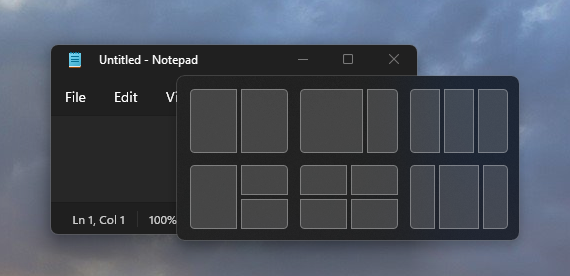
Window Snap Groups now in the works for ChromeOS
With all those new ways to arrange and snap your windows, Microsoft also added a way to save those layouts for quick access in your multitasking workflow. There are multiple guides on the web about how to leverage this, but the application is pretty clear and I could easily see great usefulness for all sorts of setups on a Chromebook.
For those that don’t love swiping through multiple desktop setups with the fantastic Virtual Desks present on ChromeOS, these snap groups may prove to be a great addition to the single desk workflow. You could set up snap groups for all your related tasks and have those groups minimized in your shelf to call up as needed. I can think of a few setups off the top of my head where this would be useful.
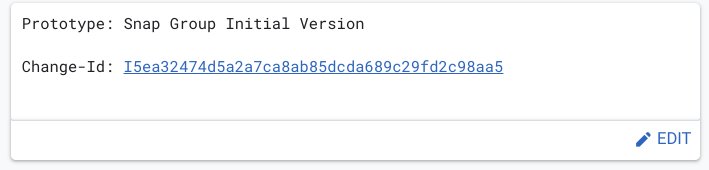
While it is clearly early days for this feature on ChromeOS, it is definitely in the works. We know that multiple, new snap sizes are already on the way, so a way to group and save those setups for later use only makes sense. While we don’t know if all the snap options we see on Windows 11 will show up for Chromebooks, I’m more interested in the 1/3, 2/3 variety than anything. I don’t have a ton of situations that call for a 1/4 sized window on my screen, but there are some of you who likely do. If the ChromeOS team is at work on multiple window snap sizes, I could see them adding the 1/4 screen option, too.
Either way, it seems window snapping on Chromebooks is set for a pretty big upgrade down the road. While it is early in this development, we have to remember that window snapping has been on Chromebooks for a very long time. With the additional Virtual Desk abilities we’ve seen in the past year, it seems these sorts of evolutionary additions to the OS don’t take quite as long as implementation of a brand new feature. If Window Snap Groups is just an enhancement of an existing feature, things could progress quickly.
Here’s hoping that is the case as I’m sure many of you would love to enhance your window snapping powers on your Chromebook sooner than later. We’ll be keeping a close eye on this one for sure and report back as we find new additions.
SUBSCRIBE TO UPSTREAM
Get Chrome Unboxed delivered straight to your inbox
Upstream is our flagship, curated newsletter with the top stories, most click-worthy deals, giveaways, and trending articles from Chrome Unboxed sent directly to your inbox a few times a week. Join 31,000+ subscribers.

