
• Skip to main content
  • Skip to primary sidebar
  • Deals
  • Features
  • Guides
  • Chromebooks
  • Videos
  • Podcast
  • More +
    • Reviews
    • Unboxing
    • Upcoming Devices
    • Chromebook Plus
    • Chrome
    • ChromeOS
    • Chrome OS Flex
  • Search
  • Sign Up
  • Log In
Chrome Unboxed – The Latest Chrome OS News

Chrome Unboxed - The Latest Chrome OS News

A Space for All Things Chrome, Google, and More!

  • Deals
  • Features
  • Guides
  • Chromebooks
  • Videos
  • Podcast
  • More +
    • Reviews
    • Unboxing
    • Upcoming Devices
    • Chromebook Plus
    • Chrome
    • ChromeOS
    • Chrome OS Flex
  • Search
  • Sign Up
  • Log In

ChromeOS will soon have two-thirds and one-third window snapping

June 12, 2022 By Johanna Romero View Comments

Support our independent tech coverage. Chrome Unboxed is written by real people, for real people—not search algorithms. Join Chrome Unboxed Plus for just $2 a month to get an ad-free experience, access to our private Discord, and more. Learn more about membership here.
START FREE TRIAL (MONTHLY)START FREE TRIAL (ANNUAL)

Before the release of Windows 11, ChromeOS had, in my opinion, the best – yet simple – approach to native window management. I preferred it to Windows 10’s split screens and MacOS’ split view, which forced window pairings into full-screen mode. However, all of that changed when Windows 11 introduced Snap Layouts, giving the user more options to arrange applications and windows by hovering over the maximize button.

Though not an exact replication, ChromeOS is getting one step closer to Windows 11-esque windows management. A code change was spotted by Chrome Story, and reported on by About Chromebooks, which shows that Google is working on implementing a windows management feature that lets you split windows into thirds. Initially, the new flag in question (#partial-split) was described as “enable the option to snap windows by thirds for split view,” which can confuse when read at its face value. When I initially read it, I understood it to mean that we could split three windows and have them side by side in equal sizes. However, the most recent code change on this flag from two days ago reworded the description to say, “Enables the option to snap two windows into 2/3 and 1/3 for split view.”

Xremove ads

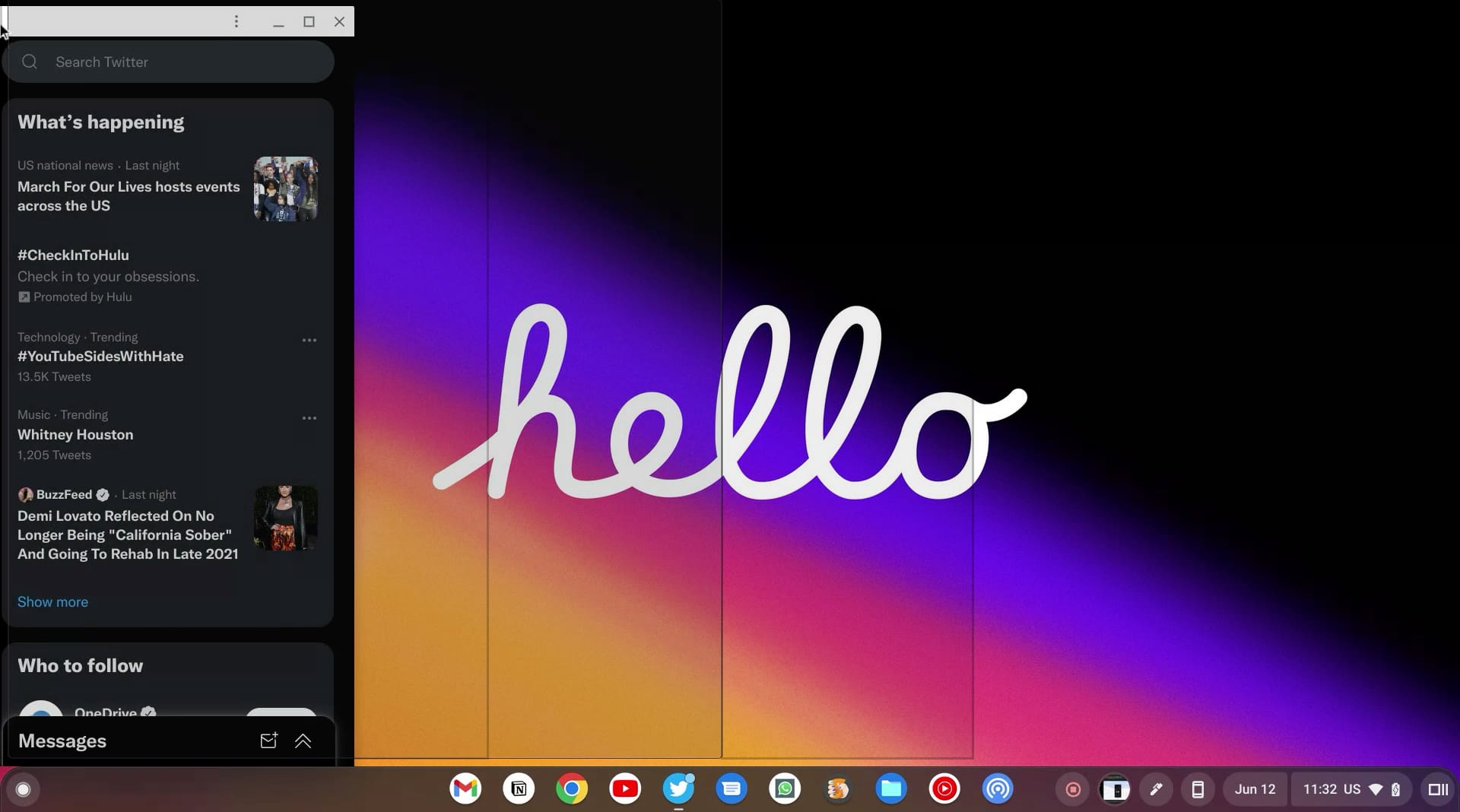
What this wording change means to me is that we will still only be able to split two windows, except one will take up 2/3 of the screen, and the other will take up 1/3. This 2/3 and 1/3 view makes sense to me as sometimes I want to have a social media app open beside Chrome that can be narrower and give that extra space to Chrome. I can think of countless other app combinations that can benefit from such a layout as well.

There is no additional information available yet on this flag beside the description above, so it is unclear how exactly this will be implemented. However, how I imagine this could work is that once you start dragging your window to one side to snap it, you will be shown three different overlays with snapping options: a third screen split, a half screen split, and a two-third screen split.
Featured Videos

Xremove ads
Mockup of what snapping might look like with #partial-split flag enabled

However the implementation turns out to be, I will be really happy once I am able to split my windows into thirds without having to eye-ball them and resize them manually. The flag is not yet present in any of the public versions of ChromeOS, so we’ll just have to be patient and wait for it to surface, hopefully in version 104.

Filed Under: ChromeOS, New & Upcoming Features Tagged With: chrome os, partial split, split screen, window snapping

Primary Sidebar

Xremove ads

Deals

The touchscreen Lenovo Chromebook Slim 3 is a steal at under $200

By Robby Payne
March 16, 2026

Google TV Streamer and Remote held in front of a wall-mounted TV

The premium Google TV Streamer 4K is back down to $80

By Joseph Humphrey
March 16, 2026

The best Chromebook deals today

By Robby Payne
March 16, 2026

Pixel Buds Pro 2 running

I still love the Pixel Buds Pro 2 and they are $60 off right now

By Joseph Humphrey
March 13, 2026

The Lenovo Chromebook Slim 3 is the one to get, starting at just $139 right now

By Robby Payne
March 6, 2026

More Deals

Xremove ads

Reviews

Acer Chromebook Plus Spin 514 Review: Kompanio Ultra power in a convertible

By Robby Payne
December 24, 2025

My review after 6 weeks with the Lenovo Chromebook Plus 14 [VIDEO]

By Robby Payne
August 11, 2025

One week with the best small Android tablet you can buy, and I’m sold

By Robby Payne
May 9, 2025

Best Chromebooks of 2024 [VIDEO]

By Robby Payne
November 28, 2024

Samsung Galaxy Chromebook Plus Review: Samsung is back! [VIDEO]

By Robby Payne
October 28, 2024

More Reviews

Xremove ads

Guides

This Chromebook trackpad shortcut is definitely not new, but is blowing my mind

By Robby Payne
March 11, 2024

How to reduce broadcast delay on YouTube TV to stop live spoilers

By Robby Payne
December 8, 2023

Windows PC keyboard and Chromebook

How to use a Windows keyboard with a Chromebook

By Joseph Humphrey
December 8, 2023

How reset and revert your Chromebook to the previous version of Chrome OS

By Robby Payne
November 29, 2023

My Chromebook Plus features disappeared: here’s how I fixed it

By Robby Payne
November 24, 2023

More Guides

TWITTER · FACEBOOK · INSTAGRAM · YOUTUBE · EMAIL · ABOUT

Copyright © 2026 · Chrome Unboxed · Chrome is a registered trademark of Google Inc.
We are participants in various affiliate advertising programs designed to provide a means for us to earn fees by linking to affiliated sites.

PRIVACY POLICY