


Support our independent tech coverage. Chrome Unboxed is written by real people, for real people—not search algorithms. Join Chrome Unboxed Plus for just $2 a month to get an ad-free experience, access to our private Discord, and more. Learn more about membership here.
START FREE TRIAL (MONTHLY)START FREE TRIAL (ANNUAL)
In the midst of the pandemic we’re all too familiar with at this point, we’ve all likely been on more video calls than we care to count. From work meetings to family meetings to social meetings, there’s no shortage of reasons to be sat with your face in front of a screen staring at a grid of people you need to see, chat with, and connect to. Firm numbers are tough to nail down right now, but we know services like Zoom, Google Meet, and Duo have seen astronomical growth in the past few months.
I don’t think this trend will go away anytime soon, either. In fact, I think using teleconferencing tech will become a much more standard practice until we have a vaccine for COVID-19 and beyond. There are so many practical ways we could all be using this type of tech on a more regular basis to accomplish things from places previously thought unworkable. Companies across the world are figuring out what it could mean to allow more work-from-home activity than they did before all this, families are seeing more of the older generations participate in long-distance video calls, and I’m sure there are countless other scenarios where video calling will stick around as the new normal for many users.
One thing all of this has made painfully clear is the fact that the baseline camera setup in Chromebooks (and most Windows laptops and Macbooks, too) is woefully under-powered and inadequate. Sure, there are a few oddballs out there, but the standard camera on a Chromebook is a lowly 720p shooter that looks just as grainy, soft, and terrible as it sounds. Whereas we previously didn’t give much thought to the quality and usefulness of our web cams, the pandemic has thrust this shortcoming into full view and the look is quite bad.

Galaxy Chromebook front camera 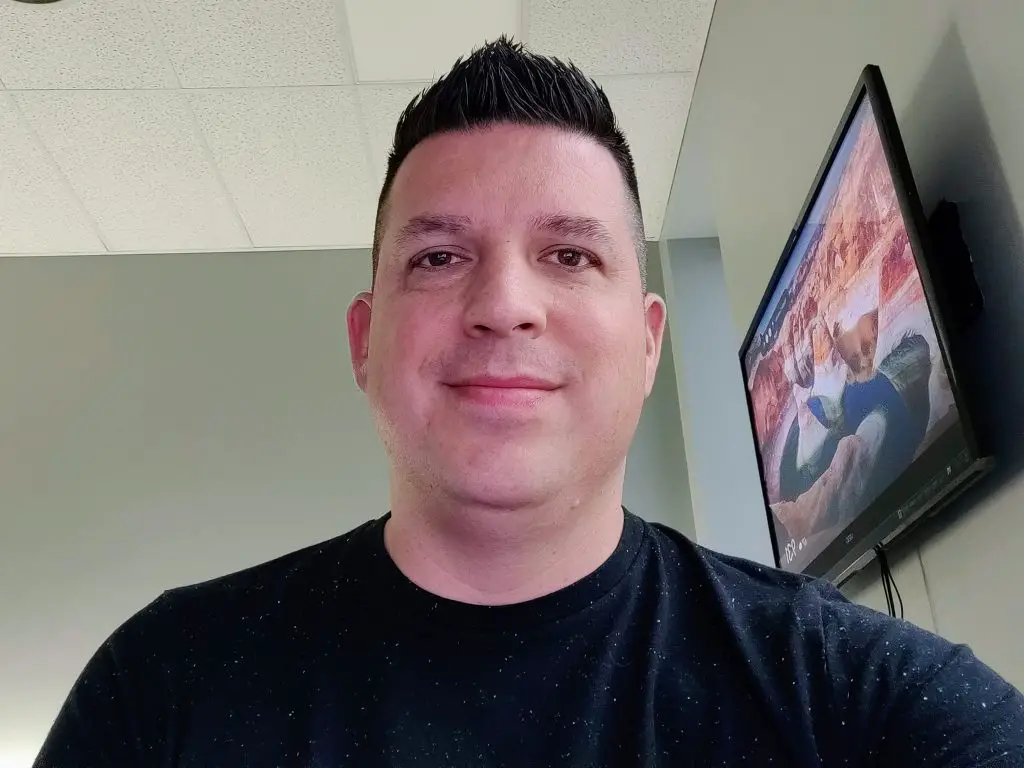
OnePlus 8 front camera

I was in a chat just last night with a group and reminded quite clearly (or quite blurrily, if I’m being accurate) that the camera built into my $999 Samsung Galaxy Chromebook is – like most Chromebooks – patently terrible. Could the other callers see me? Sure, but that’s setting a pretty low bar for a technology that is trying to step in and temporarily replace face-to-face interaction with other humans. Bandwidth limitations aside, most video conferencing services have the ability to show you a relatively-clear facsimile of the person or persons you are speaking to. If, however, the image being fed to that service is of poor quality to begin with, things only deteriorate from there.
Small cameras made for mobile devices are a dime a dozen these days and Chromebooks don’t need to have best-in-class shooters pointed at your face to be reasonable. Instead, I’d say we at least need 5MP-8MP shooters for users to be able to send a clear image specifically for video chats. And, call me crazy, but I think future Chromebooks should consider dual cameras for tight shots or nice, wide, group style images. Or, they could split the middle with a relatively-wide, high resolution shooter that could simply be digitally punched-in for tighter shots when you need to cut out your surroundings a bit. While we’re at it, can we get some slightly larger sensors, too? Pixel phones and iPhones have proven you don’t need wildly-high megapixel counts to get fantastic photos. Just a larger sensor and some Google imaging magic could go a long, long way to making these cameras far better than they currently are.
Placed side by side, you can see the staggering difference in camera quality between the Galaxy Chromebook and the OnePlus 8. Frankly, on a $999 Chromebook, this is embarrassing. But its not just Samsung. Nearly all Chromebook cameras look like this or worse. A few outliers exist in the form of the Google Pixelbook Go and Pixel Slate, but the vast majority of Chromebooks simply have terrible webcams and this needs to change. As our present circumstances have painfully exposed, this is one of those forgotten parts of the laptop equation that needs to be rediscovered for everyone involved. Chromebook makers, please address this moving forward. There’s no way for anyone to pivot and fix hardware shortcomings on devices already on the shelves or in the pipeline, but there is a way to put an end to garbage image sensors in Chromebooks moving forward, and I sincerely hope it happens.
Shop All The Latest Chromebook Deals
SUBSCRIBE TO UPSTREAM
Get Chrome Unboxed delivered straight to your inbox
Upstream is our flagship, curated newsletter with the top stories, most click-worthy deals, giveaways, and trending articles from Chrome Unboxed sent directly to your inbox a few times a week. Join 31,000+ subscribers.

