


Support our independent tech coverage. Chrome Unboxed is written by real people, for real people—not search algorithms. Join Chrome Unboxed Plus for just $2 a month to get an ad-free experience, access to our private Discord, and more. Learn more about membership here.
START FREE TRIAL (MONTHLY)START FREE TRIAL (ANNUAL)
It’s been quite some time since the look of the built-in ChromeOS virtual keyboard got a new look. Back in 2020, Google gave it an overhaul and made it decidedly more Gboard-esque, but little has changed since then. Two years later, it seems they are ready to try out a fresher, more Material You look to match up better with what we see on Android 12 with devices like the Pixel 6 and Pixel 6 Pro.
The move a few years ago gave the keyboard a few more-contrasted grays and put an outline around the individual keys. Though not an earth-shattering change, it really did give the ChromeOS keyboard a modern feel that made it fit in far better with the Google aesthetic of the time. This new update is a bigger change, not only changing the look and feel of the keyboard, but rearranging and adding to it as well.
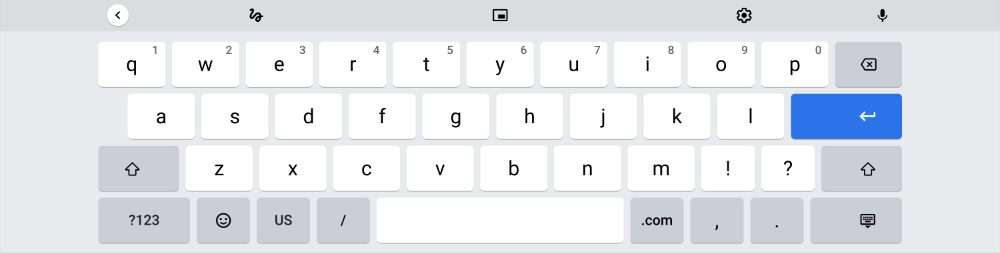
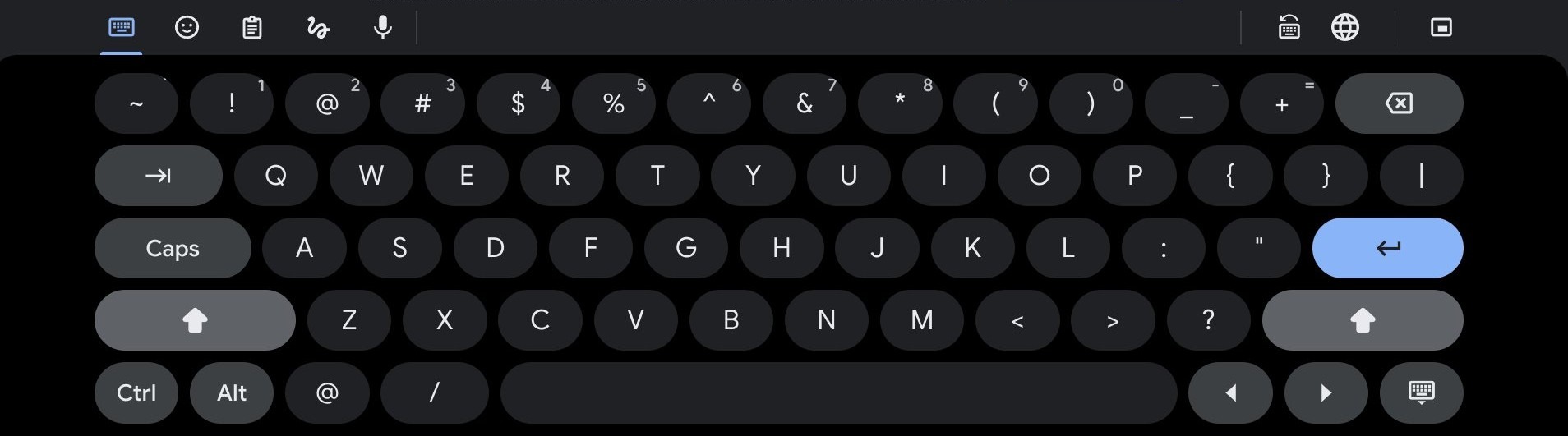
Thanks to @cr_c2cv on Twitter, we can see that this updated keyboard (in the Canary channel for now) brings about a few differences. First up, the options for things like handwriting, microphone access and emojis are all grouped in a way that looks far better. The current layout spreads those buttons out, making it look like Google took the Gboard mobile layout and just stretched it across the top.
Second, we get a full number key row as well, and this makes sense with the added real estate offered by just about any Chromebook. This is an option out of the box on Google’s Gboard on Android phones, but not on ChromeOS. Even with smartphones, I find the addition of the dedicated number row a handy option, so it only makes sense for it to be here for larger layouts as well.
Next up we have a few additional function keys. If you’ve ever used a Chromebook in tablet mode for any time at all, you likely recognize the missing Tab, Control and Alt keys. While not necessary all the time, there are plenty of reasons you would need these keys when navigating your device without a keyboard attached. The updated ChromeOS virtual keyboard adds these in along with a dedicated set of left/right arrows that should assist greatly in navigating when in tablet mode.
Finally, I’m glad to see the symbols key getting booted from the layout. Just like on a standard keyboard, there is a shift key for that sort of thing, utilizing the number keys as symbols when you need them. With most users quite familiar with standardized keyboard layouts we use on a daily basis, this move makes a ton of sense to me.
Will these changes revolutionize the Chromebook tablet experience? Not really, but it will make using a Chromebook in tablet mode or a ChromeOS tablet a far simpler experience. At the end of the day, a tablet should be usable without the need of a physical keyboard attached. These small changes to the ChromeOS virtual keyboard will definitely make that far more possible when it launches on the Stable Channel of ChromeOS soon.
SUBSCRIBE TO UPSTREAM
Get Chrome Unboxed delivered straight to your inbox
Upstream is our flagship, curated newsletter with the top stories, most click-worthy deals, giveaways, and trending articles from Chrome Unboxed sent directly to your inbox a few times a week. Join 31,000+ subscribers.

