

Support our independent tech coverage. Chrome Unboxed is written by real people, for real people—not search algorithms. Join Chrome Unboxed Plus for just $2 a month to get an ad-free experience, access to our private Discord, and more. Learn more about membership here.
START FREE TRIAL (MONTHLY)START FREE TRIAL (ANNUAL)
A few years ago, we made a video highlighting the arrival of NVIDIA’s then-new GeForce NOW game streaming service on Chromebooks. It was a big moment as the first real competitor to Google’s own Stadia finally showed up with a proper web-based version and ever since that point, GeForce NOW has always been in the conversation when we talk about game streaming services.
Now that Google has ceded defeat in the space, the remaining contenders – GeForce NOW, XBOX Cloud Gaming and Luna – are still going strong and each come with their own upsides. XBOX clearly has a ton of great titles and a huge, existing player base while Luna has the funding of Amazon, a very nice PWA and solid user interface to go along with it.
GeForce NOW, on the other hand, feels a bit like it sits in a league of its own. With access to games via Steam, Ubisoft and Epic, NVIDIA’s streaming game platform is by far the best of all worlds, combining an established user base (PC players), a cleaned up UI, and a large library of great games. With titles like Fortnite, Cyberpunk 2077 and Apex Legends just a click away, GeForce NOW delivers what you want in a game streaming service and does so better than anyone else out there at the moment.
A new era of cloud gaming on Chromebooks
With the launch of Google’s new gaming-focused Chromebooks, GeForce NOW has added the ability for 120Hz gaming at up to 1600p for those on the highest tier of their service, and the combination of that ability with these new gaming-focused Chromebooks is something special. Sure, anyone in the Chrome browser at this point can take advantage of these higher frame rates and better resolutions, but these new Chromebooks are built from the ground up to take full advantage of all of it.
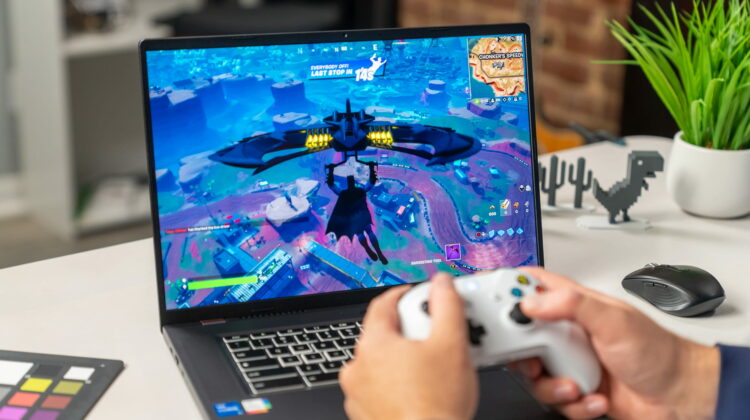
The Acer Chromebook 516GE that I’m typing this on right now comes equipped with a 120Hz QHD screen that makes NVIDIA’s new features in GeForce NOW absolutely shine. Add to that a solid RGB keyboard, fantastic upward-facing speakers and speedy internals (by Chromebook standards, anyway) and you have a combo that makes playing games via GeForce NOW an absolute delight.
Where I used to get frequent network errors, loading issues, and UI inconsistencies, using GeForce NOW these days feels all buttoned up and clean. Games launch right away and even in less-than-perfect connection situations, I’m able to play quick-twitch games like Fortnite and Apex Legends with my kids and actually keep up.
For the first time, I’m actually using GeForce NOW on a very, very regular basis. Instead of hopping into a match to experience some sort of novelty, I’m using the service to actually play the games I want to play. Instead of running Fortnite for a few minutes just to see if it works on a Chromebook, I’m actually leaning on it to get better at these games on a daily basis now.
And when you factor in the ability to seamlessly switch between mouse/keyboard and controller input, I’m left a bit baffled at how good this entire experience has become in the past few years. Seriously, in Apex Legends or Fornite, if you pick up a connected controller and hit any button, the entire UI layout will instantly shift to a controller-first setup and go right back the second mouse input is detected. It’s sublime!
There have been countless times in the past week where I’ve been deep in a battle royale match and simply forgotten that I’m playing the game on a Chromebook and that the game I’m playing isn’t installed in any way, shape or form on my device. Once up and running, the resolution, frame rates and lack of stutter or hiccups make the entire experience feel almost native.
Google and NVIDIA have put together something quite special with these devices, and you really have to try it to see it all working together. If you have a high-refresh monitor, a solid internet connection and any device running Chrome, you can try it out for yourself right now. But if you are interested in having a device tailored to this type of gaming while also being an absolutely fantastic Chromebook when not gaming, I’d recommend checking out the Acer Chromebook 516GE. Not having hands on the other two gaming-centric Chromebooks yet from ASUS and Lenovo, I can’t yet speak for those, but I can easily say I’m loving this Acer 516GE for both gaming and work alike.
There’s a future where XBOX Cloud Gaming and Luna may get on GeForce NOW’s level, but for now, NVIDIA absolutely owns this segment of the market. And with these latest upgrades added to the already-impressive ray tracing and ultra-low latency you get with their service, I’d say they’ll stay in the lead for quite some time. What they’ve built is impressive and without question, if you are remotely interested in cloud gaming at all, it’s likely time you gave it a real try.
SUBSCRIBE TO UPSTREAM
Get Chrome Unboxed delivered straight to your inbox
Upstream is our flagship, curated newsletter with the top stories, most click-worthy deals, giveaways, and trending articles from Chrome Unboxed sent directly to your inbox a few times a week. Join 31,000+ subscribers.

