


Support our independent tech coverage. Chrome Unboxed is written by real people, for real people—not search algorithms. Join Chrome Unboxed Plus for just $2 a month to get an ad-free experience, access to our private Discord, and more. Learn more about membership here.
START FREE TRIAL (MONTHLY)START FREE TRIAL (ANNUAL)
One of the newer features in ChromeOS is the addition of the split clock and date in the system tray. Not only does this give users a quick-glance way to see both the date and time on their Chromebook, it also provides a seamless way to get both the quick settings and calendar widgets to pop up when needed. The old version of this made it way more difficult to click on the right section to achieve the desired result, and the new layout makes far more sense.
In addition to this split, Google also brought along the much-needed calendar widget for a simple look at your daily agenda. Click on the date portion of that aforementioned system tray and a month-by-month calendar will pop up with small notification dots on the days where more info is available to you. Clicking on any of these dotted days brings up a secondary view with an event description and time. For now, that’s all you get, but we’re hopeful that there’s more on the way.
More details for the ChromeOS calendar widget
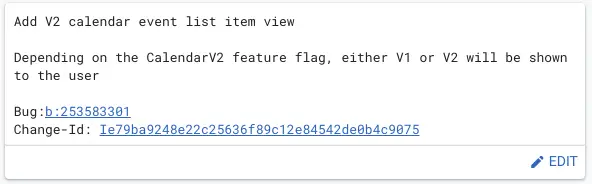
Thanks to movement on a new feature being dubbed ‘Calendar V2’, it looks like Google is setting up a bit of an overhaul to the calendar widget for Chromebook users moving forward. So far, from the couple of commits around these changes, it looks like much of the work is simply going to be surface-level changes that will likely affect the look and feel of this portion of the desktop. In my opinion, the calendar in ChromeOS is robust enough for most people and I only have a few changes I’d like to see happen at this point.
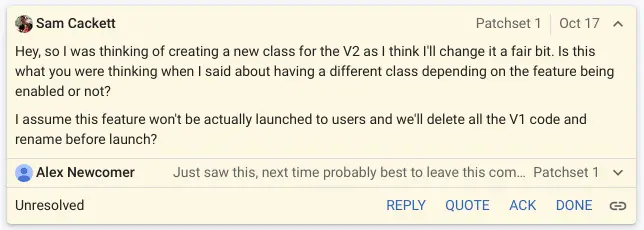
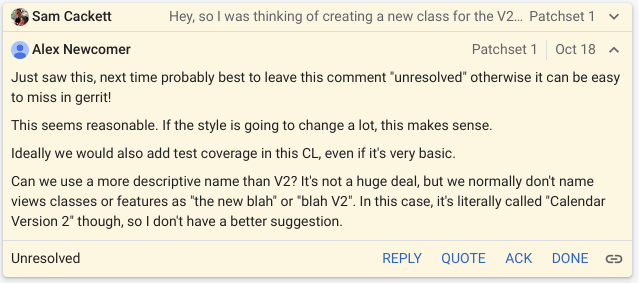
As you can see in the comments around this change, it looks like some styling changes are on the way for the Calendar widget, but there are plenty of functional tidbits being worked on as well, though none of them seem to be outside the bounds of what we currently see in the calendar widget as it stands right now in ChromeOS 106.
The biggest addition the calendar widget needs from a productivity standpoint is the ability to grab all the visible events from your Google Calendar. As it stands right now, only your own internal calendar events populate in this view, so that expansion would be very helpful. I know my calendar is largely populated for me by my wife, so not seeing her calendar entries in my calendar widget isn’t very helpful at the moment.
Most calendar apps (including Google’s own) give the user the ability to choose which of their multiple calendars show up in any given view. There seems to be no issue with the Google Calendar API being able to deliver this info, so I’d hope part of this ‘Calendar V2’ work will go towards addressing this shortcoming.
For now, however, the work is early and is not completely clear as to what changes will come from it. We’ll keep an eye on it and as soon as these changes get merged into ChromeOS, we’ll see if we can spot the changes in the Canary Channel. Stay tuned.
SUBSCRIBE TO UPSTREAM
Get Chrome Unboxed delivered straight to your inbox
Upstream is our flagship, curated newsletter with the top stories, most click-worthy deals, giveaways, and trending articles from Chrome Unboxed sent directly to your inbox a few times a week. Join 31,000+ subscribers.

