

Support our independent tech coverage. Chrome Unboxed is written by real people, for real people—not search algorithms. Join Chrome Unboxed Plus for just $2 a month to get an ad-free experience, access to our private Discord, and more. Learn more about membership here.
START FREE TRIAL (MONTHLY)START FREE TRIAL (ANNUAL)
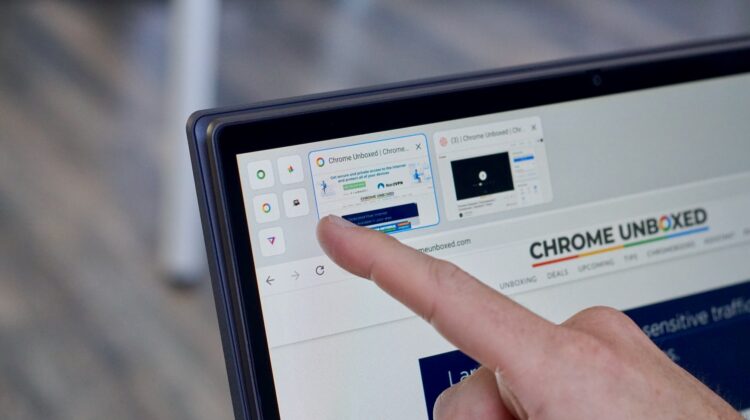
Users are just now beginning to get familiar with the new tab strip UI in Chrome for tablets. This new UI is one of the ever-expanding tablet mode additions we’ve been tracking over the course of the past 12 months in the lead up to the launch of the Lenovo Chromebook Duet. For now, the new tab strip UI exists only on that device out of the box, but anyone on Chrome OS 83 can give it a try by switching on the flag chrome://flags/webui-tab-strip and then going into tablet mode.
In every way, this new feature is made to make tablet browsing a bit more immersive while retaining the core abilities that tab browsing brings to the desktop. In some ways, I kinda prefer it over standard tabs because the UI is clean and out of the way when you don’t want it and more informative when you call it into action. Standard tabs are great, but the tab strip gives you small previews of each open tab and I really enjoy the simplicity and ease of use it offers when navigating a Chromebook via touch only.
One thing that many Chrome users fail to take advantage of across the board is the ability to pin tabs. It’s a quick action that minimizes and locks the selected tab over on the left side of the browser so that you don’t lose them amidst all the shuffling, open tabs you may have in front of your face at any given time. I like to pin my Gmail tabs most days since I know they will constantly be open and a part of my overall browsing experience for the duration of my work day. It’s a small thing, but it helps keep the important things in a prominent place and saves me time each day.
As it stands right now, you can use this pinning functionality in the new tab strip UI, but rearranging those pinned tabs isn’t really the best in terms of clarity. If you have a few tabs pinned, you can long-press to move them around, but there’s no animation and the transition from being in this edit mode is pretty janky when you leave it. The whole thing feels a bit half-baked, but a new change is coming to smooth things out quite a bit.
Spotted last night in the Chromium Repositories, a new animation is being added to pinned tabs in the tab strip UI and it greatly increases the clarity of a user’s intended actions when moving pinned tabs around via touch. There’s now a subtle animation as the tabs rearrange themselves and this tiny change will make a big difference in clearly and visually depicting what is happening when users go to make these moves.
Changes like these can sometimes go unappreciated, but there is a vast importance to updates like this because of the number of new users migrating to Chrome OS on a daily basis. There are tons of new Chromebook owners poking around in an operating system that they’ve never used and thoughtful animations and changes like this one go a long way in helping the software be more intuitive to use. For Chrome veterans, this all just looks and behaves a bit nicer, but for new users, these changes can really help make things more cohesive in a very new environment. Look for this update to roll out around Chrome OS 85.
Shop All The Latest Chromebook Deals
SUBSCRIBE TO UPSTREAM
Get Chrome Unboxed delivered straight to your inbox
Upstream is our flagship, curated newsletter with the top stories, most click-worthy deals, giveaways, and trending articles from Chrome Unboxed sent directly to your inbox a few times a week. Join 31,000+ subscribers.

