
• Skip to main content
  • Skip to primary sidebar
  • Deals
  • Features
  • Guides
  • Chromebooks
  • Videos
  • Podcast
  • More +
    • Reviews
    • Unboxing
    • Upcoming Devices
    • Chromebook Plus
    • Chrome
    • ChromeOS
    • Chrome OS Flex
  • Search
  • Sign Up
  • Log In
Chrome Unboxed – The Latest Chrome OS News

Chrome Unboxed - The Latest Chrome OS News

A Space for All Things Chrome, Google, and More!

  • Deals
  • Features
  • Guides
  • Chromebooks
  • Videos
  • Podcast
  • More +
    • Reviews
    • Unboxing
    • Upcoming Devices
    • Chromebook Plus
    • Chrome
    • ChromeOS
    • Chrome OS Flex
  • Search
  • Sign Up
  • Log In

Chrome OS is set to get a mobile hotspot feature for LTE Chromebooks

June 17, 2021 By Robby Payne View Comments

Support our independent tech coverage. Chrome Unboxed is written by real people, for real people—not search algorithms. Join Chrome Unboxed Plus for just $2 a month to get an ad-free experience, access to our private Discord, and more. Learn more about membership here.
START FREE TRIAL (MONTHLY)START FREE TRIAL (ANNUAL)

Though they aren’t sold in incredibly high numbers, there are Chromebooks available with LTE on-board and they provide a great solution to many users who need connectivity on the go. The number of LTE-enabled Chromebooks is only on the way up, so some of the features users expect from wireless devices are bound to follow, and few features are as weaved into the wireless device landscape as mobile hotspots.

The concept is simple: take a device that gets internet access via a wireless internet provider (i.e. – T-Mobile, AT&T, Verizon, etc.) and enable that device to share that connection just like a wireless router in a home or office would. This feature has become so common with smartphones that Chromebooks even have a built-in mobile data feature that uses your connected phone’s mobile data as a wireless hotspot when a standard Wi-Fi connection becomes unavailable. But what about the other way around? What if you had LTE or 5G on your Chromebook and wanted/needed to share that connection with a friend or coworker. Soon, you’ll be able to do just that.
Xremove ads
via the Chromium Gerrit

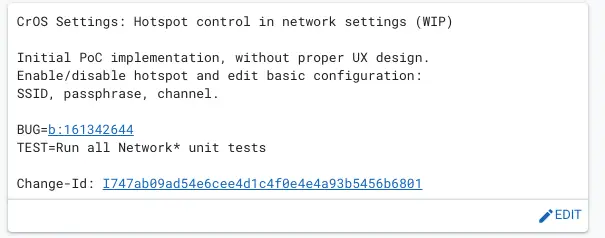
Found just a day ago in the Chromium Repositories, changes are being made to enable hotspot functionality for Chrome OS. At first I thought this was a change to the existing mobile data setup we have had on Chromebooks for years at this point, but that is definitely not the case. As you can see in the specific file change below, this new feature is for setting up an Wi-Fi Acess Point, not connecting to one:
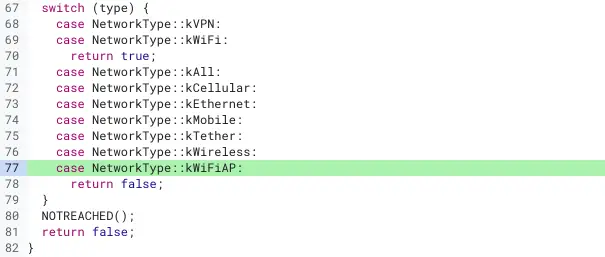
via the Chromium Gerrit

In the near future, it seems Chromebook users who have LTE or 5G enabled devices will simply be able to create their own wireless hotspot access point for those around them to take advantage of. While I don’t see myself using this sort of feature on a regular basis, I can imagine a scenario where many, many people do. After all, most of our wireless plans come with limited hotspot data, so being able to have two sources of data to pull from each month could be a big win. I could also see this being a big benefit to professionals using Chromebooks while away from the desk. Setting up a mobile hotspot on a Chromebook could be a far more battery efficient way for data to be shared to surrounding devices. We’ll keep an eye out for this to arrive and will update as soon as it shows up in the Stable Channel of Chrome OS in the future.

Featured Videos

Xremove ads

SUBSCRIBE TO UPSTREAM

Get Chrome Unboxed delivered straight to your inbox

Upstream is our flagship, curated newsletter with the top stories, most click-worthy deals, giveaways, and trending articles from Chrome Unboxed sent directly to your inbox a few times a week. Join 31,000+ subscribers.

SUBSCRIBE HERE!

Filed Under: Chromebooks, ChromeOS, New & Upcoming Features, News

About Robby Payne

As the founder of Chrome Unboxed, Robby has been reviewing Chromebooks for over a decade. His passion for ChromeOS and the devices it runs on drives his relentless pursuit to find the best Chromebooks, best services, and best tips for those looking to adopt ChromeOS and those who've already made the switch.

Primary Sidebar

Xremove ads

Deals

You can score $40 off Google’s battery-powered Nest Doorbell right now

By Joseph Humphrey
March 20, 2026

The touchscreen Lenovo Chromebook Slim 3 is a steal at under $200

By Robby Payne
March 16, 2026

Google TV Streamer and Remote held in front of a wall-mounted TV

The premium Google TV Streamer 4K is back down to $80

By Joseph Humphrey
March 16, 2026

The best Chromebook deals today

By Robby Payne
March 16, 2026

Pixel Buds Pro 2 running

I still love the Pixel Buds Pro 2 and they are $60 off right now

By Joseph Humphrey
March 13, 2026

More Deals

Xremove ads

Reviews

Acer Chromebook Plus Spin 514 Review: Kompanio Ultra power in a convertible

By Robby Payne
December 24, 2025

My review after 6 weeks with the Lenovo Chromebook Plus 14 [VIDEO]

By Robby Payne
August 11, 2025

One week with the best small Android tablet you can buy, and I’m sold

By Robby Payne
May 9, 2025

Best Chromebooks of 2024 [VIDEO]

By Robby Payne
November 28, 2024

Samsung Galaxy Chromebook Plus Review: Samsung is back! [VIDEO]

By Robby Payne
October 28, 2024

More Reviews

Xremove ads

Guides

This Chromebook trackpad shortcut is definitely not new, but is blowing my mind

By Robby Payne
March 11, 2024

How to reduce broadcast delay on YouTube TV to stop live spoilers

By Robby Payne
December 8, 2023

Windows PC keyboard and Chromebook

How to use a Windows keyboard with a Chromebook

By Joseph Humphrey
December 8, 2023

How reset and revert your Chromebook to the previous version of Chrome OS

By Robby Payne
November 29, 2023

My Chromebook Plus features disappeared: here’s how I fixed it

By Robby Payne
November 24, 2023

More Guides

TWITTER · FACEBOOK · INSTAGRAM · YOUTUBE · EMAIL · ABOUT

Copyright © 2026 · Chrome Unboxed · Chrome is a registered trademark of Google Inc.
We are participants in various affiliate advertising programs designed to provide a means for us to earn fees by linking to affiliated sites.

PRIVACY POLICY