


Support our independent tech coverage. Chrome Unboxed is written by real people, for real people—not search algorithms. Join Chrome Unboxed Plus for just $2 a month to get an ad-free experience, access to our private Discord, and more. Learn more about membership here.
START FREE TRIAL (MONTHLY)START FREE TRIAL (ANNUAL)
Earlier this month, Robby uncovered work being done to move rich media notifications to a more static location inside the system tray and activated on the Chrome OS shelf when media is playing. Last week, we got our first look at the feature when a video was posted in the ongoing bug report where the feature’s progress is being tracked by developers. It was only a matter of time before the new Global Media Controls UI popped up in the Canary channel of Chrome OS and after last night’s update, they have officially arrived.
The feature is still disabled behind the flag chrome://flags/#global-media-controls-for-chromeos but appears to be working as intended when the flag is enabled. When navigating to YouTube and starting a video, the rich media notification is still appearing in the notification tray but now, we also see a media card in the system tray. Clicking on the card opens up a dedicated media tab in the system tray where you can seek forward/backward, play/pause, or dismiss the card entirely. You will also notice that a Picture-in-picture icon has been added to the card. This does exactly what you’d think buy opening a floating video player on your host display.
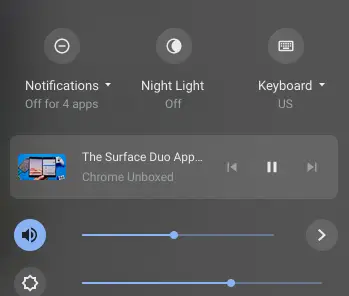
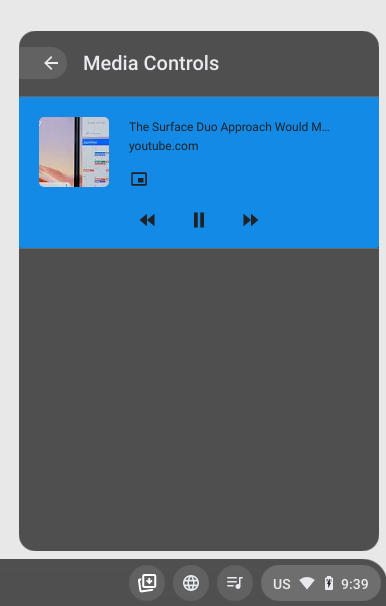
In addition to the system tray controls, active media invokes a shelf icon that gives users one-click access to the very same controls. This will be a very useful tool for quickly managing active media on your desktop. As you can see in the image below, the shelf controls will display any open media whether local or web-based and you can quickly see which piece of content is active. I am very happy to report that the Global Media Controls work perfectly with YouTube Music and even the Chrome OS audio player.

There’s still some polishing to be done on this feature but eventually, it should result in the removal of rich media cards from the notifications tray. As Robby pointed out, this feature if very nice but notifications can stack up quickly in that vertical space and these new media controls should help in keeping that under control. I don’t expect we’ll have to wait much longer to see this roll up to the Developer channel. At this pace, we should see the new Global Media Controls land before the end of the year.
Shop The Best Chromebooks of 2020 at Chrome Shop
SUBSCRIBE TO UPSTREAM
Get Chrome Unboxed delivered straight to your inbox
Upstream is our flagship, curated newsletter with the top stories, most click-worthy deals, giveaways, and trending articles from Chrome Unboxed sent directly to your inbox a few times a week. Join 31,000+ subscribers.

