

Support our independent tech coverage. Chrome Unboxed is written by real people, for real people—not search algorithms. Join Chrome Unboxed Plus for just $2 a month to get an ad-free experience, access to our private Discord, and more. Learn more about membership here.
START FREE TRIAL (MONTHLY)START FREE TRIAL (ANNUAL)
Rich media notifications have been a part of Android devices for some time and, not long ago, they appeared for Chrome OS as well. What is a rich media notification? Simple. It is a graphic interface that appears in your notifications panel when media is playing on your device that gives you quick, at-a-glance control over basic play/pause/forward/back functions.
You can read all about this feature coming to the Canary Channel of Chrome OS all the way back in May, but as of Chrome OS 76 that just recently landed, all users will now see these eye-pleasing notifications on a more regular basis. I think this is a worthwhile addition to the notification tray and makes for a simpler experience of stopping or pausing playback when a music track or video is playing in the background.

What we’re seeing as an addition to this feature in the Dev Channel of Chrome OS right now is both interesting and a tad unusual. Right now, if you were to dismiss one of those fancy, new, rich media notifications we talked about above, you wouldn’t be able to re-access it again for at least a few minutes. It will show up again in time, but it does heed your dismissal for at least a while and keeps itself hidden.
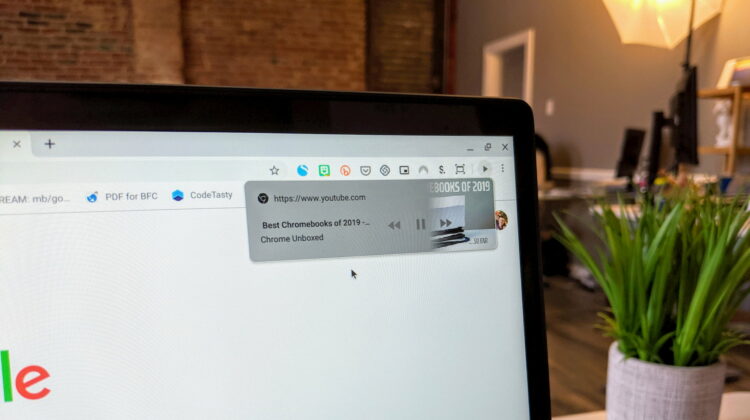
This new global media control section steps in where the notification leaves off. Once a video or audio track is started in Chrome, a new play button appears in the right side of your extensions area. Hovering it just shows a pop-up that states this is your “global media controls.” Clicking the button brings up the same graphically-driven UI you get in your notifications. Oh, and no worries if you hit that clear all button in your notifications, either, as this new option stays put until the media has been fully closed.
For now, this only appears in full browser windows and does not appear in PWAs that are set to open as a window. Though you can see all your web-based extensions from the PWA 3-dot menu, this new global media control button does not carry over.
Overall, I’m not fully sure what the general use cases are for this. I suppose it gives many users a clear way to get to the basic media controls at a glance since we generally spend a lot of time in a Chrome browser window. If the notification is going to remain present, however, it feels a bit redundant. Perhaps the functionality is going to grow over time and this feature can begin to encompass Chromecast volume, Android app volumes, and more. For now, its a bit of a head-scratcher.
SUBSCRIBE TO UPSTREAM
Get Chrome Unboxed delivered straight to your inbox
Upstream is our flagship, curated newsletter with the top stories, most click-worthy deals, giveaways, and trending articles from Chrome Unboxed sent directly to your inbox a few times a week. Join 31,000+ subscribers.

