

Support our independent tech coverage. Chrome Unboxed is written by real people, for real people—not search algorithms. Join Chrome Unboxed Plus for just $2 a month to get an ad-free experience, access to our private Discord, and more. Learn more about membership here.
START FREE TRIAL (MONTHLY)START FREE TRIAL (ANNUAL)
We’re feverishly working through all the changes in Chrome OS 76, looking for all the new features that will enhance user experience with this latest version. There are lots of new things in this version of Chrome OS both out of the box and behind flags, but we generally focus on all the features you as a user can leverage right away after the update without extra steps, caveats, or flags.
Along with leaving out all the features still behind flags, we also don’t spend much time talking about all the various bugs that have been addressed in updates. In general, many of the bugs being fixed either go unnoticed by general users or they are quiet clean0ups that don’t necessarily deserve a ton of attention the way big, new features do.
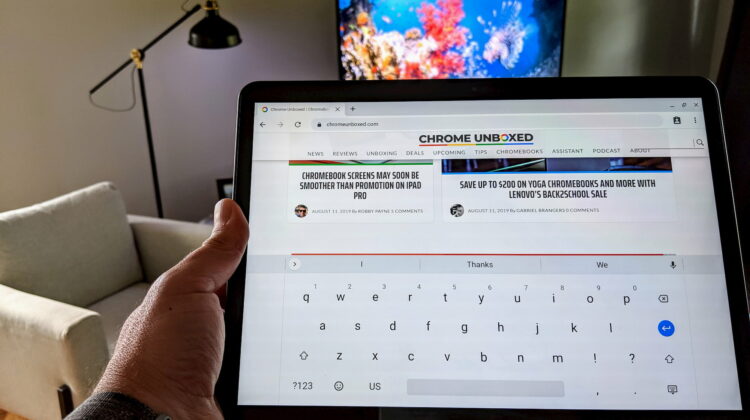
From time to time, however, there are bugs that not only persist for long periods; they are pretty glaring and annoying, too. The bug we’re talking about today affects the sound-on-keypress feature for the virtual keyboard. Perhaps you don’t use tablet mode very often, have never turned on keyboard sounds, or simply didn’t notice the issue. That very well may describe quite a few of you out there, but I can confirm this bug has been a persistent aggravation for many users for nearly a year at this point.
So, what is the issue, exactly? For many months sound-on-key-press has been broken in Chrome OS and, upon turning on these sounds, it only takes about 10-15 minutes of use to cause the keyboard to stop outputting sounds completely. While this sounds minor, there is no haptic feedback on a Chromebook, so sounds on key-presses are one of the only ways a user knows their inputs are actually registering. When using the on-screen keyboard for any amount of time, I can testify to the usefulness of this seemingly-basic feature. For users of Chrome OS tablets, I image this brokenness is infuriating.
What caused the issue isn’t clear, but something in the Chrome OS 70 update surfaced this bug and it has taken far too long to be addressed. With Google’s emphasis on getting tablet mode ready for the Pixel Slate, it is honestly shocking that the virtual keyboard has been basically without sound for a year. Sure, Google has decided to stop building in-house tablets, but trust us, Chrome OS tablets are coming and in great number. A bug like this is so fundamental it makes the issue that much more annoying.
The good news? In Chrome OS 76, the problem has been marked as fixed and from our testing, the issue looks to be fully dealt with moving forward. While this one was a shocking ommision over the course of 6 OS updates, I can cut Google a bit of slack as they were considering bringing Gboard over to Chrome OS at one point, so they may have simply stopped forward progress on the Chrome OS keyboard for a time. We’ll never know for certain, but I’m very glad to report this bug as officially squashed.
SUBSCRIBE TO UPSTREAM
Get Chrome Unboxed delivered straight to your inbox
Upstream is our flagship, curated newsletter with the top stories, most click-worthy deals, giveaways, and trending articles from Chrome Unboxed sent directly to your inbox a few times a week. Join 31,000+ subscribers.

