


Support our independent tech coverage. Chrome Unboxed is written by real people, for real people—not search algorithms. Join Chrome Unboxed Plus for just $2 a month to get an ad-free experience, access to our private Discord, and more. Learn more about membership here.
START FREE TRIAL (MONTHLY)START FREE TRIAL (ANNUAL)
I wrote at length about Material You on Chromebooks back in May, and I held to my word from that article: I’ve stayed in the Beta Channel of ChromeOS 114 since that time for the sake of keeping Material You as a part of my daily Chromebook experience. If you’ve not used a Chromebook with Material You elements all turned on, I suppose this could all be lost on you, but once you make the change and begin seeing what this operating system looks like with Google’s material you touches, it’s so hard to go back to the way things used to look.
The reason I chose to stay in Beta had everything to do with Material You elements in the OS. I don’t know that there were any other specific abilities that Chrome OS had in beta that I wanted to take advantage of, but seeing the entire operating system look and feel more modern was something I truly enjoyed and wanted to keep around on a daily basis. And with Chrome OS 114, I can now come back to the comfort of the Stable Channel and still have the ability to modernize the UI. And you can, too.
Material You = Jelly
Just like I outlined in the last post about all this, getting the Material You elements up and running is as simple as turning on a few flags. Just go to chrome://flags and run a search for the word jelly. You’ll see a handful of options come up that cover most of the ChromOS system and once you turn all of these on, you’ll basically have material you everywhere you look.
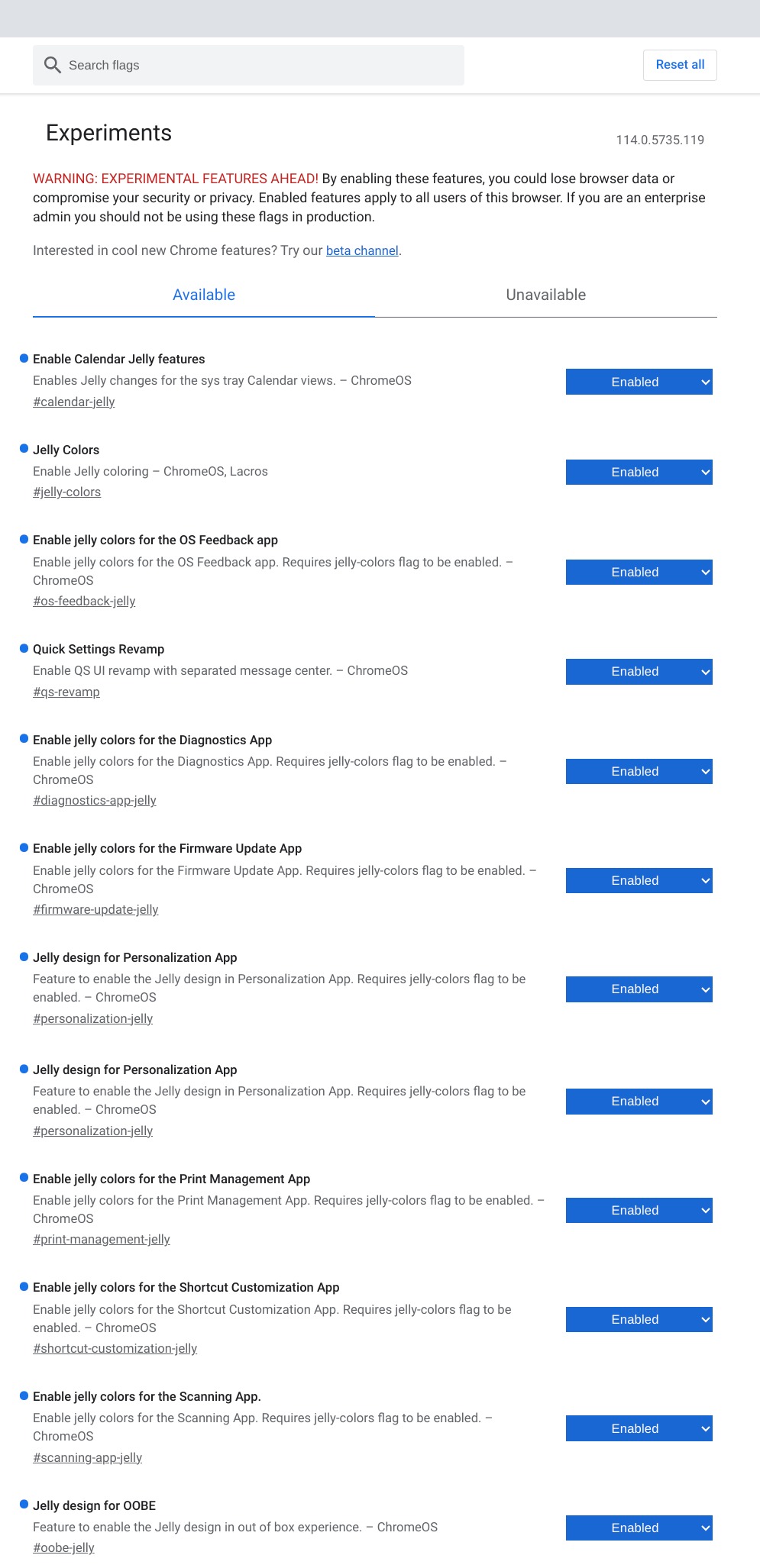
There is one other flag you’ll need to enable to get the full experience. If you run a search for quick settings, you’ll see an option to turn on the quick settings revamp. Once this is enabled, you will see all the material you treatment hitting your quick settings and notification panels. It’s a pretty big part of the overhaul of Chrome OS, so it is definitely something you’ll want to turn on if you are looking to get the full Material You on ChromeOS experience.
While the Beta channel of ChromeOS is generally a relatively-stable version of the Chromebook experience, I still like being in the Stable Channel and having a pretty firm grasp of what is and isn’t available at any given point to general users. Being back on 114 and checking out what is new and what has changed is a totally comfortable place to be now that I can turn on all of the Material You elements in the OS. I’m looking forward to finding out what else is available just beneath the surface here in ChromeOS 114, and as we find those things, we’ll be sure to share.
SUBSCRIBE TO UPSTREAM
Get Chrome Unboxed delivered straight to your inbox
Upstream is our flagship, curated newsletter with the top stories, most click-worthy deals, giveaways, and trending articles from Chrome Unboxed sent directly to your inbox a few times a week. Join 31,000+ subscribers.

