

Support our independent tech coverage. Chrome Unboxed is written by real people, for real people—not search algorithms. Join Chrome Unboxed Plus for just $2 a month to get an ad-free experience, access to our private Discord, and more. Learn more about membership here.
START FREE TRIAL (MONTHLY)START FREE TRIAL (ANNUAL)
AR and VR (augmented reality and virtual reality) are not new technologies, but delivering them to end users has always been a bit of a difficult task. With VR, you need specialized headsets, unique software, and a way to get both up and running without a ton of cables and mess. Sure, there are decent mobile options, but they are under-powered compared to the big rigs needed to power the more-immersive VR experiences. Those more powerful setups come with tons of drawbacks, though, including cables and necessary sensors installed in the room.
AR has a similar hangup, though not as problematic as VR. Good AR experiences have been relegated to specific apps since the beginning, so unless you decided to download and use those apps and had a phone that supports them, you were also out of luck. Widespread adoption of new tech like AR and VR require more and more people to get on board so that more developers will make more unique experience to meet the needs of those users. With both AR and VR, however, the lack of real world users makes this whole chicken/egg scenario problematic.
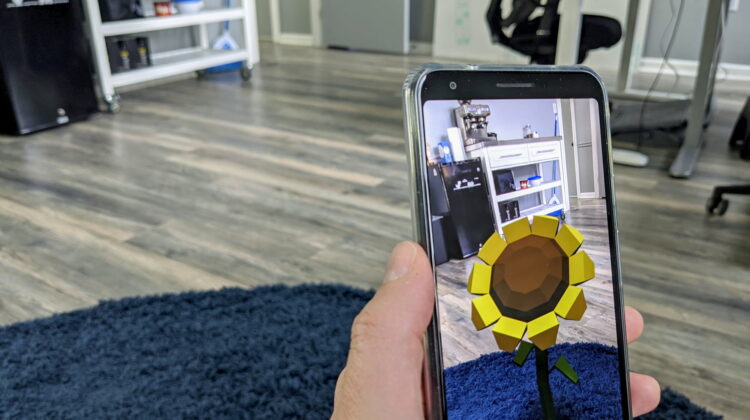
WebXR looks to help solve this conundrum and has been in the works for some time now. With Chrome 81 Beta on Android, it has become baked-in to the user experience on the web. No flags or special settings are necessary to see it in action at this point: you just need to install Chrome Beta from the Play Store (or wait until the stable version of Chrome hits 81 in a few weeks) and go to a place where you can try out a few web-based AR experiences. Luckily, Google has a place for that, and I’d recommend giving two of these experiences a try: the immersive AR session and the Hit Test session. You can see videos of both in action below.
Shop The Best Chromebooks of 2019 at Chrome Shop
Imagine the Possibilities
Consider the possibilities this opens up for AR. WebVR will be great, but it will still require a headset of some sort. AR, on the other hand, is something users can leverage anywhere they can use their phone. Think about retail spaces, restaurants, or historic tours. All of these things could have AR experiences ready to go with a simple QR code or simplified URL. Imagine sitting down to eat, scanning a QR code on the menu, and seeing a perfectly rendered 3D model of the dish you are thinking of ordering appear on the table in front of you. Or consider a museum where instead of just talking about the stature of a historic figure, you could see them rendered in 3D space right in front of you. And none of this would require an app or install of any sort. All you need is your browser and a URL.
I think this development could be the big break for AR on a broad level. Don’t get me wrong, I love games like Pokemon Go that put players out in the real world and encourage moving through real space to accomplish tasks. But AR and what can be done with it is far more broad in scope than video games. Technical tasks like car repair or home repair could be so much simpler with an overlay to guide you through the process. AR confined to an app is something only a handful of people will use, but AR via the open web is something nearly everyone can experience.
Delivering these experiences in such a way that drastically lowers the barriers to entry will only fuel developer interest in making more AR things for people to interact with. Without the need for specialized hardware or specialized apps, I could see a future where people almost expect AR-based info when out and about instead of it just being a novelty. Chrome 81 delivering AR right in the browser is a massive step in that direction, and I’m very excited to see where this will lead.
SUBSCRIBE TO UPSTREAM
Get Chrome Unboxed delivered straight to your inbox
Upstream is our flagship, curated newsletter with the top stories, most click-worthy deals, giveaways, and trending articles from Chrome Unboxed sent directly to your inbox a few times a week. Join 31,000+ subscribers.

