

• Skip to main content
  • Skip to primary sidebar
  • Deals
  • Features
  • Guides
  • Chromebooks
  • Videos
  • Podcast
  • More +
    • Reviews
    • Unboxing
    • Upcoming Devices
    • Chromebook Plus
    • Chrome
    • ChromeOS
    • Chrome OS Flex
  • Search
  • Sign Up
  • Log In
Chrome Unboxed – The Latest Chrome OS News

Chrome Unboxed - The Latest Chrome OS News

A Space for All Things Chrome, Google, and More!

  • Deals
  • Features
  • Guides
  • Chromebooks
  • Videos
  • Podcast
  • More +
    • Reviews
    • Unboxing
    • Upcoming Devices
    • Chromebook Plus
    • Chrome
    • ChromeOS
    • Chrome OS Flex
  • Search
  • Sign Up
  • Log In

Check out the Material You overhaul in the ChromeOS settings app

January 13, 2024 By Robby Payne View Comments

Support our independent tech coverage. Chrome Unboxed is written by real people, for real people—not search algorithms. Join Chrome Unboxed Plus for just $2 a month to get an ad-free experience, access to our private Discord, and more. Learn more about membership here.
START FREE TRIAL (MONTHLY)START FREE TRIAL (ANNUAL)

ChromeOS still has a few holdout areas where the latest Material You look and feel hasn’t quite made its mark. While the Files app was upgraded to the latest UI when Material You made it to ChromeOS, one other, primary system app still maintained the older look from non-Material ChromeOS: the Settings App. Sure, the color-changing, theme-matching tricks showed up with Material You, but the overall aesthetic simply doesn’t yet match things like Quick Settings, Chrome’s new look, and what you see in the app drawer. But that’s all about to change.

A whole new look for ChromeOS settings

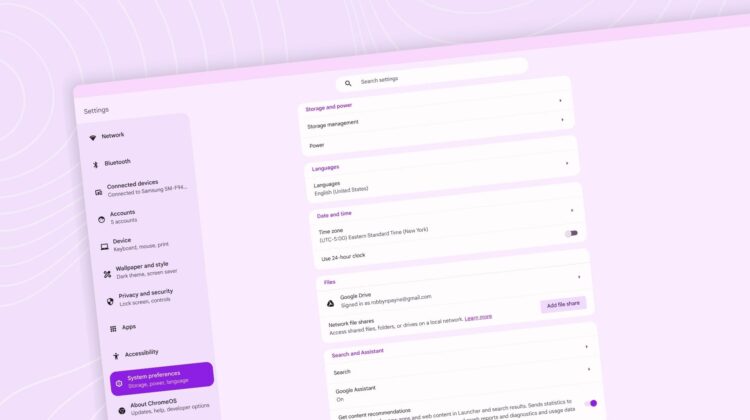
This visual overhaul will come with two major upgrades: simple design tweaks with new icons and a completely new layout. It still feels familiar and works in much the same way, but different settings are grouped in different ways that make a bit more sense for users new and old alike. Let’s look at the visuals first.
Xremove ads
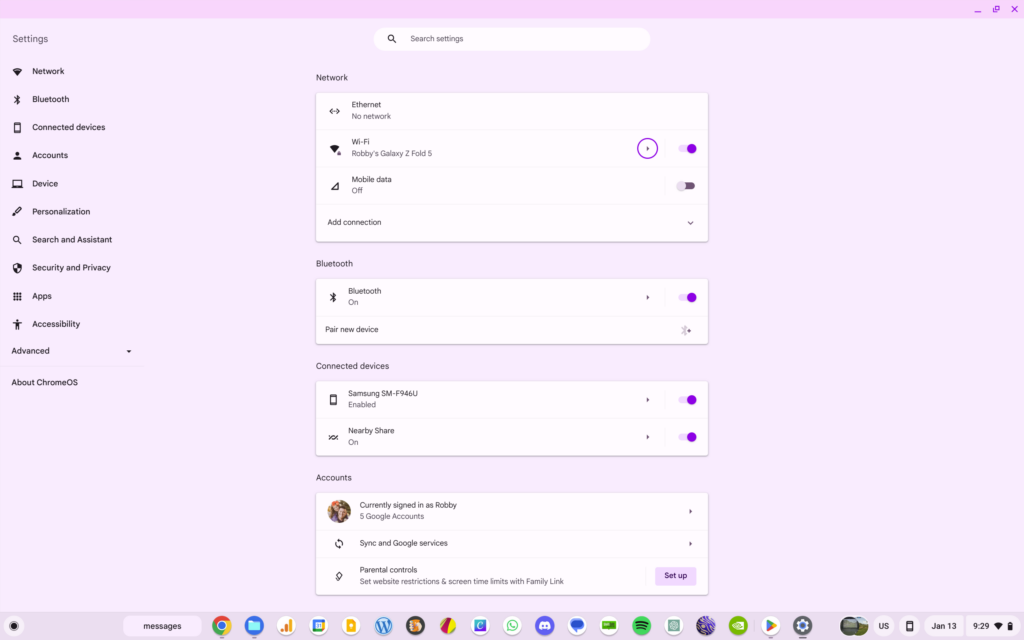
ChromeOS settings before and after

As you can see from the images above, the entire settings menu looks far more in-line with what you’d see on a Pixel phone with the latest Material You look and feel. Corners are rounded, the sidebar menu gets a nice outline, highlighted section get a massive pop of theme color, the new icons are bolder, and the sub-headings in the sidebar help users find their way around a bit easier.

Check out Today’s Best Chomebook Deals

And speaking of those icons, they accompany the new sections of the ChromeOS Settings app that group items a bit differently. Additionally, these groupings now sit on their own when selected instead of remaining as a part of one, long settings list. Clicking into the Network section, for example, only shows you settings for network-related items. It makes far more sense and is much clearer to navigate.

Featured Videos

Xremove ads

How to try it out for yourself

As long as you are on ChromeOS 120 (if not, go get updated), this new settings overhaul is behind a simple flag (chrome://flags/#os-settings-revamp-wayfinding) that you can switch on with ease. Once you do so, restart your device and this updated settings app will await you. While it doesn’t necessarily do anything new, it does help you move through setting far simpler and it just looks great doing it.

VIA: @cajl_jbmm

SUBSCRIBE TO UPSTREAM

Get Chrome Unboxed delivered straight to your inbox

Upstream is our flagship, curated newsletter with the top stories, most click-worthy deals, giveaways, and trending articles from Chrome Unboxed sent directly to your inbox a few times a week. Join 31,000+ subscribers.

Xremove ads
SUBSCRIBE HERE!

Filed Under: Chromebooks, ChromeOS, New & Upcoming Features

About Robby Payne

As the founder of Chrome Unboxed, Robby has been reviewing Chromebooks for over a decade. His passion for ChromeOS and the devices it runs on drives his relentless pursuit to find the best Chromebooks, best services, and best tips for those looking to adopt ChromeOS and those who've already made the switch.

Primary Sidebar

Googlebook

HP Googlebook 14c specs confirmed by Energy Star: Snapdragon X Elite and 32GB RAM

By Robby Payne
September 9, 2026

How many years of updates Googlebook gets could make or break it on Day One

By Robby Payne
September 8, 2026

Your Android phone might soon double as a wireless mouse for Googlebook

By Robby Payne
September 5, 2026

Google’s John Solomon explains why Googlebook is Google’s next Chromebook moment

By Robby Payne
September 4, 2026

Googlebook is designed for AI, but that’s not why I’m excited for it

By Robby Payne
September 3, 2026

More Googlebook

Xremove ads

Deals

The best Chromebook deals today

By Robby Payne
September 2, 2026

The best Chromebook ever made is $350 off at Best Buy right now

By Robby Payne
August 21, 2026

The excellent, powerful Acer Chromebook Plus Spin 514 is $150 off right now

By Robby Payne
August 12, 2026

Acer’s new Chromebook 315 is wildly affordable and points to the real future of Chromebooks

By Robby Payne
August 11, 2026

You can score the massively upgraded ASUS CX54 Chromebook Plus for just $599 right now

By Joseph Humphrey
July 28, 2026

More Deals

Xremove ads

Reviews

Acer Chromebook Plus Spin 514 Review: the best convertible you can buy [VIDEO]

By Robby Payne
July 1, 2026

Lenovo Chromebook Plus 2-in-1 Review: pretty great in a vacuum

By Robby Payne
April 23, 2026

My review after 6 weeks with the Lenovo Chromebook Plus 14 [VIDEO]

By Robby Payne
August 11, 2025

One week with the best small Android tablet you can buy, and I’m sold

By Robby Payne
May 9, 2025

Best Chromebooks of 2024 [VIDEO]

By Robby Payne
November 28, 2024

More Reviews

Xremove ads

TWITTER · FACEBOOK · INSTAGRAM · YOUTUBE · EMAIL · ABOUT

Copyright © 2026 · Chrome Unboxed · Chrome is a registered trademark of Google Inc.
We are participants in various affiliate advertising programs designed to provide a means for us to earn fees by linking to affiliated sites.

PRIVACY POLICY