


Support our independent tech coverage. Chrome Unboxed is written by real people, for real people—not search algorithms. Join Chrome Unboxed Plus for just $2 a month to get an ad-free experience, access to our private Discord, and more. Learn more about membership here.
START FREE TRIAL (MONTHLY)START FREE TRIAL (ANNUAL)
 Thanks to an email from a reader, we’ve been alerted to a known and ongoing issue with Lastpass specifically on Chromebooks and some Linux platforms.
As a LastPass user myself, I’d not encountered the issue until today. My use of the service is not very robust, though. For my day job, the company I work for utilizes LastPass to wrangle the passwords across the 130+ website installs and countless social media users we manage on a daily basis. For that, it has been great for many of our team members.
I still use Chrome’s password manager, however, as my daily driver. I’ve been accustomed to it for years, it is as secure as my Google account, and I’ve only had one issue with it in all the time I’ve used it.
My LastPass activity is mainly siloed to adding passwords that aren’t in the account for others to share and use. For that part, this bug hasn’t been a bother.
It seems other parts of the interface cause the crash and I didn’t experience one until I started poking around a little bit. Once I tried to open my vault, however, the plugin and site crashed and my extension is now removed from the omnibar.
In the extensions menu, the extension now shows up as corrupted and broken with a quick link to repair it.
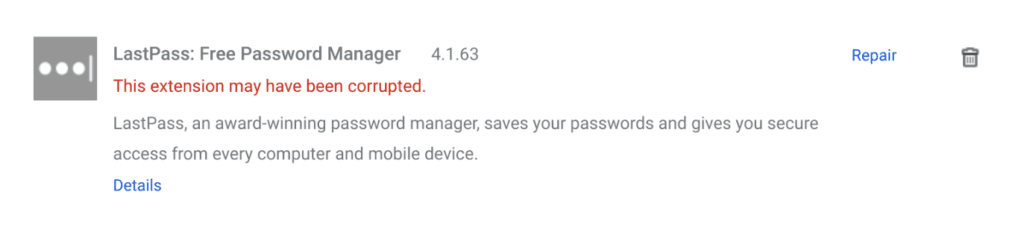
Clicking that repair link simply removes the current extension and reinstalls it. Upon signing in, however, the extension crashes immediately.
This Is A Severe Problem
The last response, offered up on September 6th states this is high-priority, but there’s no ETA on when this will get resolved. Take a look:
We believe that this might be related to a known issue our team is addressing related specifically to Linux devices. This has already been escalated in priority and reported to our Dev team, and they are in progress of developing and testing the build that will fix this issue before it can be released. We have attached your ticket to this report as well for further tracking purposes on our end, and for further review of the issue by our Dev team. We do not currently have an ETA on when a fix will be pushed out for this issue since the Dev teams work schedule can fluctuate and change at a moment’s notice.
Not really the most comforting timeline, honestly. Again, for users like myself, LastPass is an additional password manager. For many it is primary. Whether for work or personal use, a password manager is one of those things it becomes incredibly difficult to navigate without.
I know my couple months with a broken Google Passwords account were awful. I wish we could get away from this sort of password management somehow, but I don’t see that sort of future coming any time soon.
Hopefully LastPass gets this sorted and does so quickly. Here’s the link for the existing support post where you can chime in and possibly grease the wheels of progress a bit if you are a LastPass user finding yourself in the same boat.
Need some silver lining? The LastPass website still loads up just fine. Assuming you are an admin for your LastPass account, you can make a few clicks and see your passwords on a site-by-site basis. It isn’t a great workaround, but it is something. Keep in mind if you are using a shared account where you don’t have admin access to the main account, you won’t be able to view the saved passwords. So I suppose this silver lining gets a bit thin at that point.

