


Support our independent tech coverage. Chrome Unboxed is written by real people, for real people—not search algorithms. Join Chrome Unboxed Plus for just $2 a month to get an ad-free experience, access to our private Discord, and more. Learn more about membership here.
START FREE TRIAL (MONTHLY)START FREE TRIAL (ANNUAL)
Since the onset of the global pandemic, we all began a journey that would have us in front of our webcams far more often than ever before. Prior to COVID-19, I was on a video call a few times a year at most and only video chatted with family and friends when necessary. I didn’t have anything against it, and I’d wager you didn’t either; but there simply wasn’t the heightened need for video calls prior to 2020 for most people in general.
As that all shifted and we accepted this new norm, life with video chats became part of the zeitgeist. As something we all began to commonly deal with, video calls became weaved into multiple facets of our lives and the commonality of the experience quickly became something that was universally shared from one internet denizen to the next. And part of that communal experience was the need for a good video call setup and backdrop.
Background blur was a savior
It’s an over-arching truth: as we live in our spaces, they get junked up. Maybe it’s a lack of time, a lack of attention, or a lack of will: for whatever reason, we have a tendency to leave messes when we’re in a place for an extended time. With the pandemic raging, it became clear that extended time at home meant more messes, and regardless of the universality of that predicament, no one wanted anyone else to see their junk. I know I didn’t. But in cramped spaces with everyone at home, what were we to do?
The answer came in the form of artificial backgrounds. Whether it was a fake beach or a simple blur overlay added to the actual environment behind us, tweaks to a caller’s background became the norm, not the exception. In the end, it turned out that most people wanted to simply blur out their real background versus putting up some sort of fake backdrop or silly background. I am one of those, and I really appreciate a subtle blur to the random backgrounds I find myself sat in on any given call.
The problem? Web-based services like Google Meet or Zoom aren’t really the best at this blur effect. They do their best, sure, but the cutout around the subject isn’t great, and the tax on the CPU is heavy, leading to shorter battery life for those employing background blur on a regular basis. It’s become a tad better over the months since all this began, but it still isn’t great. Thankfully, there’s help on the way in the form of a new Background Blur API for web browsers. From the Git for this effort:
A vast majority of communication these days happens on our client devices. During video meetings, participants are usually aware of how they look and what their environment (usually their home) is revealing to the audience. Most folks, especially ones without a dedicated office space would be inclined to hide messy rooms with pets and kids. Video meetings like face to face meetings are important for non-verbal communication but participants would rather focus on the important subject by removing the distractions in the background and prevent any accidental snafus.
On the Web, due to a lack of a standardized JS API for Background Blur and widespread demand, developers have no options but to use ML frameworks like Tensorflow.js and other WASM libraries to satisfy their customers. This Background Blur API gives developers a choice to use the native platform’s API. This would ensure conformance to the corresponding native apps.
via Github
The folks behind this move are from both Intel and Apple, so we can feel certain there are solid people on the project. And according to How-To Geek, the Chrome team is already at work on an intent to prototype, so it may not be too long before we find signs of this update in the Canary channel of Chrome. According to early testing, this new API would be far less power-hungry than existing methods of providing background blur as is evidenced by the provided graph.
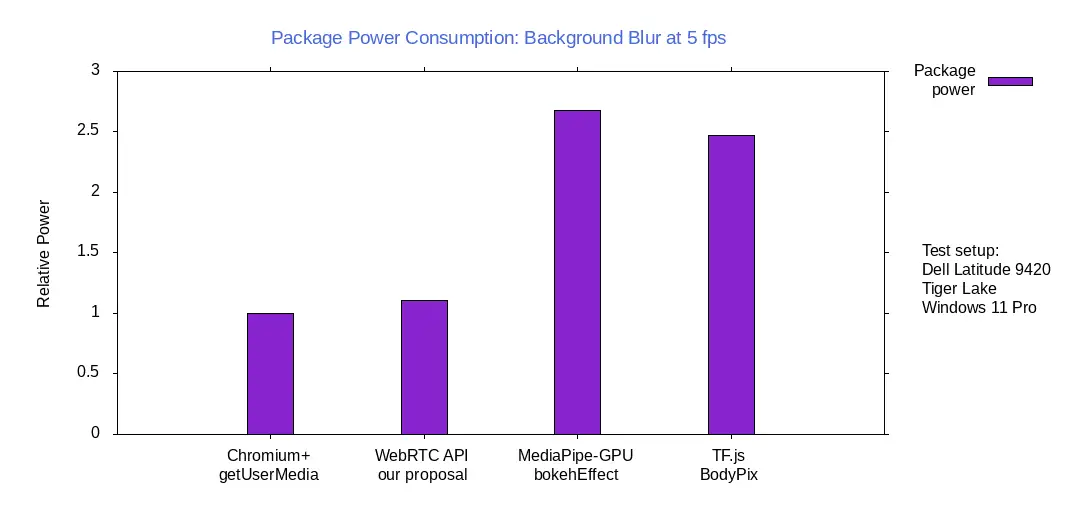
This is all in the very early stages, but moves like this could make these necessary video calls far more battery efficient in the future. Even as the pandemic recedes, it is clear that video calls likely will not. Better web-based tools for these calls are necessary, and even though the experience has improved by leaps and bounds over the past 2 years, there is still room for growth. We’ll be keeping an eye on this one and hope to see an early prototype of it up and running before too long. Stay tuned.
SUBSCRIBE TO UPSTREAM
Get Chrome Unboxed delivered straight to your inbox
Upstream is our flagship, curated newsletter with the top stories, most click-worthy deals, giveaways, and trending articles from Chrome Unboxed sent directly to your inbox a few times a week. Join 31,000+ subscribers.

