

Support our independent tech coverage. Chrome Unboxed is written by real people, for real people—not search algorithms. Join Chrome Unboxed Plus for just $2 a month to get an ad-free experience, access to our private Discord, and more. Learn more about membership here.
START FREE TRIAL (MONTHLY)START FREE TRIAL (ANNUAL)
Even though we had a quick hands-on time with the brand-new ASUS Chromebook Vibe CX34 Flip (let’s go with Vibe CX34 from here on out) at CES 2023 in Las Vegas, those impressions can be misleading. Between the noise, the crowds, and basic exhaustion, it is easy to misread a new device. And it can happen on either side of the coin, too.
In the case of something like the Samsung Galaxy Chromebook in 2020, I was absolutely enamored with that device while out at CES 2020. Once it arrived, the sheen wore off and all the shortcomings of that ambitious Chromebook became quickly apparent. Fortunately, the case is just the opposite with the ASUS Vibe CX34, leaving me even more impressed with this Chromebook now that it is here in the office than I was at CES.
Don’t sleep on this one like I did
Don’t get me wrong: I was impressed with this Chromebook out in Vegas. But our time at ASUS’ booth came smack-dab in the middle of our busiest day that also happened to be our final full day at the show. I was exhausted and frankly ready to get home, so when my time with the Vibe CX34 came, I don’t think I was able to give it the appreciation it actually deserves. Now that I have it in the comfort of our office and studio, I’m very happy with this effort by ASUS.
And to just be blunt about it, ASUS needed a win with this one. Their last couple ChromeOS devices have simply been rehashes of the excellent CX5. And while I’m a fan of iteration, these latest ASUS Chromebooks have actually been worse experiences than the 2021 CX5 (and far worse than the excellent CX5400) even though they borrowed very heavily from that device. It’s fine to generally repeat a device year over year, but each iteration should move towards a better experience, not a worse one.
Thankfully, the ASUS Vibe CX34 is a breath of fresh air from ASUS and not only feels rethought from top to bottom: it feels better than everything that came from them in the Chromebook space in 2022. The design is clean, the screen isn’t an afterthought, the inclusions are beneficial, and with a couple of days under my belt with this Chromebook now, it is easy to say that ASUS has put together a winner in the Vibe CX34.
ASUS Chromebook Vibe CX34 Flip Specs
- Intel Core i7-1255U/i5-1235U
- Iris Xe Graphics
- 8GB or 16GB LPDDR4X RAM
- 256GB or 512GB SSD
- 14-inch 1920×1200 IPS 16:10 touchscreen
- 400 nits @ 144Hz and 100% sRGB coverage
- USI pen support with included, stowed stylus
- 2X USB 3.2 Type C
- 1X USB 3.2 Type A
- Full HDMI 2.1 port
- Headphone/mic jack
- Kensington lock
- microSD Card slot
- 720p webcam with privacy shutter
- Wi-Fi 6E
- Bluetooth 5.2
- 1.8 kg | 3.97 lbs.
- 31.95 x 23.49 x 2.09cm
- 63Wh 3-cell battery (10 hours)
- RGB backlit keyboard w/60cc spill resistance
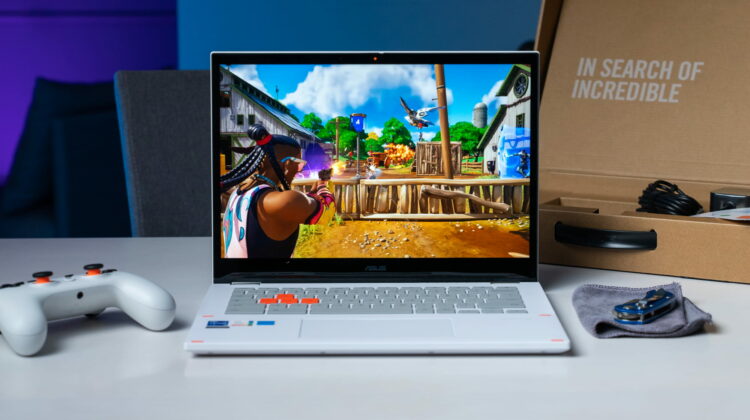
Simply from a spec standpoint, this thing is a beast. While it is aimed at cloud gaming, those vibes aren’t overwhelming and when the RGB keyboard is off or in a more neutral white color, the Vibe CX34 puts off a more-professional look. The attractive (and eye-catching) white exterior is slightly textured, giving it an almost eggshell-like coating that feels fantastic in the hand and wards off fingerprints with ease. There’s some aluminum and some plastic in the chassis, but I don’t really care how much of each we’re getting in this one as the entire Chromebook feels firm and well-made.
The screen is also a needed upgrade from ASUS’s previous Chromebooks, giving us a 400-nit, colorful (100% sRGB)16:10 IPS panel that is wonderful to look at. Oh, and it comes in at a max refresh rate of 144Hz, too, so when plugged into a charger, you get insane smoothness that impacts not just gaming, but general tasks and all OS animation as well. It’s a delight to look at.
The RGB keyboard feels great to type on, though I wouldn’t crown it as ASUS best ever. So far, the keys are responsive, clicky, and accurate, so it is definitely not a detractor in any way. And the trackpad underneath that keyboard is solid, too, with a wide glass surface and a responsive click mechanism. Also, the included, stowed stylus is a great perk that I’d like to see more manufacturers employ as inking is getting very good on these 12th-gen Alder Lake Chromebooks at this point.
With a solid port selection on the outside and very fast internals on the inside, you can start to see how this device is basically without deficiency. It’s a tad thick and definitely not the lightest Chromebook you’ll ever hold, but neither of those factors feel like an issue at all so far. For me at this point, I’m plenty impressed by this Chromebook and can’t wait to begin my review process of it. Coming from the Framework Laptop Chromebook Edition I’m just finishing up with (review coming soon), the next in line needed to be really good to compete. This Vibe CX34 from ASUS looks to measure up, and at $869 for the top-end spec and $769 for the 8GB/256GB variant, it’s a solid price for these kinds of features and specs. We’ll see how it all comes together in the review.
SUBSCRIBE TO UPSTREAM
Get Chrome Unboxed delivered straight to your inbox
Upstream is our flagship, curated newsletter with the top stories, most click-worthy deals, giveaways, and trending articles from Chrome Unboxed sent directly to your inbox a few times a week. Join 31,000+ subscribers.

