


Support our independent tech coverage. Chrome Unboxed is written by real people, for real people—not search algorithms. Join Chrome Unboxed Plus for just $2 a month to get an ad-free experience, access to our private Discord, and more. Learn more about membership here.
START FREE TRIAL (MONTHLY)START FREE TRIAL (ANNUAL)
There’s a rule of sorts called Betteridge’s law of headlines that states any headline that ends in a question mark can be answered by the word no. In the case of this particular post, it once again holds up for me. As a Chromebook Plus user – across a bunch of different devices – I’ve found the answer to the question in that headline to be a resounding no, even though I don’t want it to be.
What Quick Insert is
Because of the nature of Chromebooks and ChromeOS, there’s a good chance at this point that you’ve not heard of Quick Insert. Introduced at the fall Chromebook Showcase in October of 2024, Quick Insert is a new functionality in ChromeOS that gives users a pop-up box anywhere throughout the OS to drop in all sort of content from all sorts of sources.
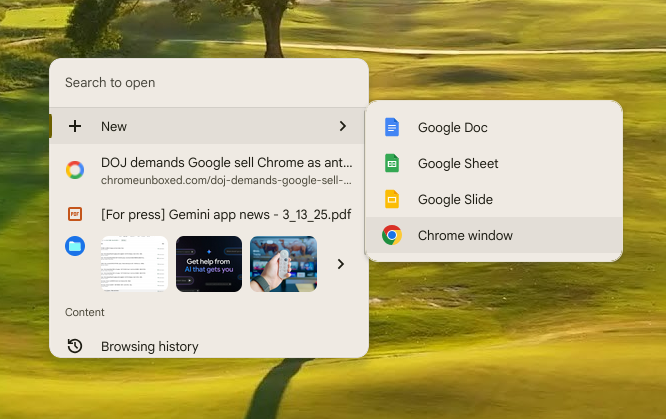
On the surface, it is genius and it works incredibly well. Devices like the Samsung Galaxy Chromebook Plus even have a dedicated key for the feature, and it’s clear Google wants users taking advantage of it. Hit that dedicated key (or Launcher + F on other devices) and you’re met with a small window full of things to insert into whatever app you have open on the screen. Again, in theory, it’s brilliant.
Why I don’t ever use it
For me, however, I’m pretty rooted in my habits. I know my way around the Chromebook keyboard, I know the shortcuts I need, and I have particular ways I organize all my windows to maximize efficiency for the things I do on a daily basis. I’d imagine many of you are the same way.
So, even though the idea of Quick Insert is great, I’ve yet to find the killer scenario where it makes most sense in my workflow. It is pretty smart and surfaces things I should need, but I’m never 100% sure what’s going to be on offer. Right now, it’s a mix of a few images I recently edited, a PDF I looked at, and a link to a site I do frequent, but also have pinned to my shelf.
Unlike the copy/paste history that I use all the time, I almost feel like the Quick Insert pop-up is trying too many things all at once. And when I’m moving fast, I’m going to rely on tools that I know and completely trust. For instance, I know for a fact that when I hit Launcher+V, I’m going to see the last 5 things I copied. There’s no wondering about that and no need to dig through a bunch of other stuff to get the items I need the moment I need them.
Below the changing parts of the Quick Insert menu, there are shortcuts that I think I could really start leveraging if I simply remembered they were there. So some of this is on me. Quick access to my latest files, Google Drive, and even my browsing history could be really useful, but I forget that Quick Insert is a faster way to get to those things most days.
So, I’m curious: are you using Quick Insert? We made a quick poll you can participate in, and I’m genuinely interested to see what the result is. When it was launched, I was all for it, and I still love the idea of it. In practice, I’ve not found my stride thus far. It’ll be very interesting to see how this little poll shakes out for sure.
SUBSCRIBE TO UPSTREAM
Get Chrome Unboxed delivered straight to your inbox
Upstream is our flagship, curated newsletter with the top stories, most click-worthy deals, giveaways, and trending articles from Chrome Unboxed sent directly to your inbox a few times a week. Join 31,000+ subscribers.

