


Support our independent tech coverage. Chrome Unboxed is written by real people, for real people—not search algorithms. Join Chrome Unboxed Plus for just $2 a month to get an ad-free experience, access to our private Discord, and more. Learn more about membership here.
START FREE TRIAL (MONTHLY)START FREE TRIAL (ANNUAL)
In celebration of the recent International Day of Persons with Disabilities, Google has announced a suite of seven new accessibility features rolling out to Android. While these tools are designed to help people with disabilities interact with the world, features like a more consistent dark mode and smarter captions will likely be welcomed by just about everyone. Here is a look at the biggest changes arriving on your device.
A true, system-wide Dark Mode is finally here
We have all felt the pain of using our phone in bed, enjoying a nice dark theme, only to open an app that doesn’t support it and getting blasted by a blinding white screen. With the release of Android 16 today, Google is solving this with a new “expanded option” for dark theme.
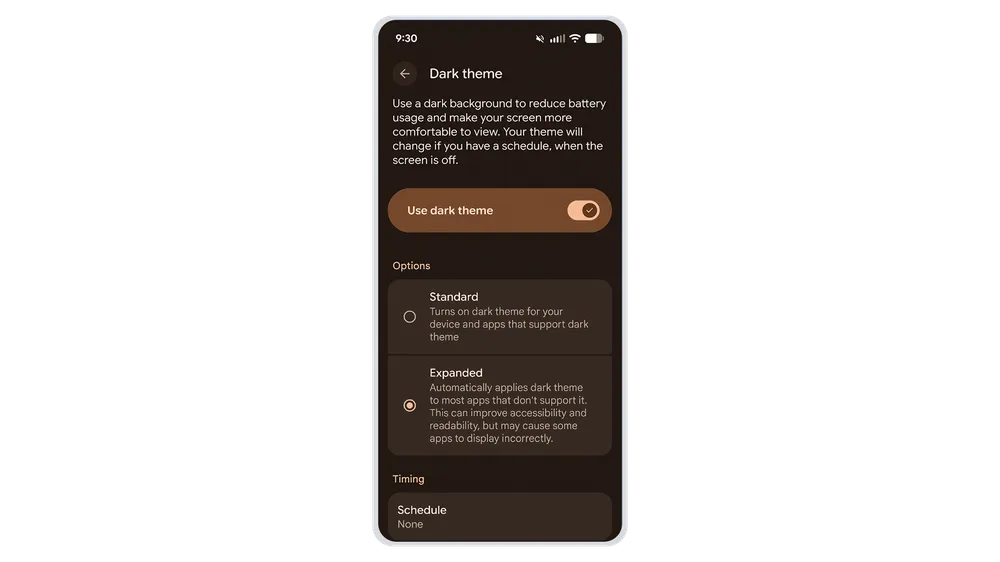
This feature allows your phone to automatically darken most apps, even those that don’t have their own native dark theme. This creates a much more consistent, comfortable viewing experience for everyone, especially those with light sensitivity.
AI that reads emotions and describes photos
Google is also leveraging Gemini to make content more understandable:
- Expressive Captions get emotional: Captions on Android can now detect and display the emotional tone of speech. You might see tags like [joy] or [sadness] to help you grasp the speaker’s intent. Google is also bringing these immersive captions—which show speech intensity and sounds like sighs—to YouTube for English videos uploaded after October.
- Guided Frame gets descriptive: The Guided Frame feature, which helps blind or low-vision users take photos, is now powered by Gemini. Instead of just saying “face detected,” it provides rich descriptions like, “One girl with a yellow T-shirt sits on the sofa and looks at the dog”.
Hands-free control and easier connecting
The update includes several other practical improvements:
- Gemini starts Voice Access: You can now launch Voice Access completely hands-free by simply saying, “Hey Google, start Voice Access”.
- Better Mouse Support: For those using an external mouse, AutoClick now offers an improved “dwell cursor” experience, letting you hover to click and customize actions like scroll, drag, or long-press.
- Fast Pair for Hearing Aids: You can now connect compatible Bluetooth LE Audio hearing aids (starting with Demant devices) with a single tap using Fast Pair.
- TalkBack Dictation: Coming soon, you’ll be able to start voice dictation in Gboard with a simple two-finger double-tap.
These updates are rolling out now, making Android not just smarter, but more inclusive for everyone.
SUBSCRIBE TO UPSTREAM
Get Chrome Unboxed delivered straight to your inbox
Upstream is our flagship, curated newsletter with the top stories, most click-worthy deals, giveaways, and trending articles from Chrome Unboxed sent directly to your inbox a few times a week. Join 31,000+ subscribers.

